

- Messages : 397
- Remerciements reçus 71
Questions on getting Xerte Toolkits installed on your server and questions about authentication and user logins.
Installation Issue
- JohnSmith
-

- Hors Ligne
- Membre platine
-

Moins
Plus d'informations
il y a 13 ans 2 mois #602
par JohnSmith
Réponse de JohnSmith sur le sujet Installation Issue
Hi,
No worries, always happy to help...
And is that the same username/password combo that you use for the other systems?
I'm not sure which part of the code is generating that error message but that page needs to attempt to drop database tables and create new ones. If that user doesn't have permissions then you might get that error. Can you check what permissions that user has assuming that the username/password/server address are all correct?
John
No worries, always happy to help...
And is that the same username/password combo that you use for the other systems?
I'm not sure which part of the code is generating that error message but that page needs to attempt to drop database tables and create new ones. If that user doesn't have permissions then you might get that error. Can you check what permissions that user has assuming that the username/password/server address are all correct?
John
Connexion ou Créer un compte pour participer à la conversation.
- Bernie123
-
 Auteur du sujet
- Hors Ligne
- Membre junior
-

Moins
Plus d'informations
- Messages : 36
- Remerciements reçus 0
il y a 13 ans 2 mois #603
par Bernie123
Réponse de Bernie123 sur le sujet Installation Issue
No I created a separate sql-database for xerte :
scsltdco_xerte
Going through database.php
everything appears correct I can access the sql database using coy and paste from the information in database.php
I can go back and delete database.php if you like and try again
scsltdco_xerte
Going through database.php
everything appears correct I can access the sql database using coy and paste from the information in database.php
I can go back and delete database.php if you like and try again
Connexion ou Créer un compte pour participer à la conversation.
- JohnSmith
-
- Hors Ligne
- Membre platine
-
Moins
Plus d'informations
- Messages : 397
- Remerciements reçus 71
il y a 13 ans 2 mois - il y a 13 ans 2 mois #604
par JohnSmith
Réponse de JohnSmith sur le sujet Installation Issue
Hi,
It is these lines of code that fails
so there must be something amiss either in your database setup or in the username/password pair as
does nothing special... please recheck that you have the "hostname" in the correct var in database.php (host and not database name or table prefix). and double check your documentation that you don't need to prefix the username with domain/ or something...
John
It is these lines of code that fails
Code:
/*
* Try to connect
*/
$mysql_connect_id = @mysql_connect($xerte_toolkits_site->database_host, $xerte_toolkits_site->database_username, $xerte_toolkits_site->database_password);
/*
* Check for connection and error if failed
*/
if (!$mysql_connect_id) {
die("<h2>Xerte Online Toolkits</h2>
<p><strong>Sorry, the system cannot connect to the database at present</strong></p>
<p>This may be because the database server is offline, or this instance of Xerte has not been setup (see <a href='setup'>/setup</a>). </p>
<p>The mysql error is <strong>" . mysql_error() . "</strong></p>");
}
so there must be something amiss either in your database setup or in the username/password pair as
Code:
@mysql_connect($xerte_toolkits_site->database_host, $xerte_toolkits_site->database_username, $xerte_toolkits_site->database_password);
does nothing special... please recheck that you have the "hostname" in the correct var in database.php (host and not database name or table prefix). and double check your documentation that you don't need to prefix the username with domain/ or something...
John
Dernière édition: il y a 13 ans 2 mois par JohnSmith. Raison: Meant hostname!!
Connexion ou Créer un compte pour participer à la conversation.
- JohnSmith
-
- Hors Ligne
- Membre platine
-
Moins
Plus d'informations
- Messages : 397
- Remerciements reçus 71
il y a 13 ans 2 mois - il y a 13 ans 2 mois #605
par JohnSmith
Réponse de JohnSmith sur le sujet Installation Issue
In fact scrap that... we know hostname is 'localhost'
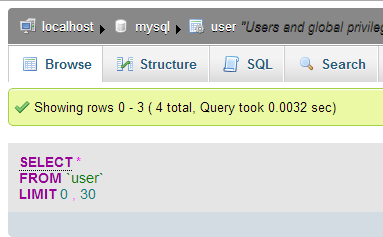
Have you enabled that user to access from localhost? You need to have either 127.0.0.1 and/or localhost in the access table. Sometimes you need both... double check the permissions for the other database that you are accessing from a different app on that server...
John
Have you enabled that user to access from localhost? You need to have either 127.0.0.1 and/or localhost in the access table. Sometimes you need both... double check the permissions for the other database that you are accessing from a different app on that server...
John
Dernière édition: il y a 13 ans 2 mois par JohnSmith.
Connexion ou Créer un compte pour participer à la conversation.
- JohnSmith
-
- Hors Ligne
- Membre platine
-
Moins
Plus d'informations
- Messages : 397
- Remerciements reçus 71
il y a 13 ans 2 mois - il y a 13 ans 2 mois #606
par JohnSmith
Réponse de JohnSmith sur le sujet Installation Issue
My XAMPP setup shows

Dernière édition: il y a 13 ans 2 mois par JohnSmith.
Connexion ou Créer un compte pour participer à la conversation.
- Bernie123
-
Auteur du sujet
- Hors Ligne
- Membre junior
-
Moins
Plus d'informations
- Messages : 36
- Remerciements reçus 0
il y a 13 ans 2 mois #607
par Bernie123
Réponse de Bernie123 sur le sujet Installation Issue
OK I added a new user to the database and gave full access
Tested again and got new error:
Sorry, the system cannot connect to the database at present. The mysql error is Access denied for user 'scsltdco_TESTUSE'@'localhost' to database 'scsltdco_xerte'
Tested again and got new error:
Sorry, the system cannot connect to the database at present. The mysql error is Access denied for user 'scsltdco_TESTUSE'@'localhost' to database 'scsltdco_xerte'
Connexion ou Créer un compte pour participer à la conversation.
Temps de génération de la page : 0.152 secondes