

- Messages : 102
- Remerciements reçus 14
The place for more technical questions for those who want to create new pagetypes or bespoke functionality.
Accordion navigator in Bootstrap
- ymoore
-

- Hors Ligne
- Administrateur
-

Moins
Plus d'informations
il y a 8 ans 5 mois #5103
par ymoore
Réponse de ymoore sur le sujet Accordion navigator in Bootstrap
Thanks Neil. It doesn't work for me yet, I get a strange result where half the content disappears. It may be a typo, so I'll persevere!
Thanks
Thanks
Connexion ou Créer un compte pour participer à la conversation.
- ronm
-

- Hors Ligne
- Administrateur
-
il y a 8 ans 5 mois #5105
par ronm
Xerte developer & trainer
e-learning & m-learning consultant
mitchellmedia.co.uk | xerteacademy.com | learningapps.co.uk
Note: Support here is voluntary and meant for users to support each other.
Need direct commercial support with Xerte? mitchellmedia.co.uk/contact/
Réponse de ronm sur le sujet Accordion navigator in Bootstrap
Hi Yvonne
are you using the code I posted earlier in this thread? That code was added to source view of a text element and would need to be edited if using a combination of text element and script element as in Neil's example.
Attached is a screenshot of a text element with the code added in source view. You could try this yourself e.g. add a new empty text element, switch to source view and paste the following:
In the tree that should look something like the attached screenshot.
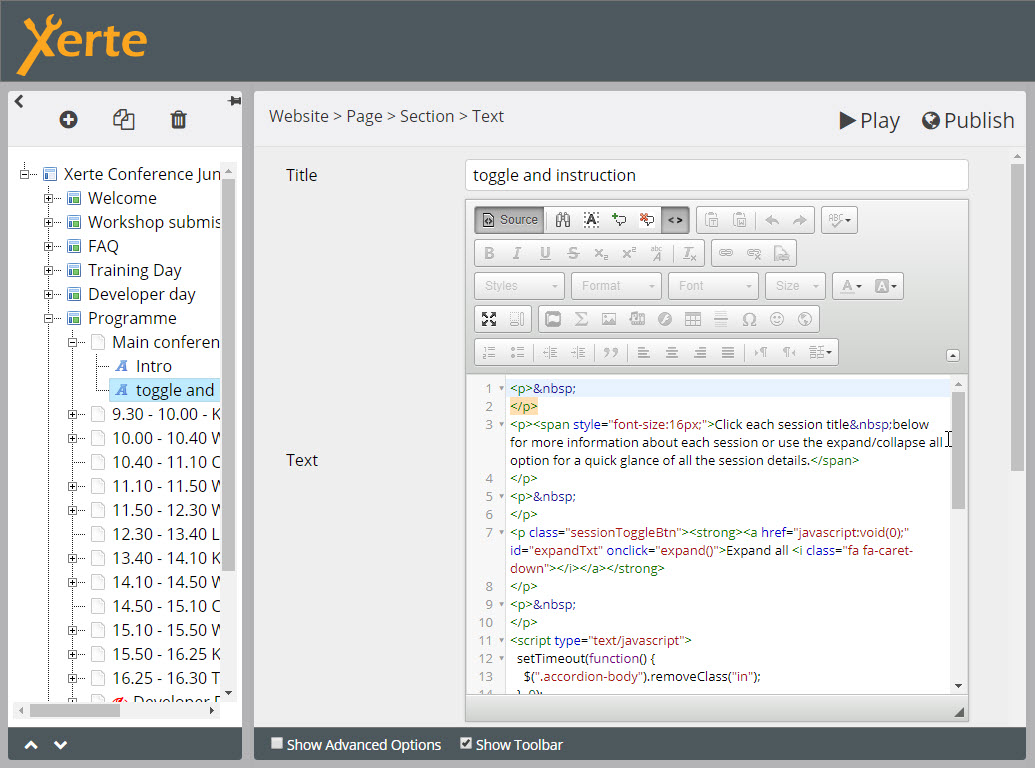
HTH
Ron
are you using the code I posted earlier in this thread? That code was added to source view of a text element and would need to be edited if using a combination of text element and script element as in Neil's example.
Attached is a screenshot of a text element with the code added in source view. You could try this yourself e.g. add a new empty text element, switch to source view and paste the following:
Code:
<p>
</p>
<p><span style="font-size:16px;">Click each session title below for more information about each session or use the expand/collapse all option for a quick glance of all the session details.</span>
</p>
<p>
</p>
<p class="sessionToggleBtn"><strong><a href="javascript:void(0);" id="expandTxt" onclick="expand()">Expand all <i class="fa fa-caret-down"></i></a></strong>
</p>
<p>
</p>
<script type="text/javascript">
setTimeout(function() {
$(".accordion-body").removeClass("in");
}, 0);
var toggle = 0;
function expand() {
if (toggle == 0) {
$(".accordion-body").addClass("in").css("height", "");
$("#expandTxt").html("Collapse all <i class='fa fa-caret-up'></i>");
toggle = 1;
} else {
$(".accordion-body").removeClass("in");
$("#expandTxt").html("Expand all <i class='fa fa-caret-down'></i>");
toggle = 0;
}
}
</script>
<style type="text/css">.sessionToggleBtn a{
text-decoration:none;
padding:8px;
background:#f1f1f1;
}
}
</style>
HTH
Ron
Xerte developer & trainer
e-learning & m-learning consultant
mitchellmedia.co.uk | xerteacademy.com | learningapps.co.uk
Note: Support here is voluntary and meant for users to support each other.
Need direct commercial support with Xerte? mitchellmedia.co.uk/contact/
Les utilisateur(s) suivant ont remercié: ymoore
Connexion ou Créer un compte pour participer à la conversation.
- ymoore
-
- Hors Ligne
- Administrateur
-
Moins
Plus d'informations
- Messages : 102
- Remerciements reçus 14
il y a 8 ans 5 mois #5106
par ymoore
Réponse de ymoore sur le sujet Accordion navigator in Bootstrap
Thanks Ron.
The button worked as described - I'd mistaken the initial purpose which caused me some confusion!
It would be helpful if the accordion function came with an additional property setting so you could choose whether to have the content collapsed or expanded on page entry.
The button worked as described - I'd mistaken the initial purpose which caused me some confusion!
It would be helpful if the accordion function came with an additional property setting so you could choose whether to have the content collapsed or expanded on page entry.
Connexion ou Créer un compte pour participer à la conversation.
- Fay
-

- Hors Ligne
- Membre elite
-

Moins
Plus d'informations
- Messages : 236
- Remerciements reçus 96
il y a 8 ans 4 mois #5107
par Fay
Réponse de Fay sur le sujet Accordion navigator in Bootstrap
FYI - I've added an optional property to the navigator (called 'Collapse Accordion') that will allow you to collapse the accordion initially without adding the code yourself. It will be included in the next release.
Thanks
Fay
Thanks
Fay
Les utilisateur(s) suivant ont remercié: ymoore
Connexion ou Créer un compte pour participer à la conversation.
Modérateurs: JohnSmith
Temps de génération de la page : 0.155 secondes