

- Messages : 92
- Remerciements reçus 4
The place for more technical questions for those who want to create new pagetypes or bespoke functionality.
Accordion navigator in Bootstrap
- Neil Pollock
-
 Auteur du sujet
- Hors Ligne
- Membre premium
-

Moins
Plus d'informations
il y a 8 ans 9 mois #4912
par Neil Pollock
Accordion navigator in Bootstrap a été créé par Neil Pollock
Is there any way for the accordion navigator in Bootstrap pages to start with all panels fully collapsed?
I've tried to implement the jQuery option for this, but with no luck...
I've tried to implement the jQuery option for this, but with no luck...
Code:
$(".accordion").accordion({
active: false
});
Connexion ou Créer un compte pour participer à la conversation.
- Neil Pollock
-
Auteur du sujet
- Hors Ligne
- Membre premium
-
Moins
Plus d'informations
- Messages : 92
- Remerciements reçus 4
il y a 8 ans 9 mois #4913
par Neil Pollock
Réponse de Neil Pollock sur le sujet Accordion navigator in Bootstrap
Actually, I now realise this is Bootstrap, but I can't get the options here to work either...
getbootstrap.com/2.3.2/javascript.html#collapse
Connexion ou Créer un compte pour participer à la conversation.
- ronm
-

- Hors Ligne
- Administrateur
-

il y a 8 ans 8 mois #4914
par ronm
Xerte developer & trainer
e-learning & m-learning consultant
mitchellmedia.co.uk | xerteacademy.com | learningapps.co.uk
Note: Support here is voluntary and meant for users to support each other.
Need direct commercial support with Xerte? mitchellmedia.co.uk/contact/
Réponse de ronm sur le sujet Accordion navigator in Bootstrap
Try something like this. You can obviously remove the button if you don't want that option.
Code:
<p class="accordionToggleBtn"><strong><a href="javascript:void(0);" id="expandTxt" onclick="expand()">Expand all <i class="fa fa-caret-down"></i></a></strong>
</p>
<p>
</p>
<script type="text/javascript">
setTimeout(function() {
$(".accordion-body").removeClass("in");
}, 0);
var toggle = 0;
function expand() {
if (toggle == 0) {
$(".accordion-body").addClass("in").css("height", "");
$("#expandTxt").html("Collapse all <i class='fa fa-caret-up'></i>");
toggle = 1;
} else {
$(".accordion-body").removeClass("in");
$("#expandTxt").html("Expand all <i class='fa fa-caret-down'></i>");
toggle = 0;
}
}
</script>
<style type="text/css">.accordionToggleBtn a{
text-decoration:none;
padding:8px;
background:#f1f1f1;
}
}
</style>
Xerte developer & trainer
e-learning & m-learning consultant
mitchellmedia.co.uk | xerteacademy.com | learningapps.co.uk
Note: Support here is voluntary and meant for users to support each other.
Need direct commercial support with Xerte? mitchellmedia.co.uk/contact/
Les utilisateur(s) suivant ont remercié: Neil Pollock
Connexion ou Créer un compte pour participer à la conversation.
- Neil Pollock
-
Auteur du sujet
- Hors Ligne
- Membre premium
-
Moins
Plus d'informations
- Messages : 92
- Remerciements reçus 4
il y a 8 ans 8 mois #4916
par Neil Pollock
Réponse de Neil Pollock sur le sujet Accordion navigator in Bootstrap
Thanks, Ron.
That works just right.
I eventually realised it was the "in" class that was the issue, but for whatever reason I could get the removeClass function to work...
That works just right.
I eventually realised it was the "in" class that was the issue, but for whatever reason I could get the removeClass function to work...
Connexion ou Créer un compte pour participer à la conversation.
- ymoore
-

- Hors Ligne
- Administrateur
-
Moins
Plus d'informations
- Messages : 102
- Remerciements reçus 14
il y a 8 ans 5 mois #5101
par ymoore
Réponse de ymoore sur le sujet Accordion navigator in Bootstrap
Hi Ron
I'm trying to work this out too but I'm not sure where to put the code.
If I want all the accordian content to be collapsed when the page is first viewed, where does the code go? When I add javascript at the top level my page just stops displaying any content.
Any pointers would be welcome!
Thanks
Yvonne
I'm trying to work this out too but I'm not sure where to put the code.
If I want all the accordian content to be collapsed when the page is first viewed, where does the code go? When I add javascript at the top level my page just stops displaying any content.
Any pointers would be welcome!
Thanks
Yvonne
Connexion ou Créer un compte pour participer à la conversation.
- Neil Pollock
-
Auteur du sujet
- Hors Ligne
- Membre premium
-
Moins
Plus d'informations
- Messages : 92
- Remerciements reçus 4
il y a 8 ans 5 mois #5102
par Neil Pollock
Réponse de Neil Pollock sur le sujet Accordion navigator in Bootstrap
Here's how I did it (I added a script page above the accordion).
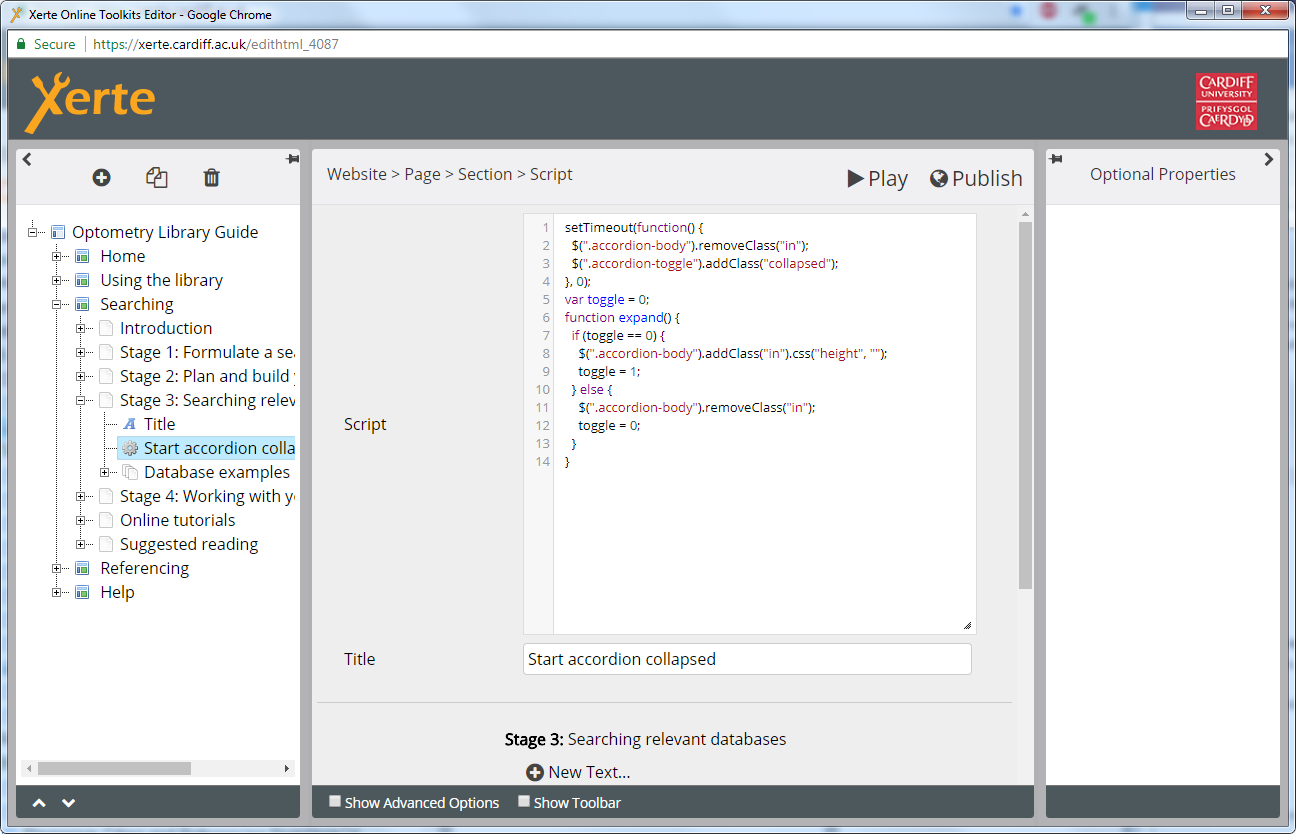
Connexion ou Créer un compte pour participer à la conversation.
Modérateurs: JohnSmith
Temps de génération de la page : 0.150 secondes