

- Messages : 27
- Remerciements reçus 0
Report any technical problems you discover and discuss solutions.
Unable to Download Projects After Updating to Xerte 3.13 – dUnzip2 Error Body:
- IMED
-
 Auteur du sujet
- Hors Ligne
- Membre junior
-

Moins
Plus d'informations
il y a 1 an 10 mois #9309
par IMED
Unable to Download Projects After Updating to Xerte 3.13 – dUnzip2 Error Body: a été créé par IMED
Hello everyone,
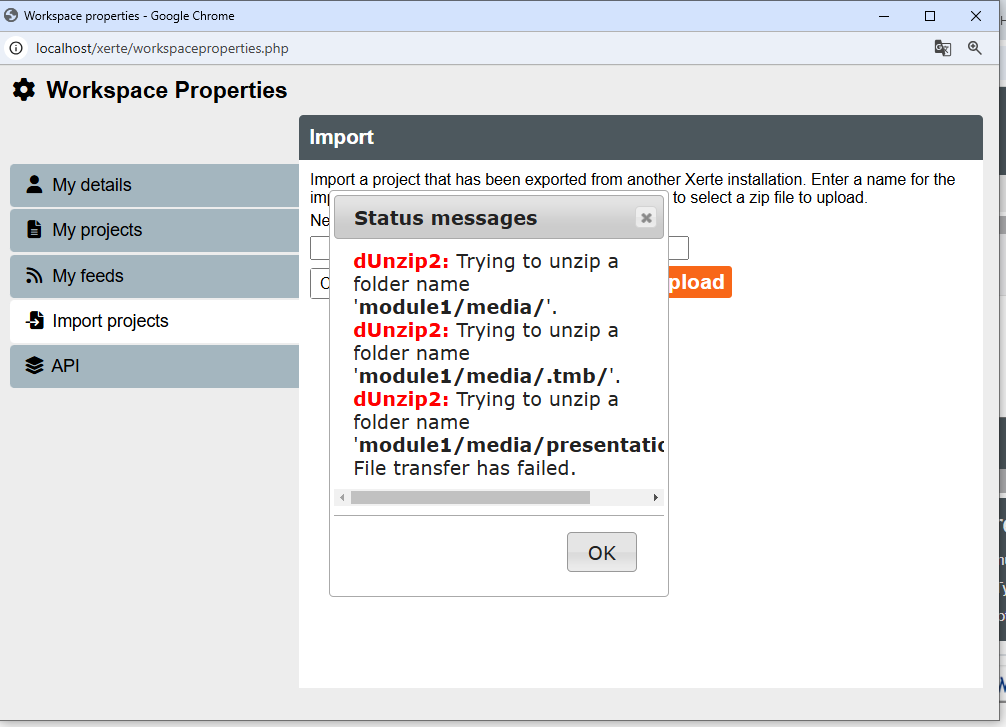
After updating to Xerte 3.13, I am unable to download my projects. I keep encountering the following error messages:
dUnzip2: Trying to unzip a folder name 'module1 ext/media/'.
I’ve checked my file structure and permissions, and everything seems correct. The ZIP file appears to be valid, and I’ve tested it using tools like 7-Zip, which reports no issues. However, Xerte still fails to handle the extraction properly.
Has anyone faced a similar issue? Could this be a bug in Xerte 3.13’s handling of dUnzip2, or is there something I might be overlooking?
Any guidance or suggestions would be greatly appreciated!
Thank you!
imed
After updating to Xerte 3.13, I am unable to download my projects. I keep encountering the following error messages:
dUnzip2: Trying to unzip a folder name 'module1 ext/media/'.
I’ve checked my file structure and permissions, and everything seems correct. The ZIP file appears to be valid, and I’ve tested it using tools like 7-Zip, which reports no issues. However, Xerte still fails to handle the extraction properly.
Has anyone faced a similar issue? Could this be a bug in Xerte 3.13’s handling of dUnzip2, or is there something I might be overlooking?
Any guidance or suggestions would be greatly appreciated!
Thank you!
imed
Connexion ou Créer un compte pour participer à la conversation.
- tom
-

- Hors Ligne
- Administrateur
-

Moins
Plus d'informations
- Messages : 1365
- Remerciements reçus 344
il y a 1 an 10 mois #9310
par tom
Réponse de tom sur le sujet Unable to Download Projects After Updating to Xerte 3.13 – dUnzip2 Error Body:
Hi,
Could you please check whether the php zip extension is enabled?
Tom
Could you please check whether the php zip extension is enabled?
Tom
Connexion ou Créer un compte pour participer à la conversation.
- IMED
-
Auteur du sujet
- Hors Ligne
- Membre junior
-
Moins
Plus d'informations
- Messages : 27
- Remerciements reçus 0
il y a 1 an 10 mois #9317
par IMED
Réponse de IMED sur le sujet Unable to Download Projects After Updating to Xerte 3.13 – dUnzip2 Error Body:
Hi Tom,
Thank you for your reply.
We are using Laragon as our local development environment and have downloaded PHP 7.4. We have also reinstalled a new database and set up Xerte from scratch, and everything seems to be working fine.
However, the issue with project uploads persists. Specifically, when attempting to upload a project, we still encounter the error related to file transfer failure.
Regarding your suggestion about the PHP zip extension, we will double-check to ensure that it is enabled. I will verify this and let you know if it makes a difference.
Thank you for your support.
Best regards,
imed
Thank you for your reply.
We are using Laragon as our local development environment and have downloaded PHP 7.4. We have also reinstalled a new database and set up Xerte from scratch, and everything seems to be working fine.
However, the issue with project uploads persists. Specifically, when attempting to upload a project, we still encounter the error related to file transfer failure.
Regarding your suggestion about the PHP zip extension, we will double-check to ensure that it is enabled. I will verify this and let you know if it makes a difference.
Thank you for your support.
Best regards,
imed
Connexion ou Créer un compte pour participer à la conversation.
- tom
-
- Hors Ligne
- Administrateur
-
Moins
Plus d'informations
- Messages : 1365
- Remerciements reçus 344
il y a 1 an 10 mois #9319
par tom
Réponse de tom sur le sujet Unable to Download Projects After Updating to Xerte 3.13 – dUnzip2 Error Body:
Another common problem when uploading Xerte projects is that the upload_max_filesize and post_max_size are too small. Make sure those settings (in php.ini) are large enough to be able to upload the zip file.
I think that is not the issue, becasue than I would have expected a different error message.
I think that is not the issue, becasue than I would have expected a different error message.
Connexion ou Créer un compte pour participer à la conversation.
- IMED
-
Auteur du sujet
- Hors Ligne
- Membre junior
-
Moins
Plus d'informations
- Messages : 27
- Remerciements reçus 0
il y a 1 an 10 mois #9320
par IMED
Réponse de IMED sur le sujet Unable to Download Projects After Updating to Xerte 3.13 – dUnzip2 Error Body:
Hi Tom
Thank you for your suggestion. I have already checked the upload_max_filesize and post_max_size settings in the php.ini file, and both values are configured to allow for large file uploads. Additionally, the error message I am encountering does not seem to indicate an issue with file size limits.
Just to recap:
I am using Laragon with PHP 7.4.
The PHP zip extension is enabled.
Xerte is fully installed and functional, and the database has been freshly configured.
Despite this, the upload issue persists. Could there be any other configuration or server-side factor causing this problem?
Thank you for your assistance!
Best regards,
Imed
Thank you for your suggestion. I have already checked the upload_max_filesize and post_max_size settings in the php.ini file, and both values are configured to allow for large file uploads. Additionally, the error message I am encountering does not seem to indicate an issue with file size limits.
Just to recap:
I am using Laragon with PHP 7.4.
The PHP zip extension is enabled.
Xerte is fully installed and functional, and the database has been freshly configured.
Despite this, the upload issue persists. Could there be any other configuration or server-side factor causing this problem?
Thank you for your assistance!
Best regards,
Imed
Connexion ou Créer un compte pour participer à la conversation.
- tom
-
- Hors Ligne
- Administrateur
-
Moins
Plus d'informations
- Messages : 1365
- Remerciements reçus 344
il y a 1 an 10 mois #9321
par tom
Réponse de tom sur le sujet Unable to Download Projects After Updating to Xerte 3.13 – dUnzip2 Error Body:
One other thing is that the import folder should be writable by the user that runs the webserver, i.e. www-data on Ubuntu
Connexion ou Créer un compte pour participer à la conversation.
Modérateurs: ronm, julten, JohnSmith
Temps de génération de la page : 0.636 secondes