

- Messages : 13
- Remerciements reçus 1
General questions and topics about Xerte Toolkits that don’t fit anywhere else.
Flashcard header text and icons
- andymconnor
-
 Auteur du sujet
- Hors Ligne
- Nouveau membre
-

Moins
Plus d'informations
il y a 2 ans 11 mois #8762
par andymconnor
Flashcard header text and icons a été créé par andymconnor
I'm developing some flashcards using Xerte and keen to change some of the way these are displayed to they appear a bit more seamless when used on our LMS.
The two things (see attached) that I would like to do are:
1. Change the size of the header text
2. Change the colour of the icons used
I'm developing a custom theme as I go and have tried changing the CSS for the #x_headerBlock, h2, h1 section of the theme, I can change the colour and weight of the text in the header no problem, but if I try and change the size then it has no effect. I've tried inserting a style directly into the content, and it is the same deal. I can change other attributes of the text but not the size.
I also can't find how to change the colour of the icons. I've tried changing the colours in the theme icons but that doesn't seem to do anything.
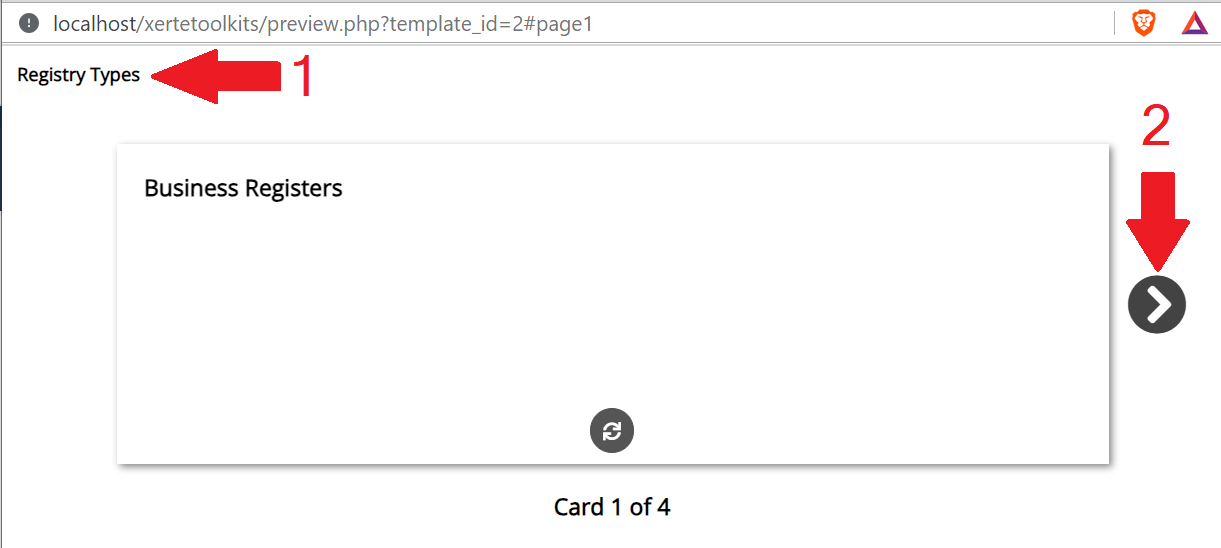
The two things (see attached) that I would like to do are:
1. Change the size of the header text
2. Change the colour of the icons used
I'm developing a custom theme as I go and have tried changing the CSS for the #x_headerBlock, h2, h1 section of the theme, I can change the colour and weight of the text in the header no problem, but if I try and change the size then it has no effect. I've tried inserting a style directly into the content, and it is the same deal. I can change other attributes of the text but not the size.
I also can't find how to change the colour of the icons. I've tried changing the colours in the theme icons but that doesn't seem to do anything.
Connexion ou Créer un compte pour participer à la conversation.
- andymconnor
-
Auteur du sujet
- Hors Ligne
- Nouveau membre
-
Moins
Plus d'informations
- Messages : 13
- Remerciements reçus 1
il y a 2 ans 11 mois - il y a 2 ans 11 mois #8763
par andymconnor
Réponse de andymconnor sur le sujet Flashcard header text and icons
Should have waiting another half an hour before asking for help..... the "responsive text" option was set, so with that turned off I can set the font size of <h1> text. Only by adding it in to the learning object itself as a style. I'd really like to do this in the theme so that it would apply to all new LOs. Any suggestions? Edits that I make to the theme CSS don't seem to get applied.
Still looking into the icon colour as well..
Still looking into the icon colour as well..
Dernière édition: il y a 2 ans 11 mois par andymconnor.
Connexion ou Créer un compte pour participer à la conversation.
- tom
-

- Hors Ligne
- Administrateur
-

Moins
Plus d'informations
- Messages : 1365
- Remerciements reçus 344
il y a 2 ans 11 mois #8765
par tom
Réponse de tom sur le sujet Flashcard header text and icons
Hi,
If you're working on a theme, I have a tip for you:
You can limit changing css attributes for tags to a certain page by including the class of the page type before the tag:
.x_flashCards_page .h3 {
color: #ff0000;
}
To change the color of the buttons you should be able to use something like:
.x_flashCards_page .btnHolder span {
color: #ff0000;
}
If you're working on a theme, I have a tip for you:
You can limit changing css attributes for tags to a certain page by including the class of the page type before the tag:
.x_flashCards_page .h3 {
color: #ff0000;
}
To change the color of the buttons you should be able to use something like:
.x_flashCards_page .btnHolder span {
color: #ff0000;
}
Les utilisateur(s) suivant ont remercié: andymconnor
Connexion ou Créer un compte pour participer à la conversation.
- andymconnor
-
Auteur du sujet
- Hors Ligne
- Nouveau membre
-
Moins
Plus d'informations
- Messages : 13
- Remerciements reçus 1
il y a 2 ans 11 mois #8766
par andymconnor
Réponse de andymconnor sur le sujet Flashcard header text and icons
Thanks, I'll give that a go. It can be on all pages, it just seems that size doesn't get adjusted from the theme. I will keep playing around with it until I get it to work.
Connexion ou Créer un compte pour participer à la conversation.
Modérateurs: ingdon
Temps de génération de la page : 0.157 secondes