

- Messages : 4
- Remerciements reçus 0
The place for more technical questions for those who want to create new pagetypes or bespoke functionality.
Change the width of sound audio bar and transcript
- brenowers
-
 Auteur du sujet
- Hors Ligne
- Nouveau membre
-

Moins
Plus d'informations
il y a 6 ans 1 mois #6834
par brenowers
Change the width of sound audio bar and transcript a été créé par brenowers
Hi there,
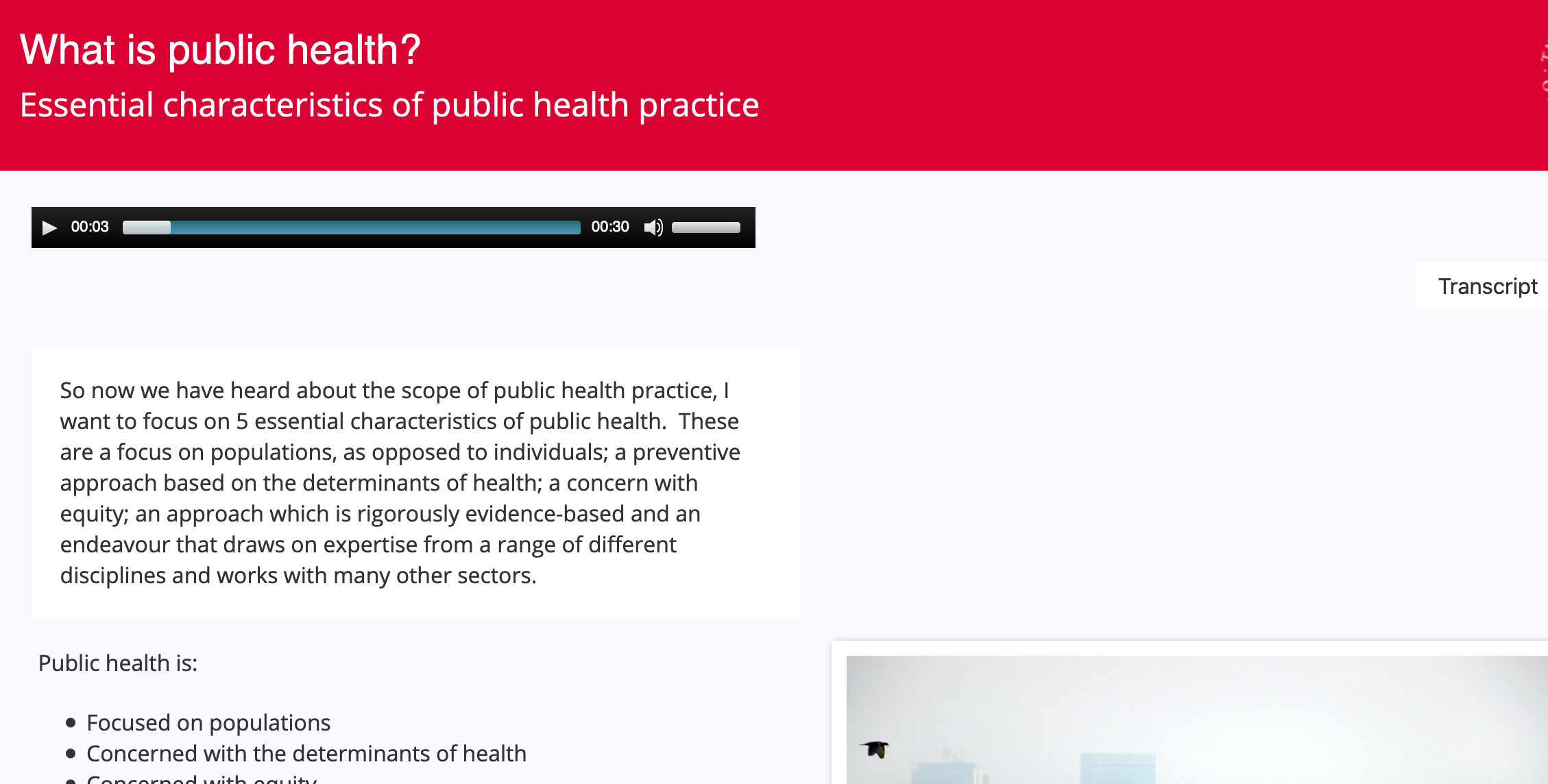
We have a XOT where we have the audio (via the 'sound' function rather than narration) and transcript appear above the main content area on slides. The problem we're facing is that their width is based on the width of the image that is being used on each individual slide, which is usually different, so the audio bar and transcript width are never the same (screenshot attached). Would anyone be able to suggest a way around this?
(We'd quite like to keep the page types the same)
This is my first post here, forgive me if I should have posted in another category.
Best,
Brendan
We have a XOT where we have the audio (via the 'sound' function rather than narration) and transcript appear above the main content area on slides. The problem we're facing is that their width is based on the width of the image that is being used on each individual slide, which is usually different, so the audio bar and transcript width are never the same (screenshot attached). Would anyone be able to suggest a way around this?
(We'd quite like to keep the page types the same)
This is my first post here, forgive me if I should have posted in another category.
Best,
Brendan
Connexion ou Créer un compte pour participer à la conversation.
- ronm
-

- Hors Ligne
- Administrateur
-

il y a 6 ans 1 mois #6838
par ronm
Xerte developer & trainer
e-learning & m-learning consultant
mitchellmedia.co.uk | xerteacademy.com | learningapps.co.uk
Note: Support here is voluntary and meant for users to support each other.
Need direct commercial support with Xerte? mitchellmedia.co.uk/contact/
Réponse de ronm sur le sujet Change the width of sound audio bar and transcript
Hi
there's probably a bit of css or script you could use but can you share a link to an example so that we can inspect and suggest a solution?
HTH
Ron
there's probably a bit of css or script you could use but can you share a link to an example so that we can inspect and suggest a solution?
HTH
Ron
Xerte developer & trainer
e-learning & m-learning consultant
mitchellmedia.co.uk | xerteacademy.com | learningapps.co.uk
Note: Support here is voluntary and meant for users to support each other.
Need direct commercial support with Xerte? mitchellmedia.co.uk/contact/
Connexion ou Créer un compte pour participer à la conversation.
- brenowers
-
Auteur du sujet
- Hors Ligne
- Nouveau membre
-
Moins
Plus d'informations
- Messages : 4
- Remerciements reçus 0
il y a 6 ans 1 mois #6839
par brenowers
Réponse de brenowers sur le sujet Change the width of sound audio bar and transcript
Hi Ron,
Thanks for the response. Here is a playground link: xerte.cahss.ed.ac.uk/play.php?template_id=1595
from slide 2 onwards.
Best,
Brendan
Thanks for the response. Here is a playground link: xerte.cahss.ed.ac.uk/play.php?template_id=1595
from slide 2 onwards.
Best,
Brendan
Connexion ou Créer un compte pour participer à la conversation.
- brenowers
-
Auteur du sujet
- Hors Ligne
- Nouveau membre
-
Moins
Plus d'informations
- Messages : 4
- Remerciements reçus 0
il y a 6 ans 1 mois #6840
par brenowers
Réponse de brenowers sur le sujet Change the width of sound audio bar and transcript
I should also say I am using JS insertBefore{} to display the transcript and audio above the content.
Connexion ou Créer un compte pour participer à la conversation.
- ronm
-
- Hors Ligne
- Administrateur
-
il y a 6 ans 1 mois - il y a 6 ans 1 mois #6841
par ronm
Xerte developer & trainer
e-learning & m-learning consultant
mitchellmedia.co.uk | xerteacademy.com | learningapps.co.uk
Note: Support here is voluntary and meant for users to support each other.
Need direct commercial support with Xerte? mitchellmedia.co.uk/contact/
Réponse de ronm sur le sujet Change the width of sound audio bar and transcript
Hi Brendan
as well as that you have custom css controlling width and various layout elements etc and the problem is the size of the audio player including it's controls etc is controlled dynamically. That said try the following:
1. Add an optional styles property to the LO icon e.g. the first icon in the tree
2. Add the following css
Personally in your example I would also set the transcript div to fill the width and so also add the following:
HTH
Ron
as well as that you have custom css controlling width and various layout elements etc and the problem is the size of the audio player including it's controls etc is controlled dynamically. That said try the following:
1. Add an optional styles property to the LO icon e.g. the first icon in the tree
2. Add the following css
Code:
/*set the audio player to 100% width*/
.mejs-container {
width: 100% !important;
}
/*prevent the volume slide from wrapping*/
.mejs-controls div.mejs-time-rail {
max-width: 80% !important;
}
Code:
/*set the transcript width to 97%*/
#transcript{
width:97% !important;
}
HTH
Ron
Xerte developer & trainer
e-learning & m-learning consultant
mitchellmedia.co.uk | xerteacademy.com | learningapps.co.uk
Note: Support here is voluntary and meant for users to support each other.
Need direct commercial support with Xerte? mitchellmedia.co.uk/contact/
Dernière édition: il y a 6 ans 1 mois par ronm.
Les utilisateur(s) suivant ont remercié: brenowers
Connexion ou Créer un compte pour participer à la conversation.
- brenowers
-
Auteur du sujet
- Hors Ligne
- Nouveau membre
-
Moins
Plus d'informations
- Messages : 4
- Remerciements reçus 0
il y a 6 ans 1 mois #6842
par brenowers
Réponse de brenowers sur le sujet Change the width of sound audio bar and transcript
Hi Ron,
Thanks for taking a look at this. I have applied both of these and got what we're looking for
Many thanks!
Brendan
Thanks for taking a look at this. I have applied both of these and got what we're looking for
Many thanks!
Brendan
Connexion ou Créer un compte pour participer à la conversation.
Modérateurs: JohnSmith
Temps de génération de la page : 0.138 secondes