

- Messages : 3
- Remerciements reçus 1
The place for more technical questions for those who want to create new pagetypes or bespoke functionality.
Navigation menu
- DKeus
-
 Auteur du sujet
- Hors Ligne
- Nouveau membre
-

Moins
Plus d'informations
il y a 6 ans 9 mois #6220
par DKeus
Navigation menu a été créé par DKeus
Hello everyone,
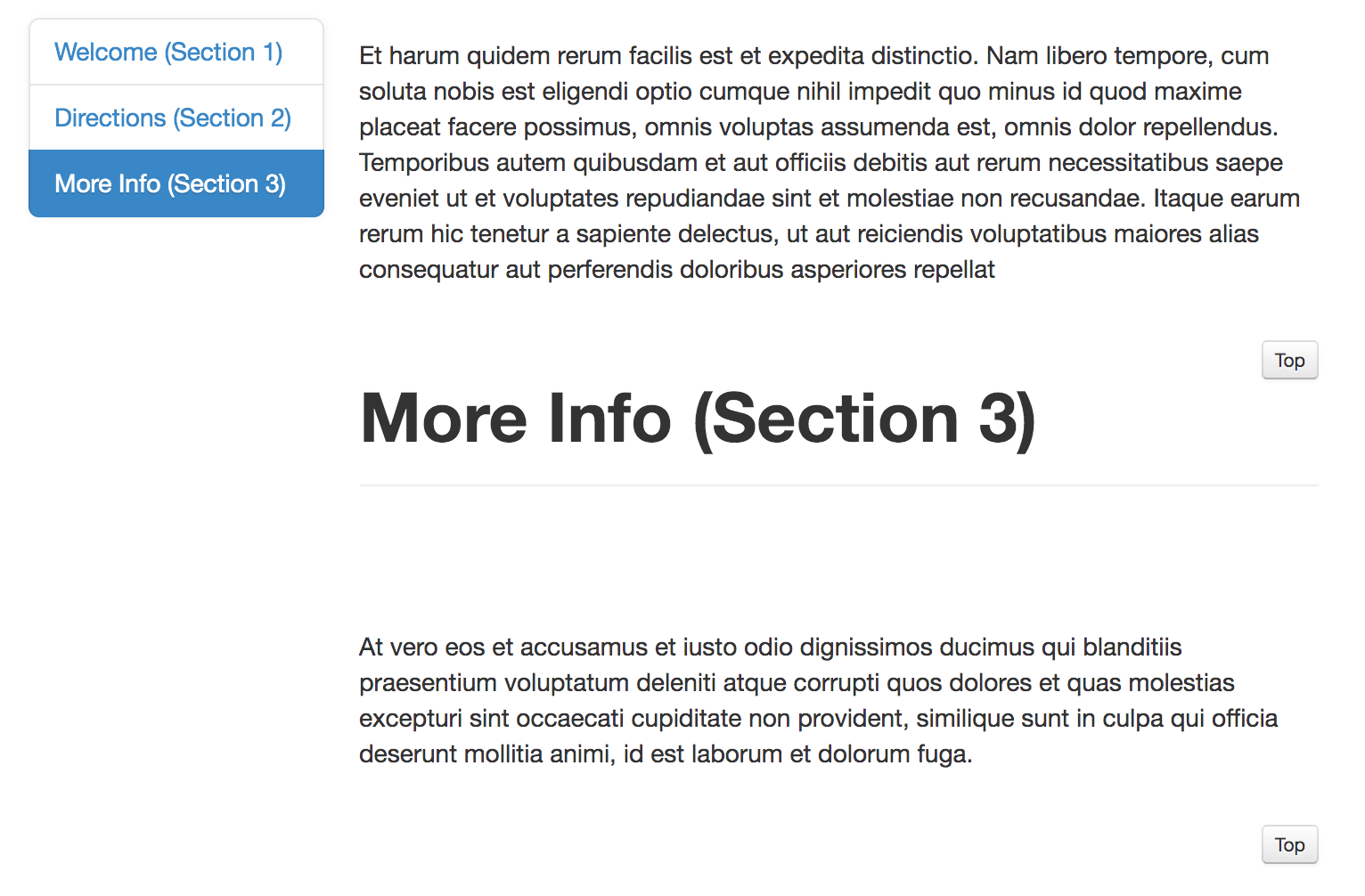
I've recently started using the Xerte bootstrap to build pages for a school. I love the way it looks and works but did get some feedback from the educational institution I work for. My question: Can I somehow highlight the part of the vertical navigation menu on the left side of the page where the user currently is currently positioned? Or to put it in different words, can the highlighted part in blue (see picture) scroll with the user to show what subject is being looked at?
Thanks in advance,
David
I've recently started using the Xerte bootstrap to build pages for a school. I love the way it looks and works but did get some feedback from the educational institution I work for. My question: Can I somehow highlight the part of the vertical navigation menu on the left side of the page where the user currently is currently positioned? Or to put it in different words, can the highlighted part in blue (see picture) scroll with the user to show what subject is being looked at?
Thanks in advance,
David

Connexion ou Créer un compte pour participer à la conversation.
- drlara
-

- Hors Ligne
- Nouveau membre
-
Moins
Plus d'informations
- Messages : 15
- Remerciements reçus 9
il y a 6 ans 8 mois #6245
par drlara
Réponse de drlara sur le sujet Navigation menu
Hi, it looks like what you're asking is the default behaviour (see screenshot).
By looking at your screenshot, it seems that you didn't include the "titles" and I noticed that without titles, then it won't work.
You can add blank spaces as title but it can't be blank, otherwise, it doesn't work.
By looking at your screenshot, it seems that you didn't include the "titles" and I noticed that without titles, then it won't work.
You can add blank spaces as title but it can't be blank, otherwise, it doesn't work.
Les utilisateur(s) suivant ont remercié: DKeus
Connexion ou Créer un compte pour participer à la conversation.
- DKeus
-
Auteur du sujet
- Hors Ligne
- Nouveau membre
-
Moins
Plus d'informations
- Messages : 3
- Remerciements reçus 1
il y a 6 ans 8 mois #6257
par DKeus
Réponse de DKeus sur le sujet Navigation menu
Thank you so much, that is exactly what I needed to know! I will try it out right away.
Connexion ou Créer un compte pour participer à la conversation.
- DKeus
-
Auteur du sujet
- Hors Ligne
- Nouveau membre
-
Moins
Plus d'informations
- Messages : 3
- Remerciements reçus 1
il y a 6 ans 8 mois #6258
par DKeus
Réponse de DKeus sur le sujet Navigation menu
Hi,
I followed your advice and still run into the same problem. I have attached a screenshot of the bootstrap. I have tried all possible combinations of titles and blank spaces: showing the title with blank spaces (multiple different numbers of spaces) and not showing a title but entering blanks or characters in the title field. It seemed to work some random times but then stopped working again for unknown reasons. I can't seem to pinpoint the source of the problem.
I even noticed that the Sample Xerte bootstrap on xot.xerte.org.uk (sorry can't post the link as a new user) has the same issue.
Can you tell me what I'm doing wrong?
Thanks in advance
I followed your advice and still run into the same problem. I have attached a screenshot of the bootstrap. I have tried all possible combinations of titles and blank spaces: showing the title with blank spaces (multiple different numbers of spaces) and not showing a title but entering blanks or characters in the title field. It seemed to work some random times but then stopped working again for unknown reasons. I can't seem to pinpoint the source of the problem.
I even noticed that the Sample Xerte bootstrap on xot.xerte.org.uk (sorry can't post the link as a new user) has the same issue.
Can you tell me what I'm doing wrong?
Thanks in advance
Les utilisateur(s) suivant ont remercié: drlara
Connexion ou Créer un compte pour participer à la conversation.
- drlara
-
- Hors Ligne
- Nouveau membre
-
Moins
Plus d'informations
- Messages : 15
- Remerciements reçus 9
il y a 6 ans 8 mois - il y a 6 ans 8 mois #6259
par drlara
Réponse de drlara sur le sujet Navigation menu
Hi. I'm not really sure what the problem could be... I'm using the latest update, the one that was released three months ago, on November 21, 2019.
You're right that in the Bootstrap sample they have in their website, the navigation is not working in the way you want it either. But perhaps it was created before Nov 21 and it might not be using the latest update.
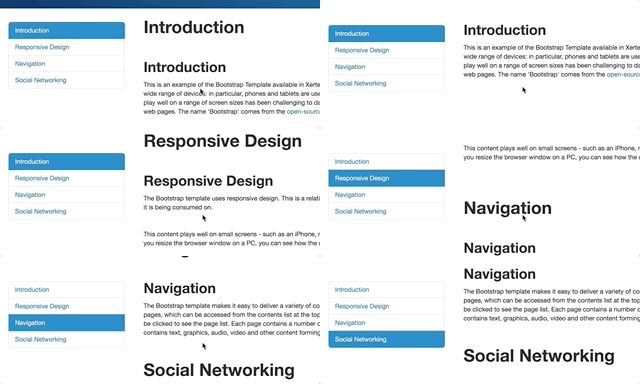
I created a quick bootstrap project using their sample and the navigation seems to be working properly (it's changing as I scroll down within the content, as shown in the attached animated gif)
Here is the link to the project, copy and paste it into a new window: csumb.space/xert/play.php?template_id=2
Best luck!
You're right that in the Bootstrap sample they have in their website, the navigation is not working in the way you want it either. But perhaps it was created before Nov 21 and it might not be using the latest update.
I created a quick bootstrap project using their sample and the navigation seems to be working properly (it's changing as I scroll down within the content, as shown in the attached animated gif)
Here is the link to the project, copy and paste it into a new window: csumb.space/xert/play.php?template_id=2
Best luck!
Dernière édition: il y a 6 ans 8 mois par drlara. Raison: Image wasn't attached
Les utilisateur(s) suivant ont remercié: DKeus
Connexion ou Créer un compte pour participer à la conversation.
- DKeus
-
Auteur du sujet
- Hors Ligne
- Nouveau membre
-
Moins
Plus d'informations
- Messages : 3
- Remerciements reçus 1
il y a 6 ans 8 mois #6266
par DKeus
Réponse de DKeus sur le sujet Navigation menu
Thanks for your answer.
I found out something interesting. Upon opening your link I found that the scrolling didn't work either even though you showed it worked in your animated gif. I tried opening the link in Firefox and Edge (I was using Chrome) and it worked in those! That might be the root of the problem. I will investigate and get back to it if you are interested.
I found out something interesting. Upon opening your link I found that the scrolling didn't work either even though you showed it worked in your animated gif. I tried opening the link in Firefox and Edge (I was using Chrome) and it worked in those! That might be the root of the problem. I will investigate and get back to it if you are interested.
Connexion ou Créer un compte pour participer à la conversation.
Modérateurs: JohnSmith
Temps de génération de la page : 0.149 secondes