

- Messages : 3
- Remerciements reçus 0
This is the place for questions about learning design and pedagogy; how to use different page types for different purposes.
Drag and drop problem
- chrisg
-
 Auteur du sujet
- Hors Ligne
- Nouveau membre
-

Moins
Plus d'informations
il y a 11 ans 1 mois #3101
par chrisg
Drag and drop problem a été créé par chrisg
Hi everyone
This is the first time I've posted here and I hope you don't mind answering my question
I've created a drag and drop and would like the image to fill the screen more fully if possible? At the moment it is either very small, or if I change the display mode to 'full screen' the image and drag and drop options are all clustered together on the right hand side of the screen. Am I selecting the wrong type of interactivity do you think? Or have I missed some settings that would enable me to get the result I am looking for?
This is the link to the rlo and the problematic interaction is on page one.
www.nottingham.ac.uk/toolkits/preview.php?template_id=12859
Many thanks
Chris
This is the first time I've posted here and I hope you don't mind answering my question
I've created a drag and drop and would like the image to fill the screen more fully if possible? At the moment it is either very small, or if I change the display mode to 'full screen' the image and drag and drop options are all clustered together on the right hand side of the screen. Am I selecting the wrong type of interactivity do you think? Or have I missed some settings that would enable me to get the result I am looking for?
This is the link to the rlo and the problematic interaction is on page one.
www.nottingham.ac.uk/toolkits/preview.php?template_id=12859
Many thanks
Chris
Connexion ou Créer un compte pour participer à la conversation.
- ronm
-

- Hors Ligne
- Administrateur
-

il y a 11 ans 1 mois #3102
par ronm
Xerte developer & trainer
e-learning & m-learning consultant
mitchellmedia.co.uk | xerteacademy.com | learningapps.co.uk
Note: Support here is voluntary and meant for users to support each other.
Need direct commercial support with Xerte? mitchellmedia.co.uk/contact/
Réponse de ronm sur le sujet Drag and drop problem
Hi and welcome
it's a friendly place to ask questions!
Firstly for anyone else reading this the public link to your example is www.nottingham.ac.uk/toolkits/play.php?template_id=12859 rather than the preview.php link which will only work for you.
It's usually a good idea to make sure you have the optional Image Width property set to Large to maximise the image size but I can see that you have that set.
Now depending on the size and shape of your image and the number of labels etc the other 'Label Position' can be useful e.g. instead of the default position of labels 'Below Image' you can change that to 'Below Text'. With your example I think you should find that the image then fills the vertical space on the right and is therefore larger and the labels fill the space on the left. At the moment this will only work with the 'Align Text' property set to left which is what you have set anyway.
HTH
Ron
it's a friendly place to ask questions!
Firstly for anyone else reading this the public link to your example is www.nottingham.ac.uk/toolkits/play.php?template_id=12859 rather than the preview.php link which will only work for you.
It's usually a good idea to make sure you have the optional Image Width property set to Large to maximise the image size but I can see that you have that set.
Now depending on the size and shape of your image and the number of labels etc the other 'Label Position' can be useful e.g. instead of the default position of labels 'Below Image' you can change that to 'Below Text'. With your example I think you should find that the image then fills the vertical space on the right and is therefore larger and the labels fill the space on the left. At the moment this will only work with the 'Align Text' property set to left which is what you have set anyway.
HTH
Ron
Xerte developer & trainer
e-learning & m-learning consultant
mitchellmedia.co.uk | xerteacademy.com | learningapps.co.uk
Note: Support here is voluntary and meant for users to support each other.
Need direct commercial support with Xerte? mitchellmedia.co.uk/contact/
Connexion ou Créer un compte pour participer à la conversation.
- chrisg
-
Auteur du sujet
- Hors Ligne
- Nouveau membre
-
Moins
Plus d'informations
- Messages : 3
- Remerciements reçus 0
il y a 11 ans 1 mois #3104
par chrisg
Réponse de chrisg sur le sujet Drag and drop problem
Hi Ron
Thank you so much for the quick response!
And thank you for letting me know about the link as well!
It sounds like your suggestion about the label position would be a good solution but I can't find it, I must have missed something or be looking in the wrong place. On the drag and drop labelling page I've got Page Title, Text, Image, Image Description, Align Text, Highlight Hotspots, Highlight Colour, Image Width. Is 'label position' hidden away somewhere?
Many thanks for helping me
Chris
Thank you so much for the quick response!
And thank you for letting me know about the link as well!
It sounds like your suggestion about the label position would be a good solution but I can't find it, I must have missed something or be looking in the wrong place. On the drag and drop labelling page I've got Page Title, Text, Image, Image Description, Align Text, Highlight Hotspots, Highlight Colour, Image Width. Is 'label position' hidden away somewhere?
Many thanks for helping me
Chris
Connexion ou Créer un compte pour participer à la conversation.
- ronm
-
- Hors Ligne
- Administrateur
-
il y a 11 ans 1 mois #3105
par ronm
Xerte developer & trainer
e-learning & m-learning consultant
mitchellmedia.co.uk | xerteacademy.com | learningapps.co.uk
Note: Support here is voluntary and meant for users to support each other.
Need direct commercial support with Xerte? mitchellmedia.co.uk/contact/
Réponse de ronm sur le sujet Drag and drop problem
Hi Chris
yes it's an optional property - follow the steps in the image below...
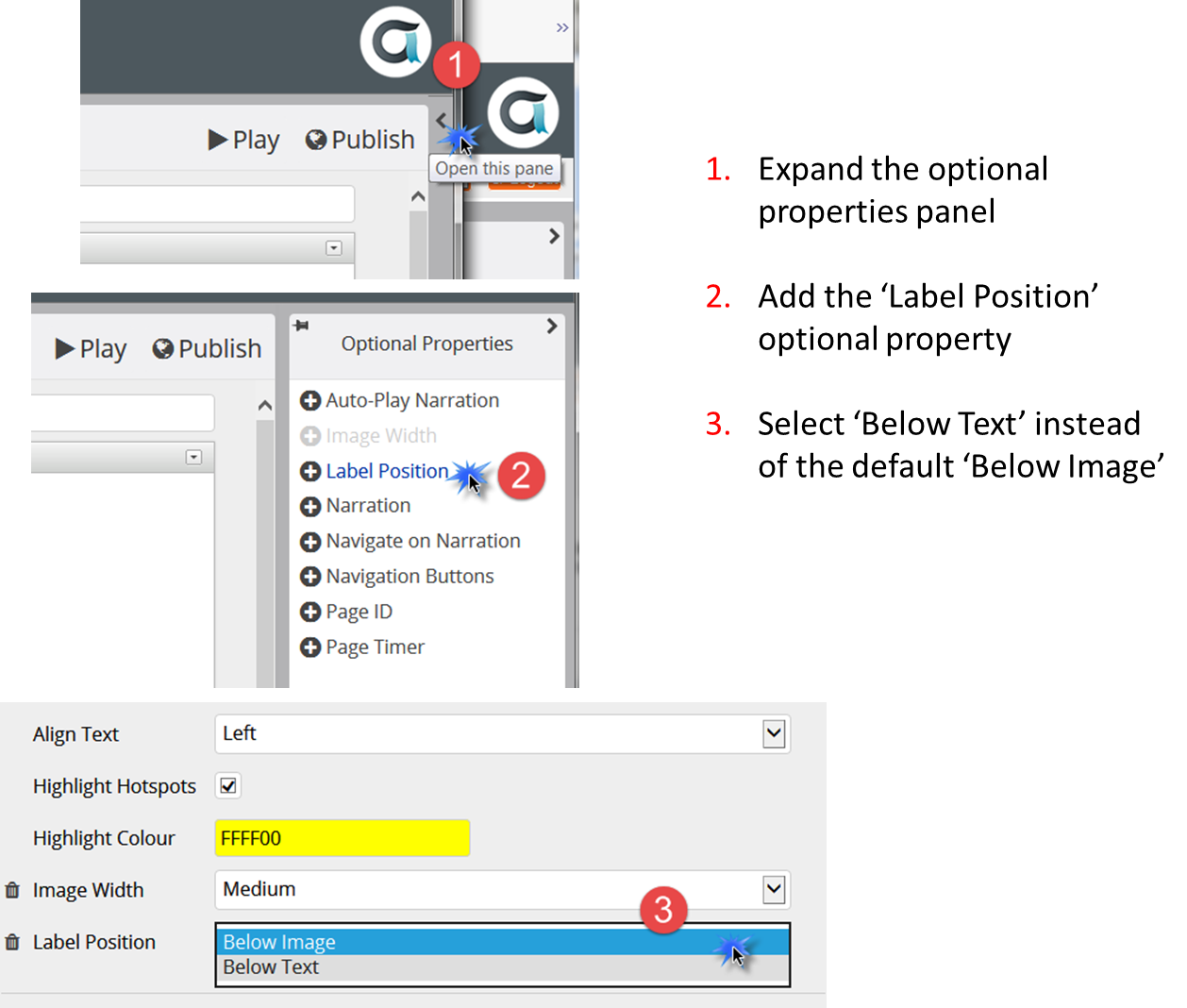
HTH
Ron
yes it's an optional property - follow the steps in the image below...
HTH
Ron
Xerte developer & trainer
e-learning & m-learning consultant
mitchellmedia.co.uk | xerteacademy.com | learningapps.co.uk
Note: Support here is voluntary and meant for users to support each other.
Need direct commercial support with Xerte? mitchellmedia.co.uk/contact/
Connexion ou Créer un compte pour participer à la conversation.
- chrisg
-
Auteur du sujet
- Hors Ligne
- Nouveau membre
-
Moins
Plus d'informations
- Messages : 3
- Remerciements reçus 0
il y a 11 ans 1 mois #3106
par chrisg
Réponse de chrisg sur le sujet Drag and drop problem
Brilliant!
Working much better now.
Thank you so much
Chris
Working much better now.
Thank you so much
Chris
Connexion ou Créer un compte pour participer à la conversation.
Modérateurs: ingdon
Temps de génération de la page : 0.146 secondes