

- Messages : 2
- Remerciements reçus 0
This is the place for questions about learning design and pedagogy; how to use different page types for different purposes.
Using Youtube
- knobby
-
 Auteur du sujet
- Hors Ligne
- Nouveau membre
-

Moins
Plus d'informations
il y a 5 ans 2 semaines - il y a 5 ans 2 semaines #7699
par knobby
Using Youtube a été créé par knobby
Hi folks,
I'm new here and to Xerte (a user for a couple of hours), but I'm finding the possibilities amazing. I'm particular interested in using video and note that it's advised to use video from a hosting/streaming service like Youtube. I have a couple of questions which I hope you can help with regsarding this:
1. Is it possible to loop a Youtube video so it keeps playing over and over until you stop it?
2. Is it possible, when a Youtube video comes to an end that you can make it just stop rather than showing a tiled image of other Youtube videos like shown in the picture below (which are, for me anyway, nothing to do with what I have just watched)?
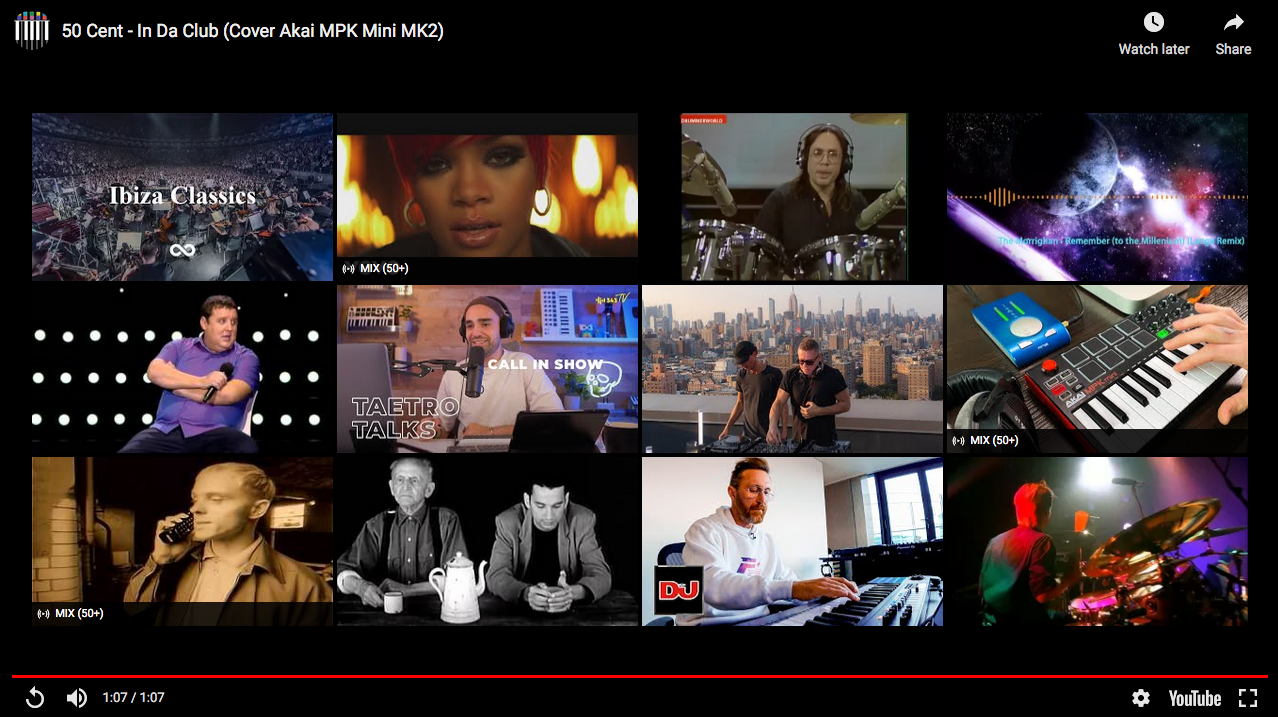
Thanks in anticipation.
I'm new here and to Xerte (a user for a couple of hours), but I'm finding the possibilities amazing. I'm particular interested in using video and note that it's advised to use video from a hosting/streaming service like Youtube. I have a couple of questions which I hope you can help with regsarding this:
1. Is it possible to loop a Youtube video so it keeps playing over and over until you stop it?
2. Is it possible, when a Youtube video comes to an end that you can make it just stop rather than showing a tiled image of other Youtube videos like shown in the picture below (which are, for me anyway, nothing to do with what I have just watched)?
Thanks in anticipation.
Dernière édition: il y a 5 ans 2 semaines par knobby. Raison: Dodgy keyboard missed a few letters out!
Connexion ou Créer un compte pour participer à la conversation.
- ronm
-

- Hors Ligne
- Administrateur
-

il y a 5 ans 2 semaines #7701
par ronm
Xerte developer & trainer
e-learning & m-learning consultant
mitchellmedia.co.uk | xerteacademy.com | learningapps.co.uk
Note: Support here is voluntary and meant for users to support each other.
Need direct commercial support with Xerte? mitchellmedia.co.uk/contact/
Réponse de ronm sur le sujet Using Youtube
Hi
your questions are for YouTube/Google rather than Xerte really. See developers.google.com/youtube/iframe_api_reference
However to answer your questions this partly depends on whether the video you want to use is from your own channel or someone else's channel? YouTube used to allow prevention of related videos with a parameter like rel=0 but I think at the moment what that does is still shows related videos at the end but only from the same channel from where the video is uploaded.
However if you can get loop to work it never reaches that end screen so doesn't matter where the video is from. I did a quick bit of testing and my recommendation would be to use the media lesson page and then you can use a YouTube link with parameters like the following www.youtube.com/watch?v=9B6Eyr1K0RA?&loop=1&autoplay=1&rel=0
You don't have to watch that through just scrub to near the end and then play to see the loop working.
This seems to work at this point in time but YouTube/Google have a habit of changing and/or deprecating features (as you can see in the above link) so you'll need to keep track of that.
HTH
Ron
your questions are for YouTube/Google rather than Xerte really. See developers.google.com/youtube/iframe_api_reference
However to answer your questions this partly depends on whether the video you want to use is from your own channel or someone else's channel? YouTube used to allow prevention of related videos with a parameter like rel=0 but I think at the moment what that does is still shows related videos at the end but only from the same channel from where the video is uploaded.
However if you can get loop to work it never reaches that end screen so doesn't matter where the video is from. I did a quick bit of testing and my recommendation would be to use the media lesson page and then you can use a YouTube link with parameters like the following www.youtube.com/watch?v=9B6Eyr1K0RA?&loop=1&autoplay=1&rel=0
You don't have to watch that through just scrub to near the end and then play to see the loop working.
This seems to work at this point in time but YouTube/Google have a habit of changing and/or deprecating features (as you can see in the above link) so you'll need to keep track of that.
HTH
Ron
Xerte developer & trainer
e-learning & m-learning consultant
mitchellmedia.co.uk | xerteacademy.com | learningapps.co.uk
Note: Support here is voluntary and meant for users to support each other.
Need direct commercial support with Xerte? mitchellmedia.co.uk/contact/
Les utilisateur(s) suivant ont remercié: ciroteo, knobby
Connexion ou Créer un compte pour participer à la conversation.
- knobby
-
Auteur du sujet
- Hors Ligne
- Nouveau membre
-
Moins
Plus d'informations
- Messages : 2
- Remerciements reçus 0
il y a 5 ans 2 semaines #7705
par knobby
Réponse de knobby sur le sujet Using Youtube
Thanks ronm,
The info was really valuable & I've now got my Youtube video to autoplay and loop.
The info was really valuable & I've now got my Youtube video to autoplay and loop.
Connexion ou Créer un compte pour participer à la conversation.
Modérateurs: ingdon
Temps de génération de la page : 0.300 secondes