

- Messages : 179
- Remerciements reçus 0
This is the place for questions about learning design and pedagogy; how to use different page types for different purposes.
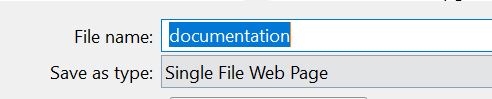
Documentation page type - Download opens Word but File>Save As defaults to web
- annem
-
 Auteur du sujet
- Hors Ligne
- Membre elite
-

Moins
Plus d'informations
il y a 6 ans 4 mois #6624
par annem
Documentation page type - Download opens Word but File>Save As defaults to web a été créé par annem
Hi All,
Hope you are well.
Is there a way to ensure that by default the 'Download' resulting Word document which opens on the screen (depending on the browser used) can by default be set to save as a Word document? Currently the Word document is set to default to Web version when using File > Save As.
This is a popular page type for us.
I look forward to hearing from the technical experts.
Best wishes
Anne
Hope you are well.
Is there a way to ensure that by default the 'Download' resulting Word document which opens on the screen (depending on the browser used) can by default be set to save as a Word document? Currently the Word document is set to default to Web version when using File > Save As.
This is a popular page type for us.
I look forward to hearing from the technical experts.
Best wishes
Anne

Connexion ou Créer un compte pour participer à la conversation.
- ronm
-

- Hors Ligne
- Administrateur
-

il y a 6 ans 4 mois #6627
par ronm
Xerte developer & trainer
e-learning & m-learning consultant
mitchellmedia.co.uk | xerteacademy.com | learningapps.co.uk
Note: Support here is voluntary and meant for users to support each other.
Need direct commercial support with Xerte? mitchellmedia.co.uk/contact/
Réponse de ronm sur le sujet Documentation page type - Download opens Word but File>Save As defaults to web
Hi Anne
this isn't something controlled by Xerte. The documentation page is generating a .doc file and it will depend on browser/local settings as to how you are prompted to save the document. I was just in a teams meeting and 3 of us tested this in each of the main browsers and none of us saw the save as web page option that you are getting. We get Save as type: Microsoft Word 97 - 2003 Document (’.DOC)
What browser and browser version are you using? Have you asked your IT team about this? It may be something they have control over.
HTH
Ron
this isn't something controlled by Xerte. The documentation page is generating a .doc file and it will depend on browser/local settings as to how you are prompted to save the document. I was just in a teams meeting and 3 of us tested this in each of the main browsers and none of us saw the save as web page option that you are getting. We get Save as type: Microsoft Word 97 - 2003 Document (’.DOC)
What browser and browser version are you using? Have you asked your IT team about this? It may be something they have control over.
HTH
Ron
Xerte developer & trainer
e-learning & m-learning consultant
mitchellmedia.co.uk | xerteacademy.com | learningapps.co.uk
Note: Support here is voluntary and meant for users to support each other.
Need direct commercial support with Xerte? mitchellmedia.co.uk/contact/
Connexion ou Créer un compte pour participer à la conversation.
- annem
-
Auteur du sujet
- Hors Ligne
- Membre elite
-
Moins
Plus d'informations
- Messages : 179
- Remerciements reçus 0
il y a 6 ans 4 mois #6628
par annem
Réponse de annem sur le sujet Documentation page type - Download opens Word but File>Save As defaults to web
Hi Ron and colleagues who tested this,
I have tried in all browsers and I get the 'Save As.....Web' with all browsers. So, I will contact our IT department. In the meantime I have told the author/creator to provide instructions to the users to change to 'Save As....Word'.
Slightly different issue reported by a user, but with the Documentation page and quoted here: "I just completed the online prep work for next weeks session and as suggested on one of the sections I downloaded my answers to print afterwards, but the downloaded document will not open and says the file is unsafe".
I can't replicate this issue, have any of you ever experienced this issue?
Hopefully someone can help?.
Best wishes
Anne
I have tried in all browsers and I get the 'Save As.....Web' with all browsers. So, I will contact our IT department. In the meantime I have told the author/creator to provide instructions to the users to change to 'Save As....Word'.
Slightly different issue reported by a user, but with the Documentation page and quoted here: "I just completed the online prep work for next weeks session and as suggested on one of the sections I downloaded my answers to print afterwards, but the downloaded document will not open and says the file is unsafe".
I can't replicate this issue, have any of you ever experienced this issue?
Hopefully someone can help?.
Best wishes
Anne
Connexion ou Créer un compte pour participer à la conversation.
Modérateurs: ingdon
Temps de génération de la page : 0.139 secondes