

- Messages : 10
- Remerciements reçus 0
This is the place for questions about learning design and pedagogy; how to use different page types for different purposes.
Glossary highlighting -> Font colour
- GoodWork
-
 Auteur du sujet
- Hors Ligne
- Nouveau membre
-

Moins
Plus d'informations
il y a 6 ans 6 mois #6444
par GoodWork
Glossary highlighting -> Font colour a été créé par GoodWork
I'm new to xerte, but it seems I do like it.
But I have an issue with the glossary.
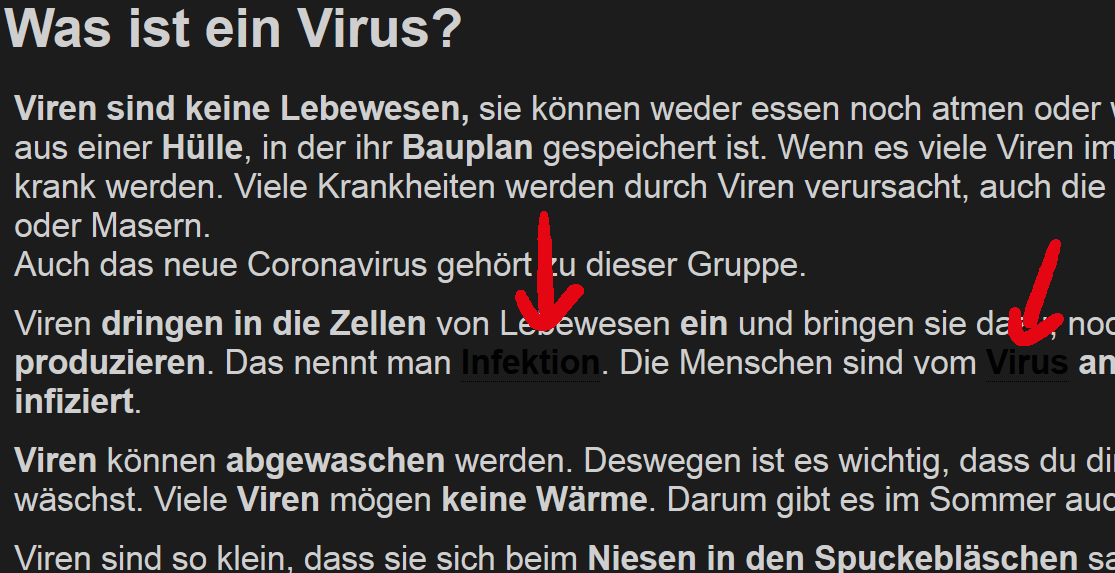
I created a LO with a black background and white fonts. Now I try to use the glossary, but... The colour of words in the glossary will be changed to either a dark blue or black (I'm not able to determe this on my monitor) and therefor not readable against a dark background.
I would like either to change the colour to another colour, or just keep the dots and have no colour change at all.
Unfortunatelly I can't find a way to do so.
Thanks
Stefan
But I have an issue with the glossary.
I created a LO with a black background and white fonts. Now I try to use the glossary, but... The colour of words in the glossary will be changed to either a dark blue or black (I'm not able to determe this on my monitor) and therefor not readable against a dark background.
I would like either to change the colour to another colour, or just keep the dots and have no colour change at all.
Unfortunatelly I can't find a way to do so.
Thanks
Stefan
Connexion ou Créer un compte pour participer à la conversation.
- ronm
-

- Hors Ligne
- Administrateur
-

il y a 6 ans 6 mois #6445
par ronm
Xerte developer & trainer
e-learning & m-learning consultant
mitchellmedia.co.uk | xerteacademy.com | learningapps.co.uk
Note: Support here is voluntary and meant for users to support each other.
Need direct commercial support with Xerte? mitchellmedia.co.uk/contact/
Réponse de ronm sur le sujet Glossary highlighting -> Font colour
Hi
when you say "I created a LO with a black background and white fonts..." do you mean you selected one of the built-in themes with that combination or something else?
What theme?
What template?
What Xerte version?
Can you share a link to an example?
HTH
Ron
when you say "I created a LO with a black background and white fonts..." do you mean you selected one of the built-in themes with that combination or something else?
What theme?
What template?
What Xerte version?
Can you share a link to an example?
HTH
Ron
Xerte developer & trainer
e-learning & m-learning consultant
mitchellmedia.co.uk | xerteacademy.com | learningapps.co.uk
Note: Support here is voluntary and meant for users to support each other.
Need direct commercial support with Xerte? mitchellmedia.co.uk/contact/
Connexion ou Créer un compte pour participer à la conversation.
- GoodWork
-
Auteur du sujet
- Hors Ligne
- Nouveau membre
-
Moins
Plus d'informations
- Messages : 10
- Remerciements reçus 0
il y a 6 ans 6 mois #6446
par GoodWork
Réponse de GoodWork sur le sujet Glossary highlighting -> Font colour
Hi Ron
Yes I did use one of the build in themes (quote: Dark grey background, off-white text, simple buttons).And it is the latest stable Xerte version 3.8.
The template used is the "xerteOnlineTollkit-template".
I did attache a part of a screenshot. The red arrows indicate my problem.
It would for sure be the easiest way to change the scheme, but I work with disabled kids, that's why I used a scheme suitable for those with seeing problems...
As far as I understand it there must be a place somewhere where all the predefined styles are stored and set. But as these are my first steps, I have no clue where that would be.
I appreciate any help!
Grettings
Stefan
Yes I did use one of the build in themes (quote: Dark grey background, off-white text, simple buttons).And it is the latest stable Xerte version 3.8.
The template used is the "xerteOnlineTollkit-template".
I did attache a part of a screenshot. The red arrows indicate my problem.
It would for sure be the easiest way to change the scheme, but I work with disabled kids, that's why I used a scheme suitable for those with seeing problems...
As far as I understand it there must be a place somewhere where all the predefined styles are stored and set. But as these are my first steps, I have no clue where that would be.
I appreciate any help!
Grettings
Stefan
Connexion ou Créer un compte pour participer à la conversation.
- ronm
-
- Hors Ligne
- Administrateur
-
il y a 6 ans 6 mois #6447
par ronm
Xerte developer & trainer
e-learning & m-learning consultant
mitchellmedia.co.uk | xerteacademy.com | learningapps.co.uk
Note: Support here is voluntary and meant for users to support each other.
Need direct commercial support with Xerte? mitchellmedia.co.uk/contact/
Réponse de ronm sur le sujet Glossary highlighting -> Font colour
Hi Stefan
ok that theme should have css to ensure that the glossary link can be seen against the dark grey background but apparently it doesn't. I've just fixed that and committed the change but that won't appear in the downloads until there is a new release. So for now with the learning object icon selected you can add a styles optional property and add the following css:
See attached.
That colour is the same as the text but you could change it to another light colour of you wish.
HTH
Ron
ok that theme should have css to ensure that the glossary link can be seen against the dark grey background but apparently it doesn't. I've just fixed that and committed the change but that won't appear in the downloads until there is a new release. So for now with the learning object icon selected you can add a styles optional property and add the following css:
Code:
a.x_glossary:link, a.x_glossary:visited, a.x_glossary:hover, a.x_glossary:active {
color: #cfcfcf;
}
That colour is the same as the text but you could change it to another light colour of you wish.
HTH
Ron
Xerte developer & trainer
e-learning & m-learning consultant
mitchellmedia.co.uk | xerteacademy.com | learningapps.co.uk
Note: Support here is voluntary and meant for users to support each other.
Need direct commercial support with Xerte? mitchellmedia.co.uk/contact/

Les utilisateur(s) suivant ont remercié: GoodWork
Connexion ou Créer un compte pour participer à la conversation.
- GoodWork
-
Auteur du sujet
- Hors Ligne
- Nouveau membre
-
Moins
Plus d'informations
- Messages : 10
- Remerciements reçus 0
il y a 6 ans 6 mois #6448
par GoodWork
Réponse de GoodWork sur le sujet Glossary highlighting -> Font colour
Hi Ron
Ah, I knew there would be an "easy" way to fix that. What is the saying?
"One will never stop learning in his lifetime!" (At least there's one like that in German).
Thanks a lot!
Stefan
Ah, I knew there would be an "easy" way to fix that.
What is the saying?"One will never stop learning in his lifetime!" (At least there's one like that in German).
Thanks a lot!
Stefan
Connexion ou Créer un compte pour participer à la conversation.
- GoodWork
-
Auteur du sujet
- Hors Ligne
- Nouveau membre
-
Moins
Plus d'informations
- Messages : 10
- Remerciements reçus 0
il y a 6 ans 6 mois - il y a 6 ans 6 mois #6449
par GoodWork
Réponse de GoodWork sur le sujet Glossary highlighting -> Font colour
Hi Ron
Sorry for bothering you again..., but I have the same colour issue with the "Annotated Diagram"-template.
The lines are visible, but they start way after the description, because the descriptions background is not really visible (Attachment "annottated diagram")...
I bet there is a simple solution as well...
I "fixed" it right now by using html tag "style" which really isn't the worst idea... Please see images (annotated diagramm 2-4) attached...
Is there any reference (and where could I possibly find it) where all the style names are written down. Maybe I can fix some css things things on my own then...
Thanks again
Stefan
p.s. How can I get rid of the image (The one I link the hotspots to) border? I other templates there is a "hide Border" checkbox, but this one is missing here...
Sorry for bothering you again..., but I have the same colour issue with the "Annotated Diagram"-template.
The lines are visible, but they start way after the description, because the descriptions background is not really visible (Attachment "annottated diagram")...
I bet there is a simple solution as well...
I "fixed" it right now by using html tag "style" which really isn't the worst idea... Please see images (annotated diagramm 2-4) attached...
Is there any reference (and where could I possibly find it) where all the style names are written down. Maybe I can fix some css things things on my own then...
Thanks again
Stefan
p.s. How can I get rid of the image (The one I link the hotspots to) border? I other templates there is a "hide Border" checkbox, but this one is missing here...




Dernière édition: il y a 6 ans 6 mois par GoodWork.
Connexion ou Créer un compte pour participer à la conversation.
Modérateurs: ingdon
Temps de génération de la page : 0.281 secondes