

- Messages : 29
- Remerciements reçus 0
This is the place for questions about learning design and pedagogy; how to use different page types for different purposes.
remember user selection
- viragom
-
 Auteur du sujet
- Hors Ligne
- Membre junior
-

Moins
Plus d'informations
il y a 7 ans 1 mois #5939
par viragom
remember user selection a été créé par viragom
Hi all ,
I would like to make a LO in which the user can make a selection, i.e. female name / male name, 2 options on a page.
The users selects one
The name is remembered througout the rest of the LO (no backward navigation)
My problem: I can't find a way to let the LO remember the selection; (tried a variable for each, but i don't know which name the user selects, then i have to have all pages double....)
Thnx
I would like to make a LO in which the user can make a selection, i.e. female name / male name, 2 options on a page.
The users selects one
The name is remembered througout the rest of the LO (no backward navigation)
My problem: I can't find a way to let the LO remember the selection; (tried a variable for each, but i don't know which name the user selects, then i have to have all pages double....)
Thnx
Connexion ou Créer un compte pour participer à la conversation.
- Fay
-
- Hors Ligne
- Membre elite
-

Moins
Plus d'informations
- Messages : 236
- Remerciements reçus 96
il y a 7 ans 1 mois #5940
par Fay
Réponse de Fay sur le sujet remember user selection
The next release will contain functionaility that allows users to set the value of variables themselves - so you could have a text field on the first page which will set the value of a variable used on subsequent pages. There's some documentation on this here:
Variables documentation
You can achieve something similar at the moment but you will have to add some script yourself.
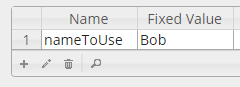
1. Create a variable which will hold the name info (in screenshots attached I've called it 'nameToUse' but it can be anything & I've set default value to be one of the names 'Bob')
2. On your first page create two links (one for each name) which point to the next page in the project (use the Xerte page link button)
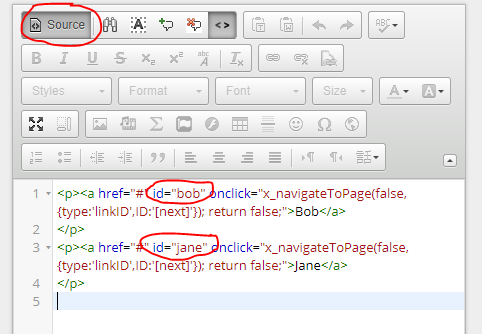
3. View the source of the text field & add an id to the links - I've called them 'bob' & 'jane' (see screenshot)
4. Add the 'script' optional property & paste in this code for each button that you want to make change the default value of the variable. Note that '#jane' needs to match the id you gave the link in step 3:
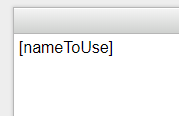
5. Then add the variable to any subsequent pages with the markup [nameToUse] (see screenshot)
I hope this helps
Fay
You can achieve something similar at the moment but you will have to add some script yourself.
1. Create a variable which will hold the name info (in screenshots attached I've called it 'nameToUse' but it can be anything & I've set default value to be one of the names 'Bob')
2. On your first page create two links (one for each name) which point to the next page in the project (use the Xerte page link button)
3. View the source of the text field & add an id to the links - I've called them 'bob' & 'jane' (see screenshot)
4. Add the 'script' optional property & paste in this code for each button that you want to make change the default value of the variable. Note that '#jane' needs to match the id you gave the link in step 3:
Code:
$('#jane').click(function() {
for (var i=0; i<x_variables.length; i++) {
if (x_variables[i].name == 'nameToUse') {
x_variables[i].value = 'Jane';
}
}
})
5. Then add the variable to any subsequent pages with the markup [nameToUse] (see screenshot)
I hope this helps
Fay
Connexion ou Créer un compte pour participer à la conversation.
- viragom
-
Auteur du sujet
- Hors Ligne
- Membre junior
-
Moins
Plus d'informations
- Messages : 29
- Remerciements reçus 0
il y a 7 ans 1 mois #5941
par viragom
Réponse de viragom sur le sujet remember user selection
Thnx Faye
But does this also work if Jane (or Bob) is a variable?
But does this also work if Jane (or Bob) is a variable?
Connexion ou Créer un compte pour participer à la conversation.
- Fay
-
- Hors Ligne
- Membre elite
-
Moins
Plus d'informations
- Messages : 236
- Remerciements reçus 96
il y a 7 ans 1 mois #5942
par Fay
Réponse de Fay sur le sujet remember user selection
With a bit of tweaking. So you could create 3 variables - one for female name, one for male name & one that's used to remember which one they choose on 1st page. Female / male names could for example be randomly choosen from a list.
Then on the page you want the user to make the selection you would have two links with id 'male' 'female' & can have this script:
You really need to understand some javascript if you want to go about doing this (not sure if you do) as you're likely to want to play around with exactly how you set it up yourself.
Then on the page you want the user to make the selection you would have two links with id 'male' 'female' & can have this script:
Code:
var maleName,
femaleName;
for (var i=0; i<x_variables.length; i++) {
if (x_variables[i].name == 'male') {
maleName = x_variables[i].value;
}
if (x_variables[i].name == 'female') {
femaleName = x_variables[i].value;
}
}
$('#female').click(function() {
for (var i=0; i<x_variables.length; i++) {
if (x_variables[i].name == 'nameToUse') {
x_variables[i].value = femaleName;
}
}
})
$('#male').click(function() {
for (var i=0; i<x_variables.length; i++) {
if (x_variables[i].name == 'nameToUse') {
x_variables[i].value = maleName;
}
}
})
You really need to understand some javascript if you want to go about doing this (not sure if you do) as you're likely to want to play around with exactly how you set it up yourself.
Connexion ou Créer un compte pour participer à la conversation.
- viragom
-
Auteur du sujet
- Hors Ligne
- Membre junior
-
Moins
Plus d'informations
- Messages : 29
- Remerciements reçus 0
il y a 7 ans 1 mois #5943
par viragom
Réponse de viragom sur le sujet remember user selection
Thnx Fay
I do understand a little bit of JS...
and because the variable was used on the page already (in the clickable link for male and female), i could also use the GetElementById('male').textContent function in JS
I like your solution, so I'm gonna use that one.
Thnx
I do understand a little bit of JS...
and because the variable was used on the page already (in the clickable link for male and female), i could also use the GetElementById('male').textContent function in JS
I like your solution, so I'm gonna use that one.
Thnx
Connexion ou Créer un compte pour participer à la conversation.
Modérateurs: ingdon
Temps de génération de la page : 0.287 secondes