

- Messages : 179
- Remerciements reçus 0
This is the place for questions about learning design and pedagogy; how to use different page types for different purposes.
Documentation - position of the 'Download' button
- annem
-
 Auteur du sujet
- Hors Ligne
- Membre elite
-

Moins
Plus d'informations
il y a 7 ans 6 mois #5687
par annem
Documentation - position of the 'Download' button a été créé par annem
Hi Xerte Community,
Is there a way of changing the default position of the 'Download' button on the 'Documentation' page type?
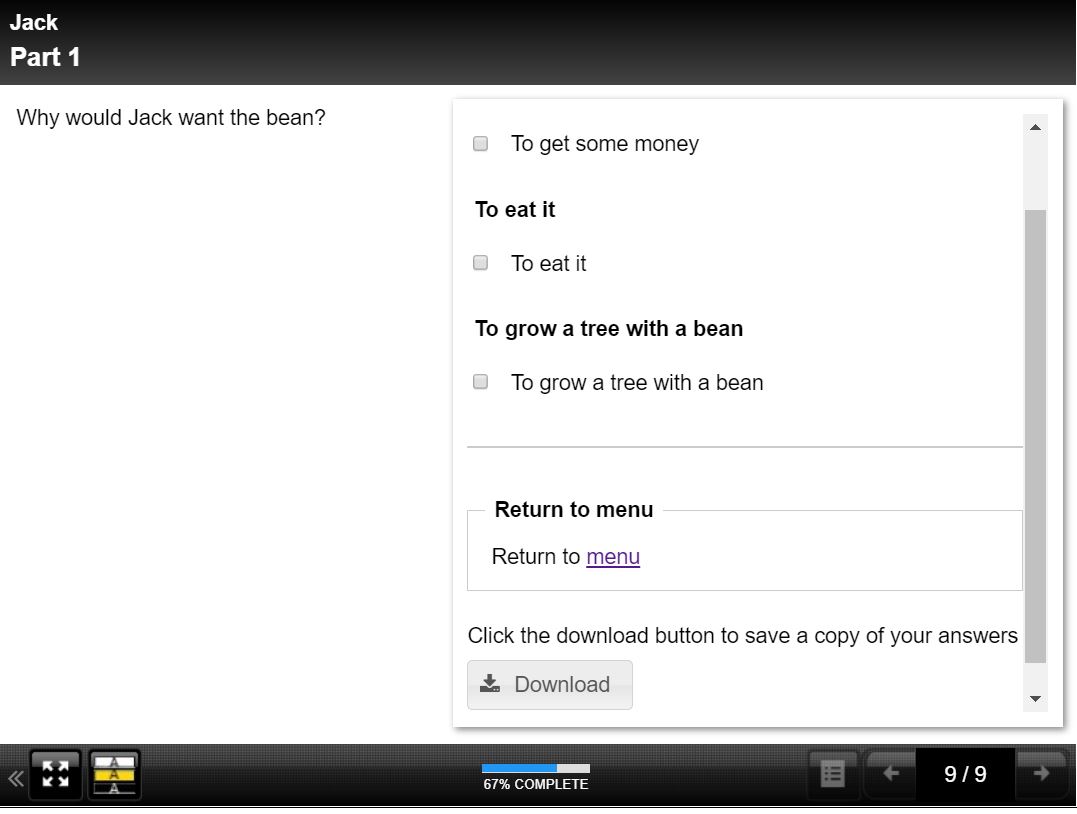
Attached is a screenshot of a simple test Xerte, whereby I am linking back from the Documentation page to a menu, but the link to menu I have added shows above the 'Download' button which displays in the defaulted position.
Thanks in advance for any help.
Anne
Is there a way of changing the default position of the 'Download' button on the 'Documentation' page type?
Attached is a screenshot of a simple test Xerte, whereby I am linking back from the Documentation page to a menu, but the link to menu I have added shows above the 'Download' button which displays in the defaulted position.
Thanks in advance for any help.
Anne
Connexion ou Créer un compte pour participer à la conversation.
- Fay
-
- Hors Ligne
- Membre elite
-
Moins
Plus d'informations
- Messages : 236
- Remerciements reçus 96
il y a 7 ans 6 mois #5688
par Fay
Réponse de Fay sur le sujet Documentation - position of the 'Download' button
Hi Anne
Try adding the script optional property to your page and using this:
This will move the download button section above the block above it which I think is what you want.
I hope this helps
Fay
Try adding the script optional property to your page and using this:
Code:
var $downloadBlock = $('#downloadBtn').parents('.item');
$downloadBlock.prev().before($downloadBlock);
This will move the download button section above the block above it which I think is what you want.
I hope this helps
Fay
Connexion ou Créer un compte pour participer à la conversation.
- annem
-
Auteur du sujet
- Hors Ligne
- Membre elite
-
Moins
Plus d'informations
- Messages : 179
- Remerciements reçus 0
il y a 7 ans 6 mois #5689
par annem
Réponse de annem sur le sujet Documentation - position of the 'Download' button
Hi Fay,
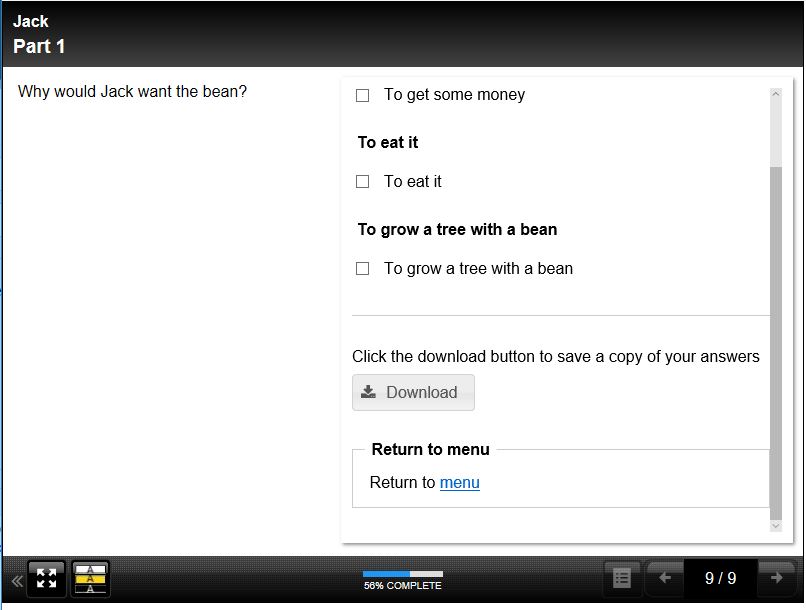
This is perfect, thank you. Attached is the view I was wanting to achieve and using the script code did it for me.
Excellent community support and feedback as usual.
Anne
This is perfect, thank you. Attached is the view I was wanting to achieve and using the script code did it for me.
Excellent community support and feedback as usual.
Anne
Connexion ou Créer un compte pour participer à la conversation.
Modérateurs: ingdon
Temps de génération de la page : 0.222 secondes