

- Messages : 153
- Remerciements reçus 10
Report any technical problems you discover and discuss solutions.
Web Browser Issue with Embedded XOT LOs
- a511197
-
 Auteur du sujet
- Hors Ligne
- Membre premium
-

Moins
Plus d'informations
il y a 9 mois 2 semaines - il y a 9 mois 2 semaines #9684
par a511197
If you can use Lego, you can use Xerte
Web Browser Issue with Embedded XOT LOs a été créé par a511197
Happy New Year everyone!
The Issue
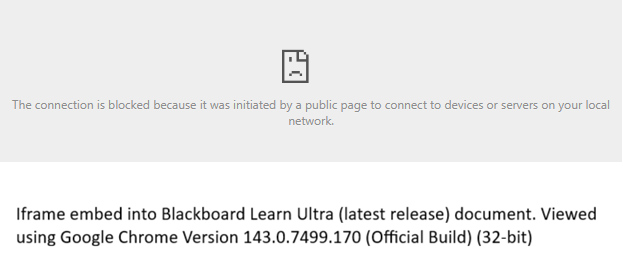
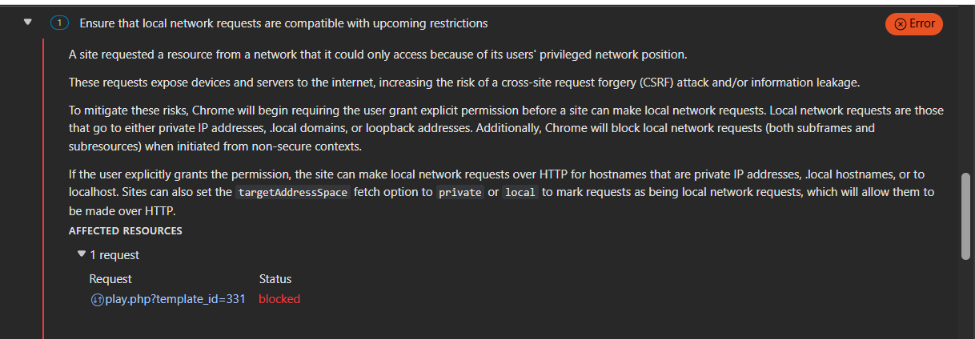
Before the Christmas break, we were looking into an issue with embedded XOT LOs (using the embed code from Project Details panel) not loading in a Blackboard Learn Ultra (latest release) document. The staff member had reported their embedded XOT LOs were working when they set them up in September but in November, they stopped working with the error message: " The connection is blocked because it was initiated by a public page to connect to devices or servers on your local network." Direct links to the XOT url do work as expected. We then took a look at the Chrome - Inspect -Console and that led us to the Local Network Access restrictions which were implemented with Chrome v143 and Edge v143. During testing In Chrome and Ms Edge, the Xerte LOs do not load without being connected to our University VPN. In FireFox the Xerte LOs load with or without VPN.
At the moment, we are thinking this is a browser bug.
So, my questions for the Xerte community:
1. Is anyone else who uses a VLE, preferably Blackboard Learn Ultra, experiencing the same issues?
2. Besides the workaround of just using the direct URL link to the XOT LO, has anyone found a solution?
Useful Links related to this issue
The following link refers to the Local Network Access restrictions and Cross-Origin Resource Sharing (CORS):
support.google.com/chrome/thread/3860570...on-not-working?hl=en
Related link to Local Network Access restrictions (albeit in reference to MS Teams):
github.com/OfficeDev/microsoft-teams-library-js/issues/2919
The Issue
Before the Christmas break, we were looking into an issue with embedded XOT LOs (using the embed code from Project Details panel) not loading in a Blackboard Learn Ultra (latest release) document. The staff member had reported their embedded XOT LOs were working when they set them up in September but in November, they stopped working with the error message: " The connection is blocked because it was initiated by a public page to connect to devices or servers on your local network." Direct links to the XOT url do work as expected. We then took a look at the Chrome - Inspect -Console and that led us to the Local Network Access restrictions which were implemented with Chrome v143 and Edge v143. During testing In Chrome and Ms Edge, the Xerte LOs do not load without being connected to our University VPN. In FireFox the Xerte LOs load with or without VPN.
At the moment, we are thinking this is a browser bug.
So, my questions for the Xerte community:
1. Is anyone else who uses a VLE, preferably Blackboard Learn Ultra, experiencing the same issues?
2. Besides the workaround of just using the direct URL link to the XOT LO, has anyone found a solution?
Useful Links related to this issue
The following link refers to the Local Network Access restrictions and Cross-Origin Resource Sharing (CORS):
support.google.com/chrome/thread/3860570...on-not-working?hl=en
Related link to Local Network Access restrictions (albeit in reference to MS Teams):
github.com/OfficeDev/microsoft-teams-library-js/issues/2919
If you can use Lego, you can use Xerte
Dernière édition: il y a 9 mois 2 semaines par a511197.
Connexion ou Créer un compte pour participer à la conversation.
- tom
-

- Hors Ligne
- Administrateur
-

Moins
Plus d'informations
- Messages : 1365
- Remerciements reçus 344
il y a 9 mois 2 semaines #9685
par tom
Réponse de tom sur le sujet Web Browser Issue with Embedded XOT LOs
Hi Allison,
Happy New Year for you too!
Hmm. Ok, so the error is caused by the fact that the Xerte LO is embedded in blackboard. Blackboard is on a public IP address and apparently Xerte is not (the Xerte URL resolves to a private IP address). This is not a Xerte issue perse, it is a configuration issue of the network.
However, you say that testing shows that the (embedded) Xerte LOs do not load if not connected to the University VPN and that is strange. I would expect it to be exactly the other way around. I woudl expect the embedded Xerte LOs to be working when NOT connected to the VPN as the Xerte URL will resolve to the public IP address of the Xerte installation. When connected to the University VPN you probably use the internal University DNS servers and the Xerte URL might resolve to a priveta IP address, causing the error.
You need to verify the following:
- Am I right that the situation is the other way around and that when connected to the VPN it does not work?
You need to verify the following with IT:
- When connected to the Univerity VPN, will the xerte installation resolve to a private IP address?
- If so, can the xerte installation point to the public IP address even when connected to the VPN (that should solve the issue).
You should have the same issues with internally hosted videos or other internally hosted resources. This is caused by the change in Chrome.
Tom
Happy New Year for you too!
Hmm. Ok, so the error is caused by the fact that the Xerte LO is embedded in blackboard. Blackboard is on a public IP address and apparently Xerte is not (the Xerte URL resolves to a private IP address). This is not a Xerte issue perse, it is a configuration issue of the network.
However, you say that testing shows that the (embedded) Xerte LOs do not load if not connected to the University VPN and that is strange. I would expect it to be exactly the other way around. I woudl expect the embedded Xerte LOs to be working when NOT connected to the VPN as the Xerte URL will resolve to the public IP address of the Xerte installation. When connected to the University VPN you probably use the internal University DNS servers and the Xerte URL might resolve to a priveta IP address, causing the error.
You need to verify the following:
- Am I right that the situation is the other way around and that when connected to the VPN it does not work?
You need to verify the following with IT:
- When connected to the Univerity VPN, will the xerte installation resolve to a private IP address?
- If so, can the xerte installation point to the public IP address even when connected to the VPN (that should solve the issue).
You should have the same issues with internally hosted videos or other internally hosted resources. This is caused by the change in Chrome.
Tom
Connexion ou Créer un compte pour participer à la conversation.
- tom
-
- Hors Ligne
- Administrateur
-
Moins
Plus d'informations
- Messages : 1365
- Remerciements reçus 344
il y a 9 mois 2 semaines #9686
par tom
Réponse de tom sur le sujet Web Browser Issue with Embedded XOT LOs
Hi Again,
What also could have happened is that you did the test while on premise (i.e. on the local university network) and that the University VPN connection causes the Xerte URL to be resolved to its public IP address. Than your explanation is correct, and the solution is similar:
Make sure that if on the University network, the Xerte installation resolves to its external IP address.
Regards,
Tom
What also could have happened is that you did the test while on premise (i.e. on the local university network) and that the University VPN connection causes the Xerte URL to be resolved to its public IP address. Than your explanation is correct, and the solution is similar:
Make sure that if on the University network, the Xerte installation resolves to its external IP address.
Regards,
Tom
Les utilisateur(s) suivant ont remercié: a511197
Connexion ou Créer un compte pour participer à la conversation.
- a511197
-
Auteur du sujet
- Hors Ligne
- Membre premium
-
Moins
Plus d'informations
- Messages : 153
- Remerciements reçus 10
il y a 9 mois 2 semaines #9687
par a511197
If you can use Lego, you can use Xerte
Réponse de a511197 sur le sujet Web Browser Issue with Embedded XOT LOs
Hi Tom,
Thank you for your response.
"Am I right that the situation is the other way around and that when connected to the VPN it does not work?"
When connected to the University VPN, the embedded XOT LOs do work. It's when I'm not connected to VPN that it doesn't work.
I was off campus during testing.
Thank you for your response.
"Am I right that the situation is the other way around and that when connected to the VPN it does not work?"
When connected to the University VPN, the embedded XOT LOs do work. It's when I'm not connected to VPN that it doesn't work.
I was off campus during testing.
If you can use Lego, you can use Xerte
Connexion ou Créer un compte pour participer à la conversation.
- tom
-
- Hors Ligne
- Administrateur
-
Moins
Plus d'informations
- Messages : 1365
- Remerciements reçus 344
il y a 9 mois 2 semaines #9688
par tom
Réponse de tom sur le sujet Web Browser Issue with Embedded XOT LOs
As a temporary fix the follwoing header might also be configured on the web server of xerte installation:
Access-Control-Allow-Private-Network: true
Access-Control-Allow-Private-Network: true
Les utilisateur(s) suivant ont remercié: a511197
Connexion ou Créer un compte pour participer à la conversation.
- tom
-
- Hors Ligne
- Administrateur
-
Moins
Plus d'informations
- Messages : 1365
- Remerciements reçus 344
il y a 9 mois 2 semaines #9689
par tom
Réponse de tom sur le sujet Web Browser Issue with Embedded XOT LOs
Also, if you would like me to investigate further, I would need some extra information (by private email).
Start a command prompt on your PC and enter he following commands:
nslookup <hostname of blackboard installation>
nslookup <hostname of xerte installation>
Now connect to VPN and repeat the two commands and send me all the output.
If the url of blackboard is something like lms.university.ed.uk/course?id=1 , then the hostname is lms.university.ed.ukj (verything after https:// and before the first /). Similer for the hostname of the xerte installation.
Tom
Start a command prompt on your PC and enter he following commands:
nslookup <hostname of blackboard installation>
nslookup <hostname of xerte installation>
Now connect to VPN and repeat the two commands and send me all the output.
If the url of blackboard is something like lms.university.ed.uk/course?id=1 , then the hostname is lms.university.ed.ukj (verything after https:// and before the first /). Similer for the hostname of the xerte installation.
Tom
Connexion ou Créer un compte pour participer à la conversation.
Modérateurs: ronm, julten, JohnSmith
Temps de génération de la page : 0.263 secondes