

- Messages : 8
- Remerciements reçus 0
Report any technical problems you discover and discuss solutions.
Problems with language options
- Roberto_Parras
-
 Auteur du sujet
- Hors Ligne
- Nouveau membre
-

Moins
Plus d'informations
il y a 10 mois 1 semaine - il y a 10 mois 1 semaine #9675
par Roberto_Parras
Problems with language options a été créé par Roberto_Parras
Hi all!
This is the first time I have contacted you. I am a Spanish vocational training teacher and some time ago I discovered Xerte. I ran some tests with my LMS, which was giving me problems with another authoring tool, and the results were excellent, so I have started to prepare my first project with a local installation of Xerte 3.14_(git_v3.14.4-9-gda5b5b31f) with xampp on Windows 11. My intention is to export it as SCORM 1.2 and offer it to my students through our LMS service.
I have had problems installing the language pack 3.14_xot_nottingham_es-ES. I cannot do it through the management page. I am not getting any response. I have seen that some of you have also had problems with the Dutch package. I have been able to move forward by unzipping the package and placing the files in the different folders. It is not the best solution, but it works for me so far.
My next problem is when I want to use some of the page templates. I see in the wiki that there are language options at the top level of these pages, but they only appear in my installation in some cases. It would be essential for me on the Interactivity > Quiz page, but the option to translate the messages does not appear. Could this be a consequence of my problems installing the Spanish language pack?
My attempts to translate directly the texts in the files where I found the original messages have been unsuccessful. I would greatly appreciate any help in making it possible to put the texts in Spanish in any type of page, or at least on the quiz page, using the general option that should be available, but which I do not have.
Best regards.
This is the first time I have contacted you. I am a Spanish vocational training teacher and some time ago I discovered Xerte. I ran some tests with my LMS, which was giving me problems with another authoring tool, and the results were excellent, so I have started to prepare my first project with a local installation of Xerte 3.14_(git_v3.14.4-9-gda5b5b31f) with xampp on Windows 11. My intention is to export it as SCORM 1.2 and offer it to my students through our LMS service.
I have had problems installing the language pack 3.14_xot_nottingham_es-ES. I cannot do it through the management page. I am not getting any response. I have seen that some of you have also had problems with the Dutch package. I have been able to move forward by unzipping the package and placing the files in the different folders. It is not the best solution, but it works for me so far.
My next problem is when I want to use some of the page templates. I see in the wiki that there are language options at the top level of these pages, but they only appear in my installation in some cases. It would be essential for me on the Interactivity > Quiz page, but the option to translate the messages does not appear. Could this be a consequence of my problems installing the Spanish language pack?
My attempts to translate directly the texts in the files where I found the original messages have been unsuccessful. I would greatly appreciate any help in making it possible to put the texts in Spanish in any type of page, or at least on the quiz page, using the general option that should be available, but which I do not have.
Best regards.
Dernière édition: il y a 10 mois 1 semaine par Roberto_Parras.
Connexion ou Créer un compte pour participer à la conversation.
- tom
-

- Hors Ligne
- Administrateur
-

Moins
Plus d'informations
- Messages : 1365
- Remerciements reçus 344
il y a 10 mois 6 jours #9678
par tom
Réponse de tom sur le sujet Problems with language options
I am not sure that I understand what you mean with 'I see in the wiki that there are language options at the top level of these pages'. However, maybe this helps:
The language options are turned off by default. You need to toggle the checkbox at the bottom of the editor to enable them.
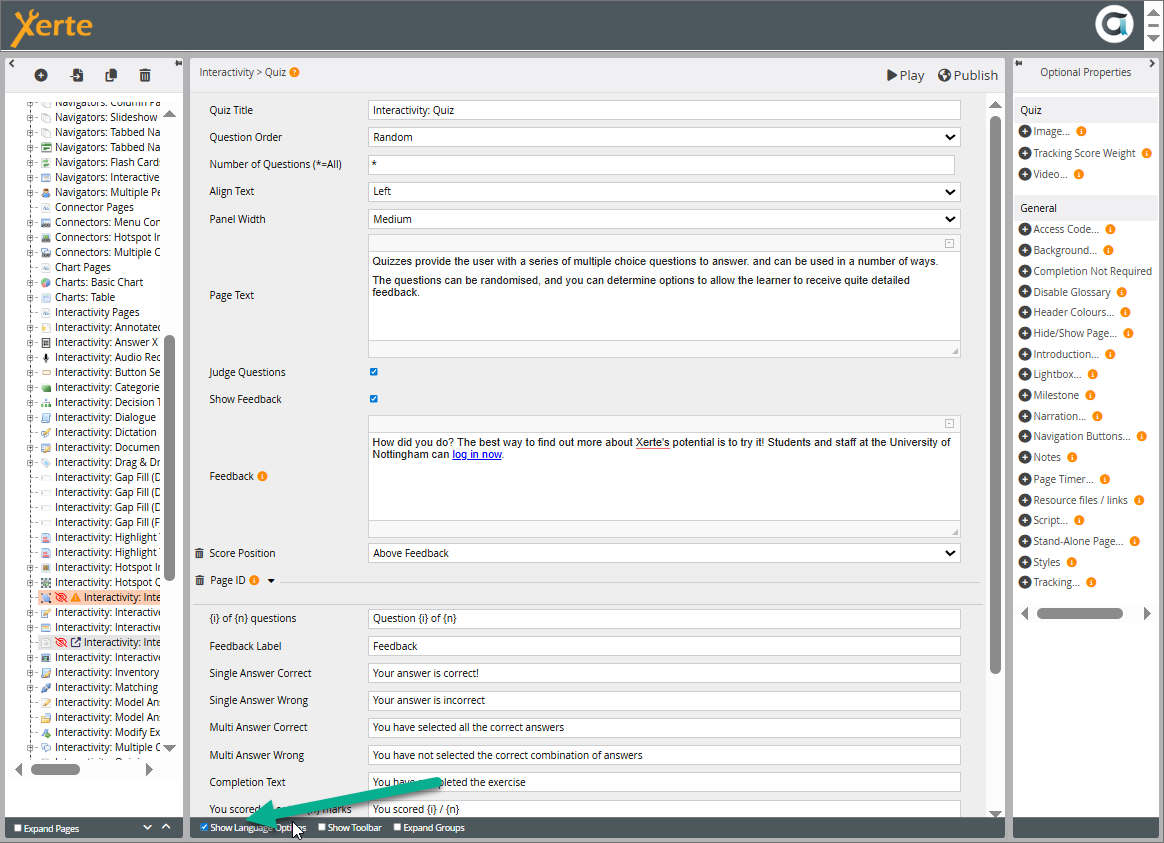
I hope this helps.
As for installing th elanguage pack, did you enable th php zip extension in XAMPP?
The language options are turned off by default. You need to toggle the checkbox at the bottom of the editor to enable them.
I hope this helps.
As for installing th elanguage pack, did you enable th php zip extension in XAMPP?
Connexion ou Créer un compte pour participer à la conversation.
- Roberto_Parras
-
Auteur du sujet
- Hors Ligne
- Nouveau membre
-
Moins
Plus d'informations
- Messages : 8
- Remerciements reçus 0
il y a 10 mois 6 jours #9679
par Roberto_Parras
Réponse de Roberto_Parras sur le sujet Problems with language options
Thank you very much. I'm afraid I've paid the price for being a novice! I searched so much through the menu on the right that I didn't see the box at the bottom.
I'm still exploring the possibilities of Xerte. Congratulations on the initiative. I'm finding it fascinating.
I'm still exploring the possibilities of Xerte. Congratulations on the initiative. I'm finding it fascinating.
Connexion ou Créer un compte pour participer à la conversation.
- SarahD03
-
- Hors Ligne
- Nouveau membre
-
Moins
Plus d'informations
- Messages : 6
- Remerciements reçus 1
il y a 10 mois 2 jours #9682
par SarahD03
Réponse de SarahD03 sur le sujet Problems with language options
I've seen this happen before - sometimes Xerte 'sticks' to the default language because of the browser cache. Have you tried opening it in an Incognito/Private window or clearing your cache after making the change in the Management console? If it works there, you'll know the setting actually saved and it's just a display lag.
Les utilisateur(s) suivant ont remercié: Roberto_Parras
Connexion ou Créer un compte pour participer à la conversation.
- Roberto_Parras
-
Auteur du sujet
- Hors Ligne
- Nouveau membre
-
Moins
Plus d'informations
- Messages : 8
- Remerciements reçus 0
il y a 7 mois 1 semaine #9720
par Roberto_Parras
Réponse de Roberto_Parras sur le sujet Problems with language options
Hello again with my language options issues.
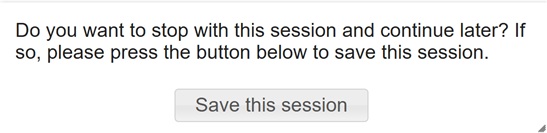
This time, I cannot find an option to easily change the messages that appear when I click the Save Session button once my project is active in my LMS.
In the optional properties / tracking, I can translate the Save Session button, but not the messages in the window that appears when you click the Save button (see attachment).
The only way I have found is to unzip my Scorm, edit the files in the models_html5 folder (saveSession.html and resumeSession.html) to translate the texts, and then recreate the Scorm zip file.
Can anyone help me and tell me if there are any ‘language options’ where I can do this translation?
Thank you
This time, I cannot find an option to easily change the messages that appear when I click the Save Session button once my project is active in my LMS.
In the optional properties / tracking, I can translate the Save Session button, but not the messages in the window that appears when you click the Save button (see attachment).
The only way I have found is to unzip my Scorm, edit the files in the models_html5 folder (saveSession.html and resumeSession.html) to translate the texts, and then recreate the Scorm zip file.
Can anyone help me and tell me if there are any ‘language options’ where I can do this translation?
Thank you
Connexion ou Créer un compte pour participer à la conversation.
- tom
-
- Hors Ligne
- Administrateur
-
Moins
Plus d'informations
- Messages : 1365
- Remerciements reçus 344
il y a 7 mois 1 semaine #9722
par tom
Réponse de tom sur le sujet Problems with language options
Well yes, not all things can be translated this way. This is one of them It really depends on the correct language pack. In this case the file language/engine_es-ES.xml is not complete. You can look at the items in language/engin_en-GB.xml what items are missing and insert the translation there. If you are going to do this, please send the changed engine-es-ES to me and I will make sure that it becomes part of the Xerte package. You should do the same with wizard_es-ES.xml.
Furthermore, we have a translation tool for the rest of the Xerte system. If you are interested we can give you access to that tool. All translations done there automatically end up in the language packs. Note, that this tool does not handle the two files above. That needs to be done by hand
Furthermore, we have a translation tool for the rest of the Xerte system. If you are interested we can give you access to that tool. All translations done there automatically end up in the language packs. Note, that this tool does not handle the two files above. That needs to be done by hand
Connexion ou Créer un compte pour participer à la conversation.
Modérateurs: ronm, julten, JohnSmith
Temps de génération de la page : 0.159 secondes