

- Messages : 17
- Remerciements reçus 0
Report any technical problems you discover and discuss solutions.
Glossary - backgroundcolor Info bubble
- Martens
-
 Auteur du sujet
- Hors Ligne
- Nouveau membre
-

Moins
Plus d'informations
il y a 11 mois 3 semaines #9627
par Martens
Glossary - backgroundcolor Info bubble a été créé par Martens
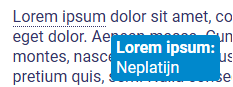
If you create a glossary, you can display the meaning of a word in a info bubble when hovering over it.
How can I change the background color of the bubble? What is the CSS code for this?
How can I change the background color of the bubble? What is the CSS code for this?
Connexion ou Créer un compte pour participer à la conversation.
- tom
-

- Hors Ligne
- Administrateur
-

Moins
Plus d'informations
- Messages : 1365
- Remerciements reçus 344
il y a 11 mois 3 semaines #9628
par tom
Réponse de tom sur le sujet Glossary - backgroundcolor Info bubble
The hover itself has id x_glossaryHover but the colors are set on the class x_tooltip by default. So this should do the trick:
.x_tooltip {
border: 1px solid #937184;
background-color: #937184;
}
.x_tooltip {
border: 1px solid #937184;
background-color: #937184;
}
Connexion ou Créer un compte pour participer à la conversation.
- Martens
-
Auteur du sujet
- Hors Ligne
- Nouveau membre
-
Moins
Plus d'informations
- Messages : 17
- Remerciements reçus 0
il y a 11 mois 2 semaines #9633
par Martens
Réponse de Martens sur le sujet Glossary - backgroundcolor Info bubble
It is not working. I've tried adding !important, but it still doesn't work.
.x_tooltip {
border: 1px solid #937184 !important;
background-color: #937184 !important;
}
.x_tooltip {
border: 1px solid #937184 !important;
background-color: #937184 !important;
}
Connexion ou Créer un compte pour participer à la conversation.
- tom
-
- Hors Ligne
- Administrateur
-
Moins
Plus d'informations
- Messages : 1365
- Remerciements reçus 344
il y a 11 mois 2 semaines #9635
par tom
Réponse de tom sur le sujet Glossary - backgroundcolor Info bubble
A question that I should have started wit, is this in the Nottingham/xot template or the bootstrap? The example should work for Nottingham/xot.
Connexion ou Créer un compte pour participer à la conversation.
- Martens
-
Auteur du sujet
- Hors Ligne
- Nouveau membre
-
Moins
Plus d'informations
- Messages : 17
- Remerciements reçus 0
il y a 11 mois 2 semaines #9636
par Martens
Réponse de Martens sur le sujet Glossary - backgroundcolor Info bubble
Bootstrap 
Connexion ou Créer un compte pour participer à la conversation.
- tom
-
- Hors Ligne
- Administrateur
-
Moins
Plus d'informations
- Messages : 1365
- Remerciements reçus 344
il y a 11 mois 2 semaines #9638
par tom
Réponse de tom sur le sujet Glossary - backgroundcolor Info bubble
Ok then
You can use
.glossaryTip {
border: 1px solid #937184;
background-color: #937184;
}
You can use
.glossaryTip {
border: 1px solid #937184;
background-color: #937184;
}
Les utilisateur(s) suivant ont remercié: Martens
Connexion ou Créer un compte pour participer à la conversation.
Modérateurs: ronm, julten, JohnSmith
Temps de génération de la page : 0.156 secondes