

- Messages : 17
- Remerciements reçus 0
Report any technical problems you discover and discuss solutions.
How do I make sure that some glossery words do NOT have a hover?
- Martens
-
 Auteur du sujet
- Hors Ligne
- Nouveau membre
-

Moins
Plus d'informations
il y a 5 ans 6 mois #7348
par Martens
 In other parts of the text the word must have a hover action to the glossery, but not in this specific heading. How do I change that?
How do I make sure that some glossery words do NOT have a hover? a été créé par Martens
Connexion ou Créer un compte pour participer à la conversation.
- simonbarne
-

- Hors Ligne
- Membre junior
-

Moins
Plus d'informations
- Messages : 36
- Remerciements reçus 5
il y a 5 ans 5 mois - il y a 5 ans 5 mois #7361
par simonbarne
Réponse de simonbarne sur le sujet How do I make sure that some glossery words do NOT have a hover?
I've found a way but it's pretty hacky. Edit the source of your text:
Then add a style to the page:
Seems to work!
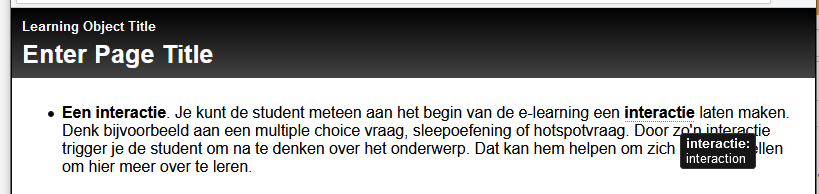
Or - a bit easier - insert a character to break up the word, then hide the character:
Code:
<ul>
<li><strong><span class="nogloss1">Een</span></strong>. Je kunt de student meteen aan het begin van de e-learning een interactie laten maken...</li>
</ul>
Code:
.nogloss1:after { content: " interactie"}
Or - a bit easier - insert a character to break up the word, then hide the character:
Code:
<strong>Een inter<span style="display:none">~</span>actie</strong>. Je kunt...
Dernière édition: il y a 5 ans 5 mois par simonbarne. Raison: Another thought
Les utilisateur(s) suivant ont remercié: Martens
Connexion ou Créer un compte pour participer à la conversation.
Modérateurs: ronm, julten, JohnSmith
Temps de génération de la page : 0.130 secondes