

- Messages : 4
- Remerciements reçus 0
Report any technical problems you discover and discuss solutions.
Dragging issues with Gap Fill slide type
- Wullie
-
 Auteur du sujet
- Hors Ligne
- Nouveau membre
-

Moins
Plus d'informations
il y a 7 ans 2 semaines #5973
par Wullie
Dragging issues with Gap Fill slide type a été créé par Wullie
Hi,
One of our content creators has made a Gap fill slide, with 7 gaps and numerous distractors (probably too many, but that won't resolve the issue).
The text covers the fullness of the screen (on normal sized view) and the answers need to be scrolled to.
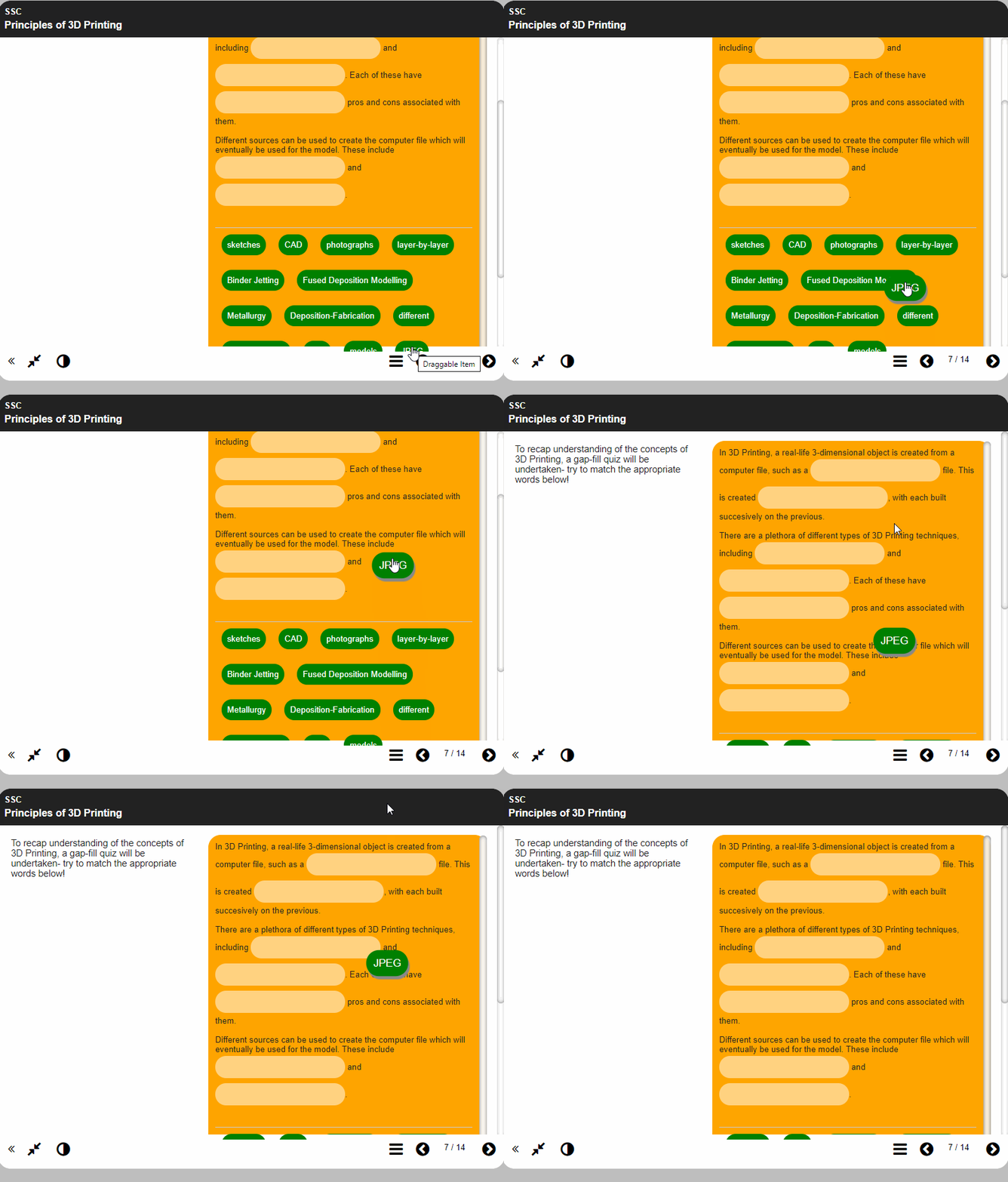
When you scroll to the correct answer for the first gap, which usually appears at or near the bottom, and have to scroll with the mousewheel back up to the top, the dragged answer never reaches anywhere near the first gap (as per the attached gif).
Is this a known issue and is there anything that can be done to resolve this issue?
One of our content creators has made a Gap fill slide, with 7 gaps and numerous distractors (probably too many, but that won't resolve the issue).
The text covers the fullness of the screen (on normal sized view) and the answers need to be scrolled to.
When you scroll to the correct answer for the first gap, which usually appears at or near the bottom, and have to scroll with the mousewheel back up to the top, the dragged answer never reaches anywhere near the first gap (as per the attached gif).
Is this a known issue and is there anything that can be done to resolve this issue?
Connexion ou Créer un compte pour participer à la conversation.
- xlearn
-

- Hors Ligne
- Membre junior
-

Moins
Plus d'informations
- Messages : 31
- Remerciements reçus 4
il y a 7 ans 1 semaine - il y a 7 ans 1 semaine #5974
par xlearn
Réponse de xlearn sur le sujet Dragging issues with Gap Fill slide type
Hi there
Would it change things very much for you if you changed the interaction to a drop-down list instead? This makes it more accessible in many ways. It's easier to use on mobile, and works better for any screen readers.
You can use a drop down to change it from 'drag and drop' to 'drop down menu', which makes it easy to just try this out.
Making the Panel Width large may also reduce the scrolling needed.
Regards
Lilian
Would it change things very much for you if you changed the interaction to a drop-down list instead? This makes it more accessible in many ways. It's easier to use on mobile, and works better for any screen readers.
You can use a drop down to change it from 'drag and drop' to 'drop down menu', which makes it easy to just try this out.
Making the Panel Width large may also reduce the scrolling needed.
Regards
Lilian
Dernière édition: il y a 7 ans 1 semaine par xlearn.
Connexion ou Créer un compte pour participer à la conversation.
- ronm
-

- Hors Ligne
- Administrateur
-

il y a 7 ans 1 semaine - il y a 7 ans 1 semaine #5977
par ronm
Xerte developer & trainer
e-learning & m-learning consultant
mitchellmedia.co.uk | xerteacademy.com | learningapps.co.uk
Note: Support here is voluntary and meant for users to support each other.
Need direct commercial support with Xerte? mitchellmedia.co.uk/contact/
Réponse de ronm sur le sujet Dragging issues with Gap Fill slide type
Hi
as Lilian has suggested the first thing I would do is set the panel width property to large so that it's wider but still enough room for your current instructions. Although on a smartphone sized device the panel will fill the width regardless of this setting.
You could then try the following:
1. add an optional script property to the page and add the following script:
The above should move the labels above the text and targets.
2. Add an optional styles property to the page and use some css to reduce the margins and padding e.g.
Note: the sizes I've used there seems to work ok with the RGBO theme which it looks like you are using but may need to be varied for other themes.
Let us know if that works?
HTH
Ron
as Lilian has suggested the first thing I would do is set the panel width property to large so that it's wider but still enough room for your current instructions. Although on a smartphone sized device the panel will fill the width regardless of this setting.
You could then try the following:
1. add an optional script property to the page and add the following script:
Code:
//move the labels above the targets
$("#labelHolder").insertBefore("#targetHolder");
2. Add an optional styles property to the page and use some css to reduce the margins and padding e.g.
Code:
.x_gapFill_page #labelHolder .label {
padding: 5px;
margin: 5px;
}
.x_gapFill_page #targetHolder .highlight {
padding: 5px;
margin: 2px;
}
.x_gapFill_page #targetHolder .target {
padding: 2px !important;
height: 26px !important;
}
Let us know if that works?
HTH
Ron
Xerte developer & trainer
e-learning & m-learning consultant
mitchellmedia.co.uk | xerteacademy.com | learningapps.co.uk
Note: Support here is voluntary and meant for users to support each other.
Need direct commercial support with Xerte? mitchellmedia.co.uk/contact/
Dernière édition: il y a 7 ans 1 semaine par ronm.
Connexion ou Créer un compte pour participer à la conversation.
Modérateurs: ronm, julten, JohnSmith
Temps de génération de la page : 0.140 secondes