

- Messages : 179
- Remerciements reçus 0
Report any technical problems you discover and discuss solutions.
Xerte users not seeing projects
- annem
-
 Auteur du sujet
- Hors Ligne
- Membre elite
-

Moins
Plus d'informations
il y a 7 ans 7 mois #5666
par annem
Xerte users not seeing projects a été créé par annem
Hi Xerte Developers and fellow Xerte users,
Have you encountered or know of users encountering a problem not seeing their Xerte projects after they have logged in to their account?
A colleague reported she could not see her projects back on 1 February 2019 using FireFox browser. I told her to cache and refresh and I also asked the user to try using different browsers. She could see her projects in different browsers (Chrome and Edge) and so I advised her to use those browsers.
Today I have another Xerte user reporting to me that she cannot see any Xerte projects in her account. I have asked if she is using FireFox browser, and I'll get a reply shortly.
My question is, do you know of any FireFox browser updates or changes which could be affecting us when logging in to our Xerte accounts using FireFox? Has anyone else experienced the issue that no Xerte projects display?
I'm curious as to why this is happening.
Hopefully someone can help and I thank you in advance for any information.
Anne
Have you encountered or know of users encountering a problem not seeing their Xerte projects after they have logged in to their account?
A colleague reported she could not see her projects back on 1 February 2019 using FireFox browser. I told her to cache and refresh and I also asked the user to try using different browsers. She could see her projects in different browsers (Chrome and Edge) and so I advised her to use those browsers.
Today I have another Xerte user reporting to me that she cannot see any Xerte projects in her account. I have asked if she is using FireFox browser, and I'll get a reply shortly.
My question is, do you know of any FireFox browser updates or changes which could be affecting us when logging in to our Xerte accounts using FireFox? Has anyone else experienced the issue that no Xerte projects display?
I'm curious as to why this is happening.
Hopefully someone can help and I thank you in advance for any information.
Anne
Connexion ou Créer un compte pour participer à la conversation.
- Fay
-
- Hors Ligne
- Membre elite
-
Moins
Plus d'informations
- Messages : 236
- Remerciements reçus 96
il y a 7 ans 7 mois #5668
par Fay
Réponse de Fay sur le sujet Xerte users not seeing projects
I haven't come across this issue before. What version of Xerte are you running? Can you see your projects when using Firefox?
Connexion ou Créer un compte pour participer à la conversation.
- annem
-
Auteur du sujet
- Hors Ligne
- Membre elite
-
Moins
Plus d'informations
- Messages : 179
- Remerciements reçus 0
il y a 7 ans 7 mois #5671
par annem
Réponse de annem sur le sujet Xerte users not seeing projects
Hi Fay and all Xerte users,
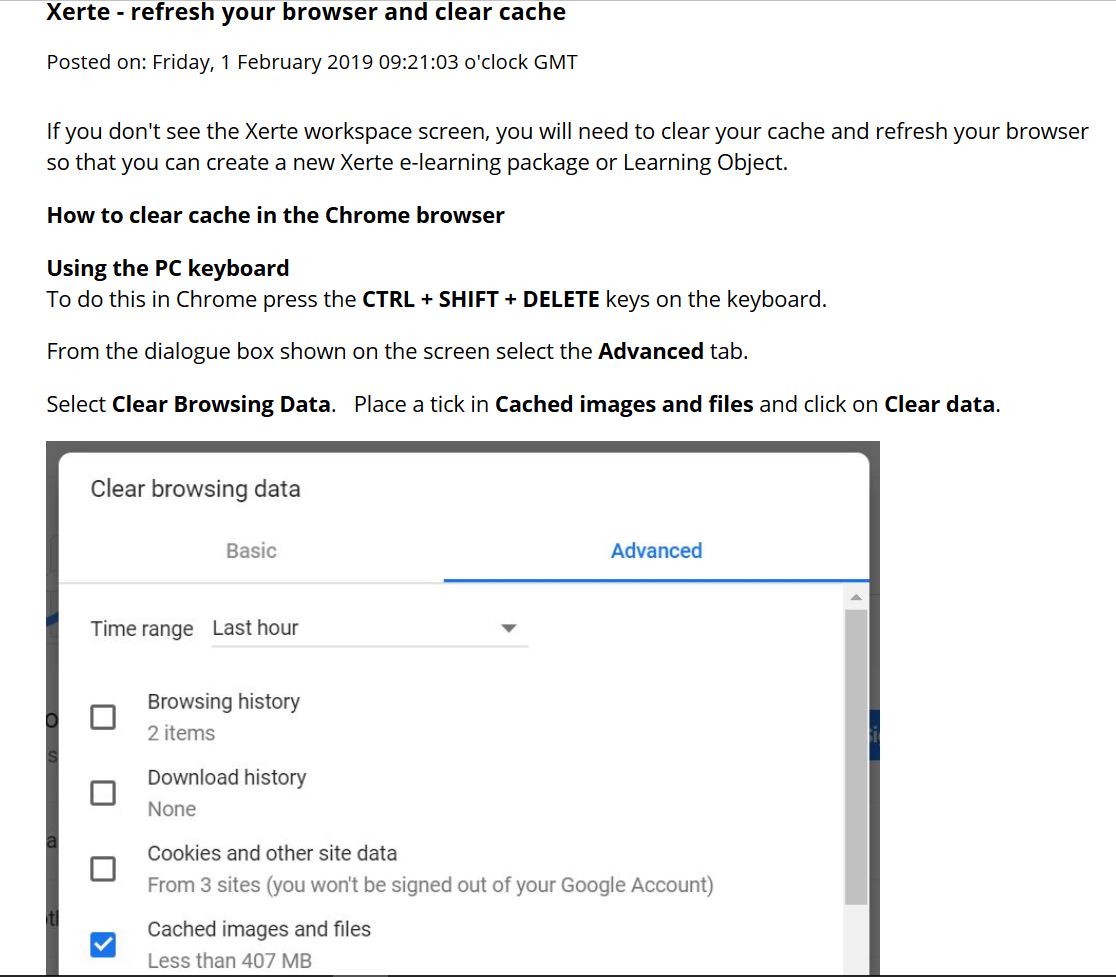
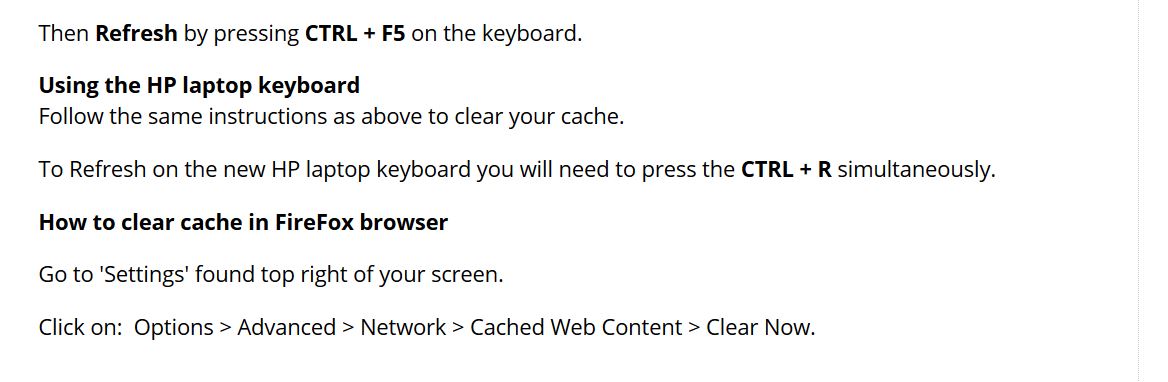
The first support log call was a user accessing Xerte using FireFox and Xerte didn't load fully (even after clearing cache and refresh, steps attached). In this instance I told user to use Chrome or Edge.
The second support call log was a user accessing Xerte using Chrome and Xerte didn't load properly (attached screenshot). In this instance I told user to use FireFox or Edge, and I received an email that Edge is working.
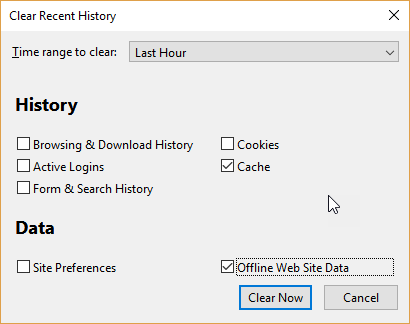
Ron kindly replied giving me steps to clear cache and I will provide these different instructions (attached) to the user to try (hopefully I be able to sit with the user or screenshare) "Firefox open and in focus press Ctrl + Shift + Delete and the most important thing to clear is the Offline Web Site Data". "If it doesn’t press F12 and report what errors are shown in the console tab after a refresh F5".
So the support calls were the same issue, but using different browsers, FireFox in the first instance and Chrome in the second instance.
If other users are experiencing this issue (Xerte not fully loading), perhaps you can also share with us.
Many thanks
Anne
The first support log call was a user accessing Xerte using FireFox and Xerte didn't load fully (even after clearing cache and refresh, steps attached). In this instance I told user to use Chrome or Edge.
The second support call log was a user accessing Xerte using Chrome and Xerte didn't load properly (attached screenshot). In this instance I told user to use FireFox or Edge, and I received an email that Edge is working.
Ron kindly replied giving me steps to clear cache and I will provide these different instructions (attached) to the user to try (hopefully I be able to sit with the user or screenshare) "Firefox open and in focus press Ctrl + Shift + Delete and the most important thing to clear is the Offline Web Site Data". "If it doesn’t press F12 and report what errors are shown in the console tab after a refresh F5".
So the support calls were the same issue, but using different browsers, FireFox in the first instance and Chrome in the second instance.
If other users are experiencing this issue (Xerte not fully loading), perhaps you can also share with us.
Many thanks
Anne

Connexion ou Créer un compte pour participer à la conversation.
Modérateurs: ronm, julten, JohnSmith
Temps de génération de la page : 0.148 secondes