

- Posts: 5
- Thank you received: 1
General questions and topics about Xerte Toolkits that don’t fit anywhere else.
CSS question
- dax045
-
 Topic Author
- Offline
- New Member
-

Less
More
4 years 4 months ago #8136
by dax045
CSS question was created by dax045
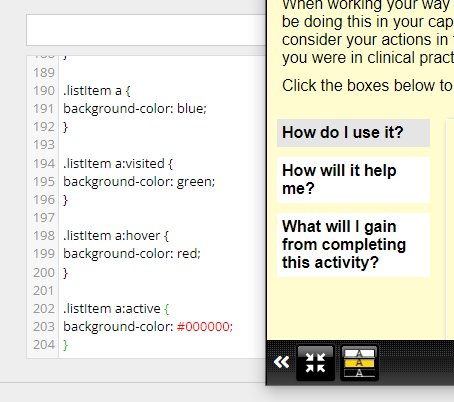
Hello - I am really sorry to ask this, as this is probably a basic question. However, I am having difficulty with changing the background colour on the list style on the "Navigators > Interactive List" page. I have put in what I think it should be, (see attached screenshot), having used at the Web Developer Tools in Firefox and nothing appears to be working. I have also tried other variations, and still no joy  .
.
I am sure this is probably a really straightforward answer, but it is eluding me, which is really frustrating. I would be really grateful, if someone would be able to put me straight.
Many thanks in advance. K/regs. Rachel O'Callaghan
.I am sure this is probably a really straightforward answer, but it is eluding me, which is really frustrating. I would be really grateful, if someone would be able to put me straight.
Many thanks in advance. K/regs. Rachel O'Callaghan
Please Log in or Create an account to join the conversation.
- ronm
-

- Offline
- Administrator
-

4 years 4 months ago - 4 years 4 months ago #8137
by ronm
Xerte developer & trainer
e-learning & m-learning consultant
mitchellmedia.co.uk | xerteacademy.com | learningapps.co.uk
Note: Support here is voluntary and meant for users to support each other.
Need direct commercial support with Xerte? mitchellmedia.co.uk/contact/
Replied by ronm on topic CSS question
Hi
to change this via a styles optional property rather than a theme you probably need to use !important. e.g. try the following and you can use this at the LO styles level rather than the individual list page but it will only change list page because of the .x_list_page
.x_list_page a.listItem {
background: red !important;
color:white !important;
}
.x_list_page a.listItem.highlight {
color: blue !important;
background: orange !important;
}
.x_list_page a.listItem:hover {
background: yellow !important;
color: green !important;
}
HTH
Ron
to change this via a styles optional property rather than a theme you probably need to use !important. e.g. try the following and you can use this at the LO styles level rather than the individual list page but it will only change list page because of the .x_list_page
.x_list_page a.listItem {
background: red !important;
color:white !important;
}
.x_list_page a.listItem.highlight {
color: blue !important;
background: orange !important;
}
.x_list_page a.listItem:hover {
background: yellow !important;
color: green !important;
}
HTH
Ron
Xerte developer & trainer
e-learning & m-learning consultant
mitchellmedia.co.uk | xerteacademy.com | learningapps.co.uk
Note: Support here is voluntary and meant for users to support each other.
Need direct commercial support with Xerte? mitchellmedia.co.uk/contact/
Last edit: 4 years 4 months ago by ronm.
Please Log in or Create an account to join the conversation.
- ronm
-
- Offline
- Administrator
-
4 years 4 months ago #8138
by ronm
Xerte developer & trainer
e-learning & m-learning consultant
mitchellmedia.co.uk | xerteacademy.com | learningapps.co.uk
Note: Support here is voluntary and meant for users to support each other.
Need direct commercial support with Xerte? mitchellmedia.co.uk/contact/
Replied by ronm on topic CSS question
Sorry I meant to add that any css you apply in this way will prevent the built-in accessibility themes from working e.g. apply your styles and then when viewing the page use the accessibility controls to switch to Invert, High Contrast or Black on Yellow, - you'll see those options can't then change your custom changes. The only way to do this properly is to create a separate theme that is then added to the install.
HTH
Ron
HTH
Ron
Xerte developer & trainer
e-learning & m-learning consultant
mitchellmedia.co.uk | xerteacademy.com | learningapps.co.uk
Note: Support here is voluntary and meant for users to support each other.
Need direct commercial support with Xerte? mitchellmedia.co.uk/contact/
The following user(s) said Thank You: dax045
Please Log in or Create an account to join the conversation.
- dax045
-
Topic Author
- Offline
- New Member
-
Less
More
- Posts: 5
- Thank you received: 1
4 years 4 months ago #8139
by dax045
Replied by dax045 on topic CSS question
Many thanks Ron for your help and additional advice, that really useful. K/regs. Rachel.
Please Log in or Create an account to join the conversation.
Moderators: ingdon
Time to create page: 0.156 seconds