

- Posts: 99
- Thank you received: 0
General questions and topics about Xerte Toolkits that don’t fit anywhere else.
Chart table csv
- rloenen
-
 Topic Author
- Offline
- Premium Member
-

Less
More
8 years 2 months ago #5239
by rloenen
Chart table csv was created by rloenen
It works fine, but I have two questions.
1. How to use csv exactly (see attachment)
2. I don't see any results using 'summary'. Why
Ronald van Loenen
1. How to use csv exactly (see attachment)
2. I don't see any results using 'summary'. Why
Ronald van Loenen
Please Log in or Create an account to join the conversation.
- Fay
-

- Offline
- Elite Member
-

Less
More
- Posts: 236
- Thank you received: 96
8 years 1 month ago - 8 years 1 month ago #5317
by Fay
Replied by Fay on topic Chart table csv
Hi Ronald
1. I have just got csv to work by entering the data in Excel and saving as 'CSV (Comma delimiated)' file type. It looks like this when then opened in notepad:
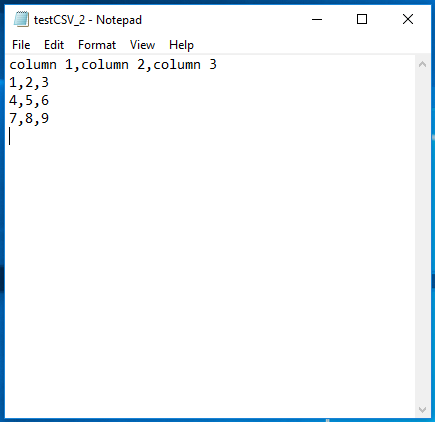
2. The summary is used by screen readers as a quick overview of the data contained in the table. It isn't seen on screen, in the same way that alt text for images isn't. It's good accessibility practice to include a summary but it's not essential.
Fay
1. I have just got csv to work by entering the data in Excel and saving as 'CSV (Comma delimiated)' file type. It looks like this when then opened in notepad:
2. The summary is used by screen readers as a quick overview of the data contained in the table. It isn't seen on screen, in the same way that alt text for images isn't. It's good accessibility practice to include a summary but it's not essential.
Fay
Last edit: 8 years 1 month ago by Fay.
Please Log in or Create an account to join the conversation.
- rloenen
-
Topic Author
- Offline
- Premium Member
-
Less
More
- Posts: 99
- Thank you received: 0
8 years 1 month ago #5328
by rloenen
Replied by rloenen on topic Chart table csv
In Dutch Excel, in an export to a CSV file, the comma(,) always will be a semicolon ( and Xerte does not understand that.
Could Xerte be changed so the semicolon in a CSV file will be accepted?
Now the user has to replace the semicolon in the CSV file first.
Ronald
and Xerte does not understand that.Could Xerte be changed so the semicolon in a CSV file will be accepted?
Now the user has to replace the semicolon in the CSV file first.
Ronald
Please Log in or Create an account to join the conversation.
- Fay
-
- Offline
- Elite Member
-
Less
More
- Posts: 236
- Thank you received: 96
8 years 1 month ago #5337
by Fay
Replied by Fay on topic Chart table csv
Sure, I've created a request for it on
GitHub #791
I'll try and look at this & the similar issue about commas as decimals in Dutch soon (for variables)
I'll try and look at this & the similar issue about commas as decimals in Dutch soon (for variables)
Please Log in or Create an account to join the conversation.
Moderators: ingdon
Time to create page: 1.453 seconds