

- Posts: 59
- Thank you received: 13
Report any technical problems you discover and discuss solutions.
Property details not displaying after upgrade to 3.12
- Jonathan Smith
-
 Topic Author
- Offline
- Administrator
-

Less
More
2 years 9 months ago - 2 years 9 months ago #8817
by Jonathan Smith
Property details not displaying after upgrade to 3.12 was created by Jonathan Smith
Hi
I recently upgraded my hosted installation to 3.12, and everything appears to be Ok, except that the Project Details for projects are no longer displaying. I cleared the cache, by clicking on F12, right-clicking on the Refresh button and selecting Empty cache and hard reload, but that didn't solve the problem.
The Project Details for folders are displaying, but when I go into the folder Properties it says "Sorry you do not have rights to this folder"
Any suggestions?
Best wishes
Jonathan Smith
I recently upgraded my hosted installation to 3.12, and everything appears to be Ok, except that the Project Details for projects are no longer displaying. I cleared the cache, by clicking on F12, right-clicking on the Refresh button and selecting Empty cache and hard reload, but that didn't solve the problem.
The Project Details for folders are displaying, but when I go into the folder Properties it says "Sorry you do not have rights to this folder"
Any suggestions?
Best wishes
Jonathan Smith
Last edit: 2 years 9 months ago by Jonathan Smith.
Please Log in or Create an account to join the conversation.
- tom
-

- Offline
- Administrator
-
Less
More
- Posts: 1365
- Thank you received: 344
2 years 9 months ago #8818
by tom
Replied by tom on topic Property details not displaying after upgrade to 3.12
Did you run upgrade.php, i.e. browse to <url of your xerte>/upgrade.php
If that doesn't work, do you get an error in the browser console (you can open the broser dev tools in most browsers on a PC by pressing F12)
If that doesn't work, do you get an error in the browser console (you can open the broser dev tools in most browsers on a PC by pressing F12)
Please Log in or Create an account to join the conversation.
- Jonathan Smith
-
Topic Author
- Offline
- Administrator
-
Less
More
- Posts: 59
- Thank you received: 13
2 years 9 months ago #8819
by Jonathan Smith
Replied by Jonathan Smith on topic Property details not displaying after upgrade to 3.12
Hi Tom
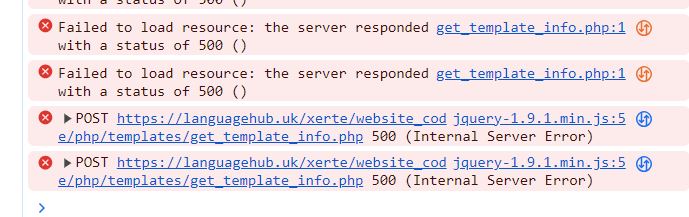
I ran the upgrade, and that didn't work. I've attached the error messages from the browser console, when I pressed F12.
Many thanks
Jonathan
I ran the upgrade, and that didn't work. I've attached the error messages from the browser console, when I pressed F12.
Many thanks
Jonathan
Please Log in or Create an account to join the conversation.
- james.pearce.bath.ac.uk
-

- Offline
- New Member
-

Less
More
- Posts: 12
- Thank you received: 0
2 years 8 months ago #8827
by james.pearce.bath.ac.uk
Replied by james.pearce.bath.ac.uk on topic Property details not displaying after upgrade to 3.12
Hi Jonathan,
I had similar issues after upgrade our test server to 3.12. I tracked it down to some of the database queries not adding the table prefix as expected. Do you have a table prefix set up in your site configuration? If so it might be worth looking in the following and make some changes
- website_code/php/properties/properties_library.php line #481 and remove the {$prefix} from before td.templatename, the td variable is set with the refix attached later in the query.
I also had some similar issues with folder sharing -
- in website_code/php/folder_status.php line #269 and #270 the {$pre} variable had to be added before folderrights in the query
Let me know if this helps.
Thanks
James
I had similar issues after upgrade our test server to 3.12. I tracked it down to some of the database queries not adding the table prefix as expected. Do you have a table prefix set up in your site configuration? If so it might be worth looking in the following and make some changes
- website_code/php/properties/properties_library.php line #481 and remove the {$prefix} from before td.templatename, the td variable is set with the refix attached later in the query.
I also had some similar issues with folder sharing -
- in website_code/php/folder_status.php line #269 and #270 the {$pre} variable had to be added before folderrights in the query
Let me know if this helps.
Thanks
James
Please Log in or Create an account to join the conversation.
- tom
-
- Offline
- Administrator
-
Less
More
- Posts: 1365
- Thank you received: 344
2 years 8 months ago #8829
by tom
Replied by tom on topic Property details not displaying after upgrade to 3.12
Hi James,
Thank you for this. It is fixed in 3.12.26.
Thank you for this. It is fixed in 3.12.26.
Please Log in or Create an account to join the conversation.
Moderators: ronm, julten, JohnSmith
Time to create page: 0.160 seconds