

- Posts: 153
- Thank you received: 10
Report any technical problems you discover and discuss solutions.
Issue with footer icons for Xhibit themed XOTs
- a511197
-
 Topic Author
- Offline
- Premium Member
-

Less
More
4 years 10 months ago #7806
by a511197
If you can use Lego, you can use Xerte
Issue with footer icons for Xhibit themed XOTs was created by a511197
Xerte installation v3.10
We have users who have customised their XOT projects using Xhibit. During testing we noticed an issue when Xhibit theme are used. The footer icons are cut in half. They still work but don't display the full icon. Switching to another theme displays the full icon.
Q. Is this a known issue?
Q. Is there a workaround/fix?
tia,
Alison
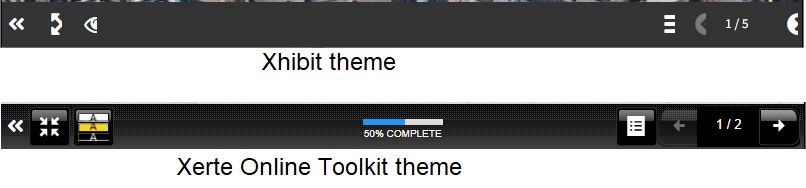
We have users who have customised their XOT projects using Xhibit. During testing we noticed an issue when Xhibit theme are used. The footer icons are cut in half. They still work but don't display the full icon. Switching to another theme displays the full icon.
Q. Is this a known issue?
Q. Is there a workaround/fix?
tia,
Alison
If you can use Lego, you can use Xerte
Please Log in or Create an account to join the conversation.
- enheca
-

- Offline
- New Member
-

Less
More
- Posts: 17
- Thank you received: 0
4 years 9 months ago #7811
by enheca
Replied by enheca on topic Issue with footer icons for Xhibit themed XOTs
Hello!!
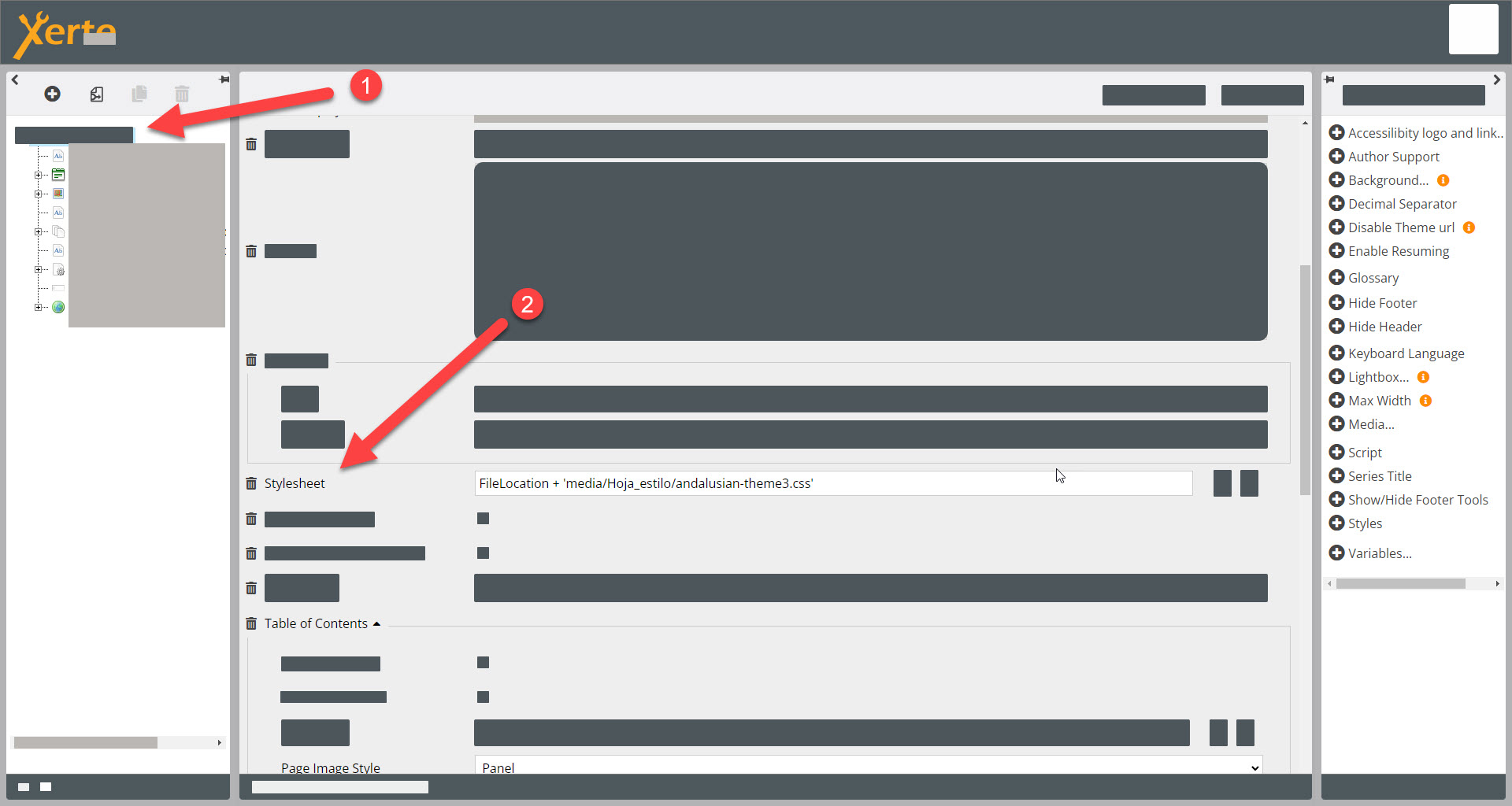
I solved that issue adding Stylesheet to the Learning Object (main page).
Attached image.
Hope that helps!!
I solved that issue adding Stylesheet to the Learning Object (main page).
Attached image.
Hope that helps!!
Please Log in or Create an account to join the conversation.
- ymoore
-

- Offline
- Administrator
-

Less
More
- Posts: 102
- Thank you received: 14
4 years 8 months ago #7870
by ymoore
Replied by ymoore on topic Issue with footer icons for Xhibit themed XOTs
Hi Alison
We had this issue some time ago, and James Roscoe from XhibitApp provided me with the following fix. (Assuming it's the same issue).
Apply the following CSS to your project, by adding the 'Styles' optional property to the top level of your Xerte project, and paste in the code below.
#x_footerBlock .x_floatLeft button.ui-button, #x_footerBlock .x_floatRight button.ui-button {
padding-right: 41px;
}
I hope this helps.
Yvonne
We had this issue some time ago, and James Roscoe from XhibitApp provided me with the following fix. (Assuming it's the same issue).
Apply the following CSS to your project, by adding the 'Styles' optional property to the top level of your Xerte project, and paste in the code below.
#x_footerBlock .x_floatLeft button.ui-button, #x_footerBlock .x_floatRight button.ui-button {
padding-right: 41px;
}
I hope this helps.
Yvonne
The following user(s) said Thank You: a511197
Please Log in or Create an account to join the conversation.
- a511197
-
Topic Author
- Offline
- Premium Member
-
Less
More
- Posts: 153
- Thank you received: 10
4 years 8 months ago #7904
by a511197
If you can use Lego, you can use Xerte
Replied by a511197 on topic Issue with footer icons for Xhibit themed XOTs
That's great Yvonne, it works! Thank you!
If you can use Lego, you can use Xerte
Please Log in or Create an account to join the conversation.
Moderators: ronm, julten, JohnSmith
Time to create page: 0.154 seconds