

- Berichten: 99
- Ontvangen bedankjes 0
General questions and topics about Xerte Toolkits that don’t fit anywhere else.
Printing Text >> Plain Text
- rloenen
-
 Onderwerp Auteur
- Offline
- Premium lid
-

Minder
Meer
2 jaren 3 weken geleden - 2 jaren 3 weken geleden #9200
door rloenen
Printing Text >> Plain Text werd gestart door rloenen
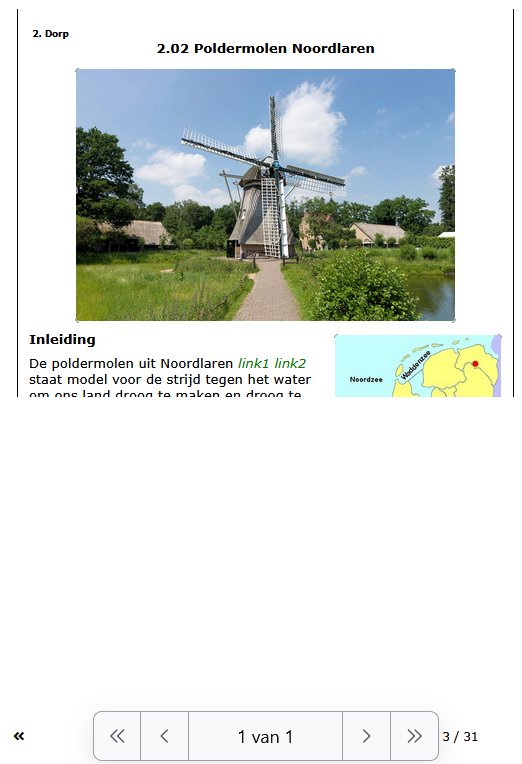
I have a Text >> Plain text, but in my browers I can't find a way to print that entire continuous page. When I choose to print, I only get the first part, the size of half an A4 format. The rest doesn't.
The problem seems only to occur with Xerte and not with other websites.
Is there a solution for that?
Ronald
The problem seems only to occur with Xerte and not with other websites.
Is there a solution for that?
Ronald
Laatst bewerkt 2 jaren 3 weken geleden door rloenen.
Graag Inloggen of een account aanmaken deelnemen aan het gesprek.
- ronm
-

- Offline
- Administrator
-

2 jaren 3 weken geleden #9201
door ronm
Xerte developer & trainer
e-learning & m-learning consultant
mitchellmedia.co.uk | xerteacademy.com | learningapps.co.uk
Note: Support here is voluntary and meant for users to support each other.
Need direct commercial support with Xerte? mitchellmedia.co.uk/contact/
Beantwoord door ronm in topic Printing Text >> Plain Text
on your page where you want to print the scrolling content add &display=1024,1800 to the url to force the height to show all the content without scroll bars then try printing again. Change the 1800 to be whatever height displays your inner content without scroll bars. You can also add &hide=bottom to the url to hide the footer if you don't want that printed or indeed &hide=both to hide both the header and footer.
Xerte developer & trainer
e-learning & m-learning consultant
mitchellmedia.co.uk | xerteacademy.com | learningapps.co.uk
Note: Support here is voluntary and meant for users to support each other.
Need direct commercial support with Xerte? mitchellmedia.co.uk/contact/
Graag Inloggen of een account aanmaken deelnemen aan het gesprek.
- rloenen
-
Onderwerp Auteur
- Offline
- Premium lid
-
Minder
Meer
- Berichten: 99
- Ontvangen bedankjes 0
2 jaren 3 weken geleden - 2 jaren 3 weken geleden #9202
door rloenen
Beantwoord door rloenen in topic Printing Text >> Plain Text
Tnx Ron.
The url of the website is vo-leshulp.nl/xerte/play.php?template_id=116#page16
I tried the display in two different places in the url, but in both cases I can't print more than just the short first bit.
vo-leshulp.nl/xerte/play.php?template_id=116#page16&dislay=1800
vo-leshulp.nl/xerte/play.php?template_id...&display=1800#page16
Do you see the problem?
The temporary username: n
Temporary password: qq
The url of the website is vo-leshulp.nl/xerte/play.php?template_id=116#page16
I tried the display in two different places in the url, but in both cases I can't print more than just the short first bit.
vo-leshulp.nl/xerte/play.php?template_id=116#page16&dislay=1800
vo-leshulp.nl/xerte/play.php?template_id...&display=1800#page16
Do you see the problem?
The temporary username: n
Temporary password: qq
Laatst bewerkt 2 jaren 3 weken geleden door rloenen.
Graag Inloggen of een account aanmaken deelnemen aan het gesprek.
- ronm
-
- Offline
- Administrator
-
2 jaren 3 weken geleden #9203
door ronm
Xerte developer & trainer
e-learning & m-learning consultant
mitchellmedia.co.uk | xerteacademy.com | learningapps.co.uk
Note: Support here is voluntary and meant for users to support each other.
Need direct commercial support with Xerte? mitchellmedia.co.uk/contact/
Beantwoord door ronm in topic Printing Text >> Plain Text
You need both width and height separated by a comma as in my example and it seems 1800 wasn’t enough for your very long scrolling page so try
vo-leshulp.nl/xerte/play.php?template_id...lay=1024,2400#page16
BTW the #pagenumber or #custompageid does need to go at the end so the display parameters go before those.
BTW the #pagenumber or #custompageid does need to go at the end so the display parameters go before those.
Xerte developer & trainer
e-learning & m-learning consultant
mitchellmedia.co.uk | xerteacademy.com | learningapps.co.uk
Note: Support here is voluntary and meant for users to support each other.
Need direct commercial support with Xerte? mitchellmedia.co.uk/contact/
De volgende gebruiker (s) zei dank u: rloenen
Graag Inloggen of een account aanmaken deelnemen aan het gesprek.
- rloenen
-
Onderwerp Auteur
- Offline
- Premium lid
-
Minder
Meer
- Berichten: 99
- Ontvangen bedankjes 0
2 jaren 3 weken geleden #9204
door rloenen
Beantwoord door rloenen in topic Printing Text >> Plain Text
Ron, tnx.
Sometimes it's a bit difficult because the length of the pages can vary quite a bit. The variable for the length must therefore be known per page. Not really something for the different users to do.
I'll see how I can use this, especially for the users.
Sometimes it's a bit difficult because the length of the pages can vary quite a bit. The variable for the length must therefore be known per page. Not really something for the different users to do.
I'll see how I can use this, especially for the users.
Graag Inloggen of een account aanmaken deelnemen aan het gesprek.
Moderators: ingdon
Tijd voor maken pagina: 0.148 seconden