

- Berichten: 33
- Ontvangen bedankjes 0
General questions and topics about Xerte Toolkits that don’t fit anywhere else.
How to use 'Go to Page ID' in a XOT Decision Tree
- cnolan-grant
-
 Onderwerp Auteur
- Offline
- Junior lid
-

Minder
Meer
8 jaren 11 maanden geleden #4736
door cnolan-grant
How to use 'Go to Page ID' in a XOT Decision Tree werd gestart door cnolan-grant
Dear all
I'm doing some testing ahead of our install of v3.5, so apologies for an inundation of forum posts...
For the 'Go to Page ID' option in the Decision Tree within a XOT, is the user meant to enter one of the unique IDs for a page within the Decision Tree? If so, it doesn't seem to be working (a 'Continue' button appears, but clicking it doesn't do anything).
Or have I got the wrong end of the stick?
Thanks
Candace
I'm doing some testing ahead of our install of v3.5, so apologies for an inundation of forum posts...
For the 'Go to Page ID' option in the Decision Tree within a XOT, is the user meant to enter one of the unique IDs for a page within the Decision Tree? If so, it doesn't seem to be working (a 'Continue' button appears, but clicking it doesn't do anything).
Or have I got the wrong end of the stick?
Thanks
Candace
Graag Inloggen of een account aanmaken deelnemen aan het gesprek.
- ronm
-

- Offline
- Administrator
-

8 jaren 11 maanden geleden #4742
door ronm
Xerte developer & trainer
e-learning & m-learning consultant
mitchellmedia.co.uk | xerteacademy.com | learningapps.co.uk
Note: Support here is voluntary and meant for users to support each other.
Need direct commercial support with Xerte? mitchellmedia.co.uk/contact/
Beantwoord door ronm in topic How to use 'Go to Page ID' in a XOT Decision Tree
Hi
When you refer to the 'Go to Page ID' do you mean the 'Target ID' field?
You make these up yourself and use whatever works for you - just make sure the Target ID matches the Unique ID of a question, result or information step.
E,g, lets say you have a question about selecting an authoring tool and the choices are commercial, free, not sure.
You then create the destinations for each of those options and give each a relevant ID and then put those ID's in the 'Target ID' field of each option.
HTH
Ron
When you refer to the 'Go to Page ID' do you mean the 'Target ID' field?
You make these up yourself and use whatever works for you - just make sure the Target ID matches the Unique ID of a question, result or information step.
E,g, lets say you have a question about selecting an authoring tool and the choices are commercial, free, not sure.
You then create the destinations for each of those options and give each a relevant ID and then put those ID's in the 'Target ID' field of each option.
HTH
Ron
Xerte developer & trainer
e-learning & m-learning consultant
mitchellmedia.co.uk | xerteacademy.com | learningapps.co.uk
Note: Support here is voluntary and meant for users to support each other.
Need direct commercial support with Xerte? mitchellmedia.co.uk/contact/
Graag Inloggen of een account aanmaken deelnemen aan het gesprek.
- cnolan-grant
-
Onderwerp Auteur
- Offline
- Junior lid
-
Minder
Meer
- Berichten: 33
- Ontvangen bedankjes 0
8 jaren 11 maanden geleden #4744
door cnolan-grant
Beantwoord door cnolan-grant in topic How to use 'Go to Page ID' in a XOT Decision Tree
Hi Ron
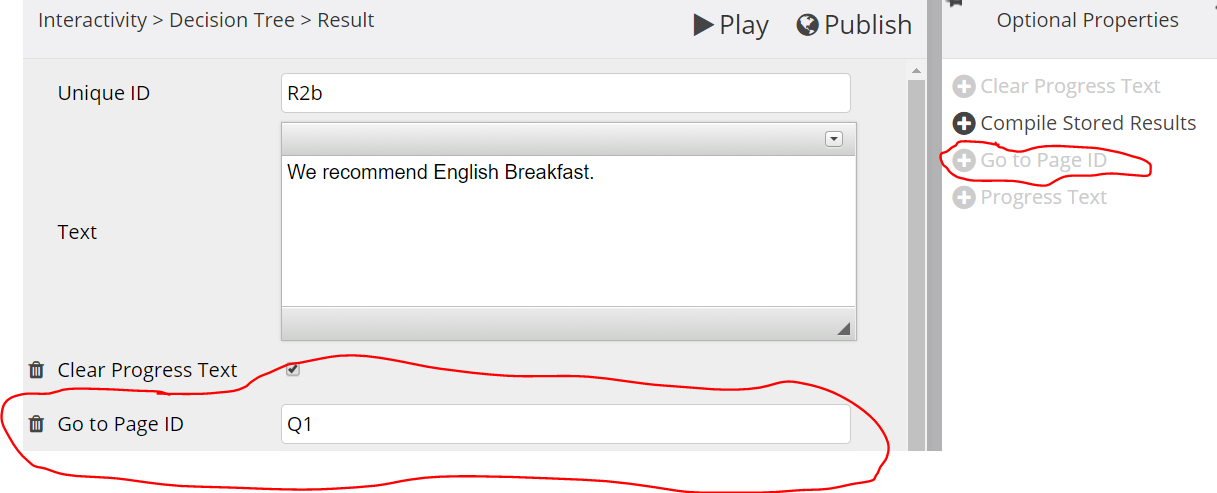
Thanks for your reply. I've attached a screenshot of the editing view (Q1 is the unique ID for one of the items in the Decision Tree). The live project is at: apps-test.dur.ac.uk/xerte/play.php?template_id=109 (the page is called 'Decision Tree').
If I understand it right, the 'Continue' button on the Results page should bring the user to the page associated with the unique ID entered here?
Thanks
Candace
Thanks for your reply. I've attached a screenshot of the editing view (Q1 is the unique ID for one of the items in the Decision Tree). The live project is at: apps-test.dur.ac.uk/xerte/play.php?template_id=109 (the page is called 'Decision Tree').
If I understand it right, the 'Continue' button on the Results page should bring the user to the page associated with the unique ID entered here?
Thanks
Candace
Graag Inloggen of een account aanmaken deelnemen aan het gesprek.
- ronm
-
- Offline
- Administrator
-
8 jaren 11 maanden geleden #4747
door ronm
Xerte developer & trainer
e-learning & m-learning consultant
mitchellmedia.co.uk | xerteacademy.com | learningapps.co.uk
Note: Support here is voluntary and meant for users to support each other.
Need direct commercial support with Xerte? mitchellmedia.co.uk/contact/
Beantwoord door ronm in topic How to use 'Go to Page ID' in a XOT Decision Tree
Hi Candace
ok so you mean the optional property that you can add to the results page 'Go to PageID'
I'm not quite sure what the original intention of that optional property was and can see that it's a bit confusing but the way it works at the moment at least is not a manual ID but the internal ID that Xerte generates for each page. So if you really want that to work (at least at the moment) add a Xerte page link in the results page text editor so that you can copy the ID and then paste that into the optional property. (see screenshot)
But you could easily just leave a page link in the text area if that's all you are trying to achieve.
HTH
Ron
ok so you mean the optional property that you can add to the results page 'Go to PageID'
I'm not quite sure what the original intention of that optional property was and can see that it's a bit confusing but the way it works at the moment at least is not a manual ID but the internal ID that Xerte generates for each page. So if you really want that to work (at least at the moment) add a Xerte page link in the results page text editor so that you can copy the ID and then paste that into the optional property. (see screenshot)
But you could easily just leave a page link in the text area if that's all you are trying to achieve.
HTH
Ron
Xerte developer & trainer
e-learning & m-learning consultant
mitchellmedia.co.uk | xerteacademy.com | learningapps.co.uk
Note: Support here is voluntary and meant for users to support each other.
Need direct commercial support with Xerte? mitchellmedia.co.uk/contact/

De volgende gebruiker (s) zei dank u: EAL
Graag Inloggen of een account aanmaken deelnemen aan het gesprek.
- cnolan-grant
-
Onderwerp Auteur
- Offline
- Junior lid
-
Minder
Meer
- Berichten: 33
- Ontvangen bedankjes 0
8 jaren 11 maanden geleden #4750
door cnolan-grant
Beantwoord door cnolan-grant in topic How to use 'Go to Page ID' in a XOT Decision Tree
Hi Ron
That's great--I'll just make a note of this for our users.
Best wishes
Candace
That's great--I'll just make a note of this for our users.
Best wishes
Candace
Graag Inloggen of een account aanmaken deelnemen aan het gesprek.
- EAL
-

- Offline
- Junior lid
-
Minder
Meer
- Berichten: 34
- Ontvangen bedankjes 3
8 jaren 1 maand geleden #5269
door EAL
Beantwoord door EAL in topic How to use 'Go to Page ID' in a XOT Decision Tree
Hi Ron,
Just found this answer when struggling with a non-linear CBT. Very helpful!
Could I change the text on the button? My CBT's are mostly in Dutch, so the 'Continue' is a bit awkward.
While I'm at it, I also have a feature request: I would like TWO of these buttons (or an unlimited number) which would make an editable text on them obvious.
(I'll put it on my wishlist, and turn that in later.)
Thanks in advance!
Elly
Just found this answer when struggling with a non-linear CBT. Very helpful!
Could I change the text on the button? My CBT's are mostly in Dutch, so the 'Continue' is a bit awkward.
While I'm at it, I also have a feature request: I would like TWO of these buttons (or an unlimited number) which would make an editable text on them obvious.
(I'll put it on my wishlist, and turn that in later.)
Thanks in advance!
Elly
Graag Inloggen of een account aanmaken deelnemen aan het gesprek.
Moderators: ingdon
Tijd voor maken pagina: 0.235 seconden