

- Berichten: 397
- Ontvangen bedankjes 71
Report any technical problems you discover and discuss solutions.
Export Zip - Index.htm doesn't play
- JohnSmith
-

- Offline
- Moderator
-

Minder
Meer
13 jaren 3 weken geleden #696
door JohnSmith
Beantwoord door JohnSmith in topic Export Zip - Index.htm doesn't play
Hmmm. I'm wondering if that server is actually serving all the javascript pages correctly, can you check in the settings for file types, mime types or something...
I'm also not liking the look of that 502 error in Chrome...
Are all the other files definitely there too? Not just the index.htm one? Can you switch to the Net tab in Chrome and press Shift-F5 to force a cache reload and see if you get any 404 or other file errors?
John
I'm also not liking the look of that 502 error in Chrome...
Are all the other files definitely there too? Not just the index.htm one? Can you switch to the Net tab in Chrome and press Shift-F5 to force a cache reload and see if you get any 404 or other file errors?
John
Graag Inloggen of een account aanmaken deelnemen aan het gesprek.
- Overlord
-

- Offline
- Nieuw lid
-

Minder
Meer
- Berichten: 13
- Ontvangen bedankjes 0
13 jaren 3 weken geleden - 13 jaren 3 weken geleden #699
door Overlord
Beantwoord door Overlord in topic Export Zip - Index.htm doesn't play
Hi John
Sorry, I was unable to locate the settings for file types and the Net tab in Chrome. The Chrome error I posted doesn't acually stay on the console. It appears for a fraction of a second while the file is (re)loading. All files, including index.html are placed in the root folder. I have even tested the module by opening the index.html in IE. It loads very slowly (after displaying a few warnings) but works flawlessly.
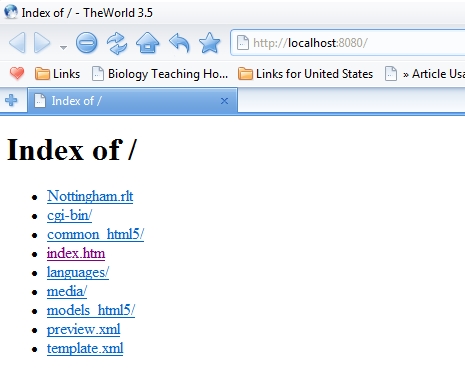
Yesterday night, I got it working using USBWebserver ( www.usbwebserver.net/en/ ) instead of tinyweb. Today, however, I am getting a list of all files in the root folder (screenshot attached) instead of the batch file loading index.html automatically. Here are the contents of the batch file:
@ echo off;
start \USB\8.5\usbwebserver.exe \USB\8.5\root 8080
Start TheWorld_en_3.5.0.3\TheWorld http://localhost:8080/
exit
What do I need to fix for it to load index.html automatically? (By default, the USBWebserver root folder had an index.php file and an images folder, which I removed before placing the files of my LO.)
(Edit: I found a configuration file in the settings folder and changed "root={path}/root/" to "root={path}/root/index.htm", which seems to work.)
Also, is there a way I can get the USBserver window to stay out of sight or close automatically when the browser is closed?
Sorry, I was unable to locate the settings for file types and the Net tab in Chrome. The Chrome error I posted doesn't acually stay on the console. It appears for a fraction of a second while the file is (re)loading. All files, including index.html are placed in the root folder. I have even tested the module by opening the index.html in IE. It loads very slowly (after displaying a few warnings) but works flawlessly.
Yesterday night, I got it working using USBWebserver ( www.usbwebserver.net/en/ ) instead of tinyweb. Today, however, I am getting a list of all files in the root folder (screenshot attached) instead of the batch file loading index.html automatically. Here are the contents of the batch file:
@ echo off;
start \USB\8.5\usbwebserver.exe \USB\8.5\root 8080
Start TheWorld_en_3.5.0.3\TheWorld http://localhost:8080/
exit
What do I need to fix for it to load index.html automatically? (By default, the USBWebserver root folder had an index.php file and an images folder, which I removed before placing the files of my LO.)
(Edit: I found a configuration file in the settings folder and changed "root={path}/root/" to "root={path}/root/index.htm", which seems to work.)
Also, is there a way I can get the USBserver window to stay out of sight or close automatically when the browser is closed?
Laatst bewerkt 13 jaren 3 weken geleden door Overlord.
Graag Inloggen of een account aanmaken deelnemen aan het gesprek.
- Overlord
-
- Offline
- Nieuw lid
-
Minder
Meer
- Berichten: 13
- Ontvangen bedankjes 0
13 jaren 3 weken geleden #700
door Overlord
Beantwoord door Overlord in topic Export Zip - Index.htm doesn't play
I redownloaded TinyWeb server and it is loading the LO in TheWorld Browser perfectly today! The batch file is the same I was running yesterday:
@ echo off;
start \www\bin\TINY.EXE \www\root 8080
start TheWorld_en_3.5.0.3\TheWorld http://localhost:8080/
exit
I'll now test it on a different system after copying everything onto a CD.
@ echo off;
start \www\bin\TINY.EXE \www\root 8080
start TheWorld_en_3.5.0.3\TheWorld http://localhost:8080/
exit
I'll now test it on a different system after copying everything onto a CD.
Graag Inloggen of een account aanmaken deelnemen aan het gesprek.
- tom
-

- Offline
- Administrator
-

Minder
Meer
- Berichten: 1365
- Ontvangen bedankjes 344
13 jaren 3 weken geleden #701
door tom
Beantwoord door tom in topic Export Zip - Index.htm doesn't play
The XtInitialise undefined error would suggest that the export is incomplete somehow.
Could you send the .zip file, so we can investigate.
Could you send the .zip file, so we can investigate.
Graag Inloggen of een account aanmaken deelnemen aan het gesprek.
- Overlord
-
- Offline
- Nieuw lid
-
Minder
Meer
- Berichten: 13
- Ontvangen bedankjes 0
13 jaren 3 weken geleden #703
door Overlord
Beantwoord door Overlord in topic Export Zip - Index.htm doesn't play
It seems this may well be a server error. USBWebserver reports Apache as "offline". This seems to happen (and resolve itself) randomly.
Graag Inloggen of een account aanmaken deelnemen aan het gesprek.
- Overlord
-
- Offline
- Nieuw lid
-
Minder
Meer
- Berichten: 13
- Ontvangen bedankjes 0
13 jaren 1 dag geleden #783
door Overlord
Beantwoord door Overlord in topic Export Zip - Index.htm doesn't play
After a lot of hit and trial, I have finally got it to work the way I wanted. Here is what I did:
- Webserver/portable browser combo: Of the various webservers I tried, I found Server2Go ( www.server2go-web.de/ ) to be the most stable and easy to use. The size, however, is a downside. I combined it with the portable The World Browser.
- Editing index.htm file: I edited the two references to online resources (jquery-1.7.1.min.js and MathJax.js) to point to local files. "jquery-1.7.1.min.js" was already present at "\common_html5\js" and I downloaded MathJax from www.mathjax.org/ . I found that this made opening the module in IE9 by simply double-clicking index.htm significantly faster, though IE would still display a warning first.
- Converting the exported module to exe: I used node webkit ( github.com/rogerwang/node-webkit ) to convert the module into a single exe file that works independently of the browser. There is no webserver required and no warnings appear before loading the module. There is an excellent tutorial at www.scirra.com/tutorials/417/exporting-to-exe-using-node-webkit if someone wishes to try it.
- Webserver/portable browser combo: Of the various webservers I tried, I found Server2Go ( www.server2go-web.de/ ) to be the most stable and easy to use. The size, however, is a downside. I combined it with the portable The World Browser.
- Editing index.htm file: I edited the two references to online resources (jquery-1.7.1.min.js and MathJax.js) to point to local files. "jquery-1.7.1.min.js" was already present at "\common_html5\js" and I downloaded MathJax from www.mathjax.org/ . I found that this made opening the module in IE9 by simply double-clicking index.htm significantly faster, though IE would still display a warning first.
- Converting the exported module to exe: I used node webkit ( github.com/rogerwang/node-webkit ) to convert the module into a single exe file that works independently of the browser. There is no webserver required and no warnings appear before loading the module. There is an excellent tutorial at www.scirra.com/tutorials/417/exporting-to-exe-using-node-webkit if someone wishes to try it.
Graag Inloggen of een account aanmaken deelnemen aan het gesprek.
Moderators: ronm, julten, JohnSmith
Tijd voor maken pagina: 0.176 seconden