

- Berichten: 9
- Ontvangen bedankjes 0
Report any technical problems you discover and discuss solutions.
Scorm 1.2 download not working
- simonball
-
 Onderwerp Auteur
- Offline
- Nieuw lid
-

Minder
Meer
12 jaren 1 maand geleden #2114
door simonball
Scorm 1.2 download not working werd gestart door simonball
Hi All
I have 21 objects in my account which I am trying to export to mount in a Moodle installation.
I have successfully downloaded all of the Scorm 3 zips. However, when I click to download the Scorm 1.2 zips, nothing happens. I have tried Chrome, Firefox and IE but it's always the same - nothing downloads, no download process begins, just nothing at all happens.
A second but related issue - a colleague has tried installing his objects in Moodle using the Scorm 1.2 download and finds that images and quizzes etc don't display, only text (well, images show in IE but that's not really much use). Is there a solution to this, or is the answer to both of my problems "use the Scorm 3 zips" - in which case, please could someone point me to relevant guidance on using the Scorm 3 zips with Moodle!
Best wishes and thanks again for a great tool.
Simon
I have 21 objects in my account which I am trying to export to mount in a Moodle installation.
I have successfully downloaded all of the Scorm 3 zips. However, when I click to download the Scorm 1.2 zips, nothing happens. I have tried Chrome, Firefox and IE but it's always the same - nothing downloads, no download process begins, just nothing at all happens.
A second but related issue - a colleague has tried installing his objects in Moodle using the Scorm 1.2 download and finds that images and quizzes etc don't display, only text (well, images show in IE but that's not really much use). Is there a solution to this, or is the answer to both of my problems "use the Scorm 3 zips" - in which case, please could someone point me to relevant guidance on using the Scorm 3 zips with Moodle!
Best wishes and thanks again for a great tool.
Simon
Graag Inloggen of een account aanmaken deelnemen aan het gesprek.
- ronm
-

- Offline
- Administrator
-

12 jaren 1 maand geleden #2115
door ronm
Xerte developer & trainer
e-learning & m-learning consultant
mitchellmedia.co.uk | xerteacademy.com | learningapps.co.uk
Note: Support here is voluntary and meant for users to support each other.
Need direct commercial support with Xerte? mitchellmedia.co.uk/contact/
Beantwoord door ronm in topic Scorm 1.2 download not working
Hi Simon
I'm assuming that when you refer to the "SCORM 3 zips" you mean the SCORM 2004 3rd edition export option? Anyway that's work so just for clarity for anyone else reading this thread.
I'm also assuming that you are referring to the TechDis VLE server here and the installation used by the TechDis team and associates rather than the sandpit? In fact I think that's a safe assumption because I checked and verified that the SCORM 1.2 export wasn't working but it should be now!
Regarding the other issue both SCORM exports should work fine in Moodle as long as the Moodle is a relatively recent version. The SCORM 2004 export should give you better tracking in Moodle and you should be able to import those in the same way (same steps) as the 1.2 import.
HTH
Ron
I'm assuming that when you refer to the "SCORM 3 zips" you mean the SCORM 2004 3rd edition export option? Anyway that's work so just for clarity for anyone else reading this thread.
I'm also assuming that you are referring to the TechDis VLE server here and the installation used by the TechDis team and associates rather than the sandpit? In fact I think that's a safe assumption because I checked and verified that the SCORM 1.2 export wasn't working but it should be now!
Regarding the other issue both SCORM exports should work fine in Moodle as long as the Moodle is a relatively recent version. The SCORM 2004 export should give you better tracking in Moodle and you should be able to import those in the same way (same steps) as the 1.2 import.
HTH
Ron
Xerte developer & trainer
e-learning & m-learning consultant
mitchellmedia.co.uk | xerteacademy.com | learningapps.co.uk
Note: Support here is voluntary and meant for users to support each other.
Need direct commercial support with Xerte? mitchellmedia.co.uk/contact/
Graag Inloggen of een account aanmaken deelnemen aan het gesprek.
- simonball
-
Onderwerp Auteur
- Offline
- Nieuw lid
-
Minder
Meer
- Berichten: 9
- Ontvangen bedankjes 0
12 jaren 1 maand geleden #2116
door simonball
Beantwoord door simonball in topic Scorm 1.2 download not working
Thanks Ron! I'll try the SCORM 1.2 downloads again - and thanks for the advice, I'll try to persuade my colleague to use the SCORM 2004 3rd Edition (Scorm 3 in my noddy language!) in Moodle!
Best wishes
Simon
Best wishes
Simon
Graag Inloggen of een account aanmaken deelnemen aan het gesprek.
- JaapJan
-

- Offline
- Premium lid
-

Minder
Meer
- Berichten: 116
- Ontvangen bedankjes 1
12 jaren 1 maand geleden #2157
door JaapJan
Holy cow!
Beantwoord door JaapJan in topic Scorm 1.2 download not working
Hi
When I upload my Scorm 1.2 to our LMS, it is not working. See the screendump. Scorm2004 is recognised but I can not see any data after using in our LMS. Can you confirm that the scormfunctionality of 1.2 and 2004 is OK before I'm going to stalk our LMS provider...
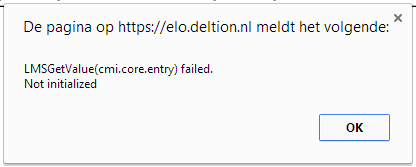
When I upload my Scorm 1.2 to our LMS, it is not working. See the screendump. Scorm2004 is recognised but I can not see any data after using in our LMS. Can you confirm that the scormfunctionality of 1.2 and 2004 is OK before I'm going to stalk our LMS provider...
Holy cow!
Graag Inloggen of een account aanmaken deelnemen aan het gesprek.
- tom
-

- Offline
- Administrator
-
Minder
Meer
- Berichten: 1365
- Ontvangen bedankjes 344
12 jaren 1 maand geleden #2158
door tom
Beantwoord door tom in topic Scorm 1.2 download not working
I am not aware of this problem (this means some function is called, before SCORM is initialised).
Could you give me the number of the LO, than I'll check in my Moodle installation.
Could you give me the number of the LO, than I'll check in my Moodle installation.
Graag Inloggen of een account aanmaken deelnemen aan het gesprek.
- JaapJan
-
- Offline
- Premium lid
-
Minder
Meer
- Berichten: 116
- Ontvangen bedankjes 1
12 jaren 1 maand geleden #2159
door JaapJan
Graag Inloggen of een account aanmaken deelnemen aan het gesprek.
Moderators: ronm, julten, JohnSmith
Tijd voor maken pagina: 0.189 seconden