

- Berichten: 81
- Ontvangen bedankjes 0
Report any technical problems you discover and discuss solutions.
Text wrap in Graphics/Text page in XOT v2.1
- ronm2
-
 Onderwerp Auteur
- Offline
- Premium lid
-

Minder
Meer
12 jaren 3 maanden geleden #1884
door ronm2
Text wrap in Graphics/Text page in XOT v2.1 werd gestart door ronm2
'Text wrap' is probably not the right description, but let me explain. This is not technically a bug just an irritant that makes a presentation look amateur.
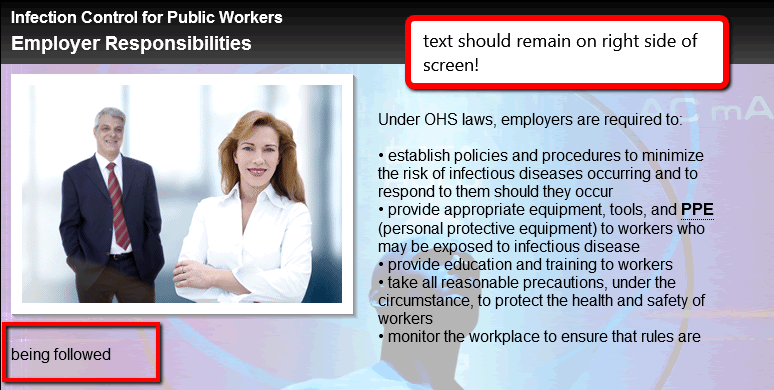
Let's say I have a graphic on the left of the screen that is not very high vertically, for example 3 inches. My text on the right side of the screen however is lengthy and goes to the bottom of the screen. Once the text line is lower than the image on the left, the text then wraps or begins the next sentence from the left side of the screen. I've attached a graphic example. To overcome this you have to ensure that your graphic is always taller than your text. Somehow, it would be nice that the text remains in whatever area it was placed in.
Let's say I have a graphic on the left of the screen that is not very high vertically, for example 3 inches. My text on the right side of the screen however is lengthy and goes to the bottom of the screen. Once the text line is lower than the image on the left, the text then wraps or begins the next sentence from the left side of the screen. I've attached a graphic example. To overcome this you have to ensure that your graphic is always taller than your text. Somehow, it would be nice that the text remains in whatever area it was placed in.
Graag Inloggen of een account aanmaken deelnemen aan het gesprek.
- JohnSmith
-

- Offline
- Moderator
-

Minder
Meer
- Berichten: 397
- Ontvangen bedankjes 71
12 jaren 3 maanden geleden #1888
door JohnSmith
Beantwoord door JohnSmith in topic Text wrap in Graphics/Text page in XOT v2.1
Hi,
In this situation yes it makes your LO look a bit strange but in some situations where you have a lot of text or a very small image you may want the text to wrap so i'm loathed to change it completely...
If this is the imageViewer page that you are using then you can make a simple change to one of the html5 model files (imageViewer.html). Around line 570 you will see:
#textHolder {
padding-bottom: 20px;
}
change that to
#textHolder {
padding-bottom: 20px;
overflow: auto;
}
Note the addition of the 'overflow' property. This should fix it for you.
We plan to soon do some work at making the pages more consistent and at that time I will most likely add in two new options: "Left (no-wrap)" and "Right (no-wrap)" to take care of situations where you need this.
John
In this situation yes it makes your LO look a bit strange but in some situations where you have a lot of text or a very small image you may want the text to wrap so i'm loathed to change it completely...
If this is the imageViewer page that you are using then you can make a simple change to one of the html5 model files (imageViewer.html). Around line 570 you will see:
#textHolder {
padding-bottom: 20px;
}
change that to
#textHolder {
padding-bottom: 20px;
overflow: auto;
}
Note the addition of the 'overflow' property. This should fix it for you.
We plan to soon do some work at making the pages more consistent and at that time I will most likely add in two new options: "Left (no-wrap)" and "Right (no-wrap)" to take care of situations where you need this.
John
De volgende gebruiker (s) zei dank u: ronm2
Graag Inloggen of een account aanmaken deelnemen aan het gesprek.
- ronm2
-
Onderwerp Auteur
- Offline
- Premium lid
-
Minder
Meer
- Berichten: 81
- Ontvangen bedankjes 0
12 jaren 3 maanden geleden #1898
door ronm2
Beantwoord door ronm2 in topic Text wrap in Graphics/Text page in XOT v2.1
Got it John, thank you!
I've just ported the first pass of content from an AW application to XOT and I'm learning a great deal about the pages, features, etc. First thing... you've likely heard this before... we could really use documentation on some of the page types/properties, but I know how hard that is as things evolve rapidly. The biggest need I see so far is for more audio on some of the pages, especially the pages that allow you nest pages. Also the audio 'slider bar' - I'd prefer that to be a single icon the user can click so you could have multiples of them on the page and the ability to place them. One thing at a time however, thanks for this text wrap tip!
I've just ported the first pass of content from an AW application to XOT and I'm learning a great deal about the pages, features, etc. First thing... you've likely heard this before... we could really use documentation on some of the page types/properties, but I know how hard that is as things evolve rapidly. The biggest need I see so far is for more audio on some of the pages, especially the pages that allow you nest pages. Also the audio 'slider bar' - I'd prefer that to be a single icon the user can click so you could have multiples of them on the page and the ability to place them. One thing at a time however, thanks for this text wrap tip!
Graag Inloggen of een account aanmaken deelnemen aan het gesprek.
- ronm
-

- Offline
- Administrator
-

12 jaren 3 maanden geleden - 12 jaren 3 maanden geleden #1900
door ronm
Xerte developer & trainer
e-learning & m-learning consultant
mitchellmedia.co.uk | xerteacademy.com | learningapps.co.uk
Note: Support here is voluntary and meant for users to support each other.
Need direct commercial support with Xerte? mitchellmedia.co.uk/contact/
Beantwoord door ronm in topic Text wrap in Graphics/Text page in XOT v2.1
Rather than customise the model file so that it affects all use of those pages you can add a bit of css direct to the page text e.g. on the pages where the wrapping isn't desirable. As John says without options it wouldn't be a good idea to enforce this as more often than not the wrapping is desirable. So on a page where you don't want the wrapping add the css as follows direct to the end of the text box:
<style>#textHolder { padding-bottom: 20px; overflow: auto;}</style>
Here's a temporary example mitchellmedia.co.uk/xot/play_113
page 2 has the above css wrapped in style tags.
HTH
Ron
<style>#textHolder { padding-bottom: 20px; overflow: auto;}</style>
Here's a temporary example mitchellmedia.co.uk/xot/play_113
page 2 has the above css wrapped in style tags.
HTH
Ron
Xerte developer & trainer
e-learning & m-learning consultant
mitchellmedia.co.uk | xerteacademy.com | learningapps.co.uk
Note: Support here is voluntary and meant for users to support each other.
Need direct commercial support with Xerte? mitchellmedia.co.uk/contact/
Laatst bewerkt 12 jaren 3 maanden geleden door ronm. Reden: typo correction
Graag Inloggen of een account aanmaken deelnemen aan het gesprek.
- ronm2
-
Onderwerp Auteur
- Offline
- Premium lid
-
Minder
Meer
- Berichten: 81
- Ontvangen bedankjes 0
12 jaren 3 maanden geleden #1902
door ronm2
Beantwoord door ronm2 in topic Text wrap in Graphics/Text page in XOT v2.1
Works perfectly Ron, thank you!
Graag Inloggen of een account aanmaken deelnemen aan het gesprek.
- ronm
-
- Offline
- Administrator
-
12 jaren 3 maanden geleden #1907
door ronm
Xerte developer & trainer
e-learning & m-learning consultant
mitchellmedia.co.uk | xerteacademy.com | learningapps.co.uk
Note: Support here is voluntary and meant for users to support each other.
Need direct commercial support with Xerte? mitchellmedia.co.uk/contact/
Beantwoord door ronm in topic Text wrap in Graphics/Text page in XOT v2.1
Glad that worked.
Just re-read my previous reply and of course I meant: As John says without options it wouldn't be a good idea to enforce this.
So adding via <style> tags is the best option for now.
HTH
Ron
Just re-read my previous reply and of course I meant: As John says without options it wouldn't be a good idea to enforce this.
So adding via <style> tags is the best option for now.
HTH
Ron
Xerte developer & trainer
e-learning & m-learning consultant
mitchellmedia.co.uk | xerteacademy.com | learningapps.co.uk
Note: Support here is voluntary and meant for users to support each other.
Need direct commercial support with Xerte? mitchellmedia.co.uk/contact/
Graag Inloggen of een account aanmaken deelnemen aan het gesprek.
Moderators: ronm, julten, JohnSmith
Tijd voor maken pagina: 0.177 seconden