

- Berichten: 2
- Ontvangen bedankjes 0
Report any technical problems you discover and discuss solutions.
SCORM Tracking Brightspace: SCORM mode is 'browse'
- gvwur
-
 Onderwerp Auteur
- Offline
- Nieuw lid
-

Minder
Meer
1 jaar 2 maanden geleden #9491
door gvwur
SCORM Tracking Brightspace: SCORM mode is 'browse' werd gestart door gvwur
Hi all!
Our organisation has started a pilot with Xerte and I'm running into some trouble when exporting Xerte projects to our Brightspace LMS as SCORM 2004 3rd Ed.
I'm trying to make sure our learners can resume where they left, therefore I enabled tracking in the Xerte project settings.
However, I keep on receiving this message when starting the uploaded SCORM from our Brightspace instance:
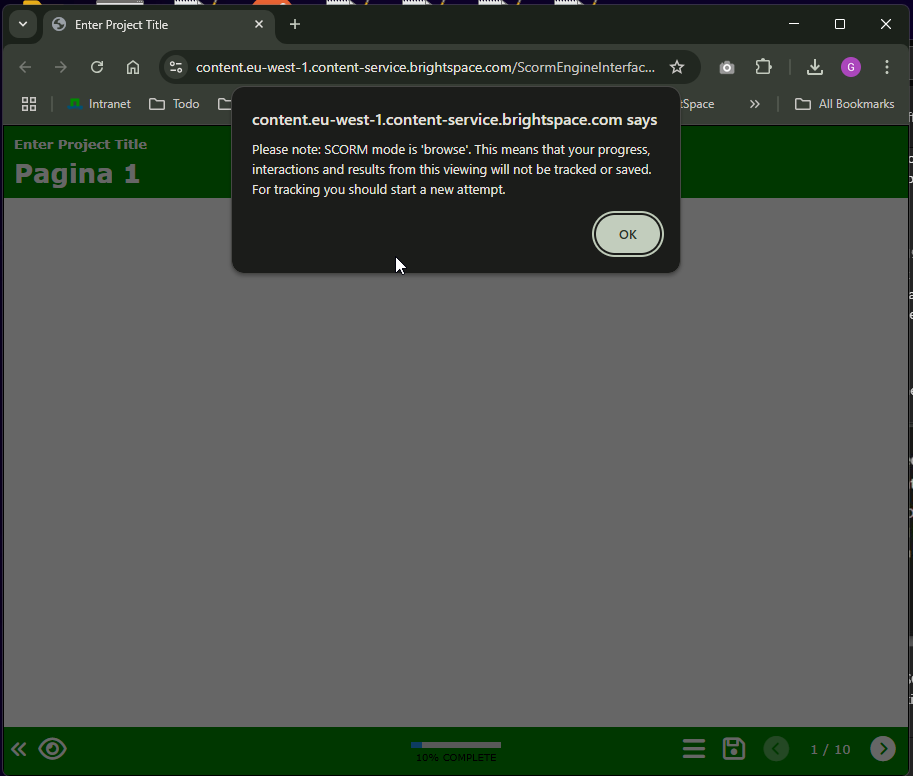
Please note: SCORM mode is 'browse'. This means that your progress, interactions and results from this viewing will not be tracked or saved. For tracking you should start a new attempt.
Does anyone know how to resolve this issue?
Our organisation has started a pilot with Xerte and I'm running into some trouble when exporting Xerte projects to our Brightspace LMS as SCORM 2004 3rd Ed.
I'm trying to make sure our learners can resume where they left, therefore I enabled tracking in the Xerte project settings.
However, I keep on receiving this message when starting the uploaded SCORM from our Brightspace instance:
Please note: SCORM mode is 'browse'. This means that your progress, interactions and results from this viewing will not be tracked or saved. For tracking you should start a new attempt.
Does anyone know how to resolve this issue?
Graag Inloggen of een account aanmaken deelnemen aan het gesprek.
- gvwur
-
Onderwerp Auteur
- Offline
- Nieuw lid
-
Minder
Meer
- Berichten: 2
- Ontvangen bedankjes 0
1 jaar 2 maanden geleden #9492
door gvwur
Beantwoord door gvwur in topic SCORM Tracking Brightspace: SCORM mode is 'browse'
Alright quick update: it seems that with my instructor role in Brightspace, I receive this message. However when impersonating a student, the tracking and scoring seems to go fine.
Graag Inloggen of een account aanmaken deelnemen aan het gesprek.
- tom
-

- Afwezig
- Administrator
-

Minder
Meer
- Berichten: 1364
- Ontvangen bedankjes 344
1 jaar 2 maanden geleden #9494
door tom
Beantwoord door tom in topic SCORM Tracking Brightspace: SCORM mode is 'browse'
Yes, A Xerte SCORM project will give you a warning if you ended up in a non-tracking mode.
Some LMS's don't even track when you impersonate a student, but only if you actually login as a student. So this is expected behaviour.
Some LMS's don't even track when you impersonate a student, but only if you actually login as a student. So this is expected behaviour.
De volgende gebruiker (s) zei dank u: gvwur
Graag Inloggen of een account aanmaken deelnemen aan het gesprek.
Moderators: ronm, julten, JohnSmith
Tijd voor maken pagina: 0.140 seconden