

- Berichten: 3
- Ontvangen bedankjes 0
Report any technical problems you discover and discuss solutions.
Sub-template issue
- RFloydLancs
-
 Onderwerp Auteur
- Offline
- Nieuw lid
-

Minder
Meer
1 jaar 10 maanden geleden #9302
door RFloydLancs
Sub-template issue werd gestart door RFloydLancs
Hello,
I'm trying to create some sub-templates. I have exported the projects I want to use as templates (including a basic unedited project - to see if it was my edits or settings that were the issue) using the "deployment" option. I have then successfully uploaded the files via Xerte management.
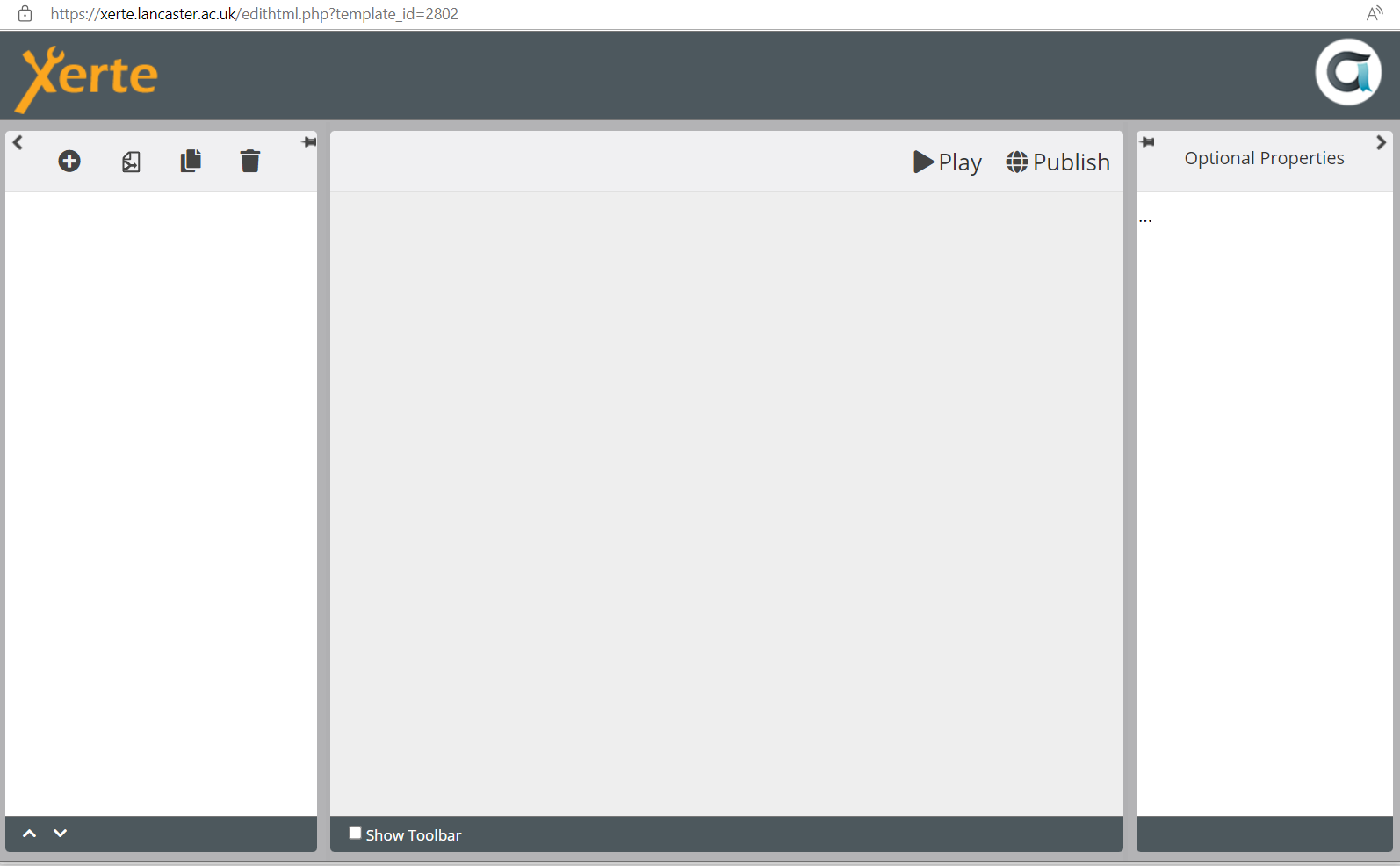
The new sub-templates appear as options in the main Xerte workspace in the project templates area, but it is not possible to use them. When I click create > choose a sub-template > click create again, nothing initially happens. If I then refresh the page, the new project appears in the list, but if I try to edit or preview the windows are blank i.e. the editor sections are there, but there is no content (see attached screenshot).
It would be great if someone is able to help us with this.
Best wishes,
Richard
I'm trying to create some sub-templates. I have exported the projects I want to use as templates (including a basic unedited project - to see if it was my edits or settings that were the issue) using the "deployment" option. I have then successfully uploaded the files via Xerte management.
The new sub-templates appear as options in the main Xerte workspace in the project templates area, but it is not possible to use them. When I click create > choose a sub-template > click create again, nothing initially happens. If I then refresh the page, the new project appears in the list, but if I try to edit or preview the windows are blank i.e. the editor sections are there, but there is no content (see attached screenshot).
It would be great if someone is able to help us with this.
Best wishes,
Richard
Graag Inloggen of een account aanmaken deelnemen aan het gesprek.
- ronm
-

- Offline
- Administrator
-

1 jaar 10 maanden geleden #9304
door ronm
Xerte developer & trainer
e-learning & m-learning consultant
mitchellmedia.co.uk | xerteacademy.com | learningapps.co.uk
Note: Support here is voluntary and meant for users to support each other.
Need direct commercial support with Xerte? mitchellmedia.co.uk/contact/
Beantwoord door ronm in topic Sub-template issue
Do you have access to the server and its file system?
Sub templates get uploaded and unzipped and added to the relevant templates folder within modules.
So the web server user (usually apache) needs to be able to write to the relevant templates folder.
Usually easiest to make sure that user can write to modules and everything below it.
Check the relevant templates folder for the name of your sub template is that empty?
Also check that the zip extension is installed.
HTH
Ron
Sub templates get uploaded and unzipped and added to the relevant templates folder within modules.
So the web server user (usually apache) needs to be able to write to the relevant templates folder.
Usually easiest to make sure that user can write to modules and everything below it.
Check the relevant templates folder for the name of your sub template is that empty?
Also check that the zip extension is installed.
HTH
Ron
Xerte developer & trainer
e-learning & m-learning consultant
mitchellmedia.co.uk | xerteacademy.com | learningapps.co.uk
Note: Support here is voluntary and meant for users to support each other.
Need direct commercial support with Xerte? mitchellmedia.co.uk/contact/
De volgende gebruiker (s) zei dank u: RFloydLancs
Graag Inloggen of een account aanmaken deelnemen aan het gesprek.
- ronm
-
- Offline
- Administrator
-
1 jaar 10 maanden geleden #9305
door ronm
Xerte developer & trainer
e-learning & m-learning consultant
mitchellmedia.co.uk | xerteacademy.com | learningapps.co.uk
Note: Support here is voluntary and meant for users to support each other.
Need direct commercial support with Xerte? mitchellmedia.co.uk/contact/
Beantwoord door ronm in topic Sub-template issue
BTW once the permissions are correct and the zip extension definitely installed then when you hit the button to upload the sub template wait until you see a confirmation pop-up and be patient. There is no progress indicator but you will get a confirmation or error once the attempt to add the sub template is complete.
Xerte developer & trainer
e-learning & m-learning consultant
mitchellmedia.co.uk | xerteacademy.com | learningapps.co.uk
Note: Support here is voluntary and meant for users to support each other.
Need direct commercial support with Xerte? mitchellmedia.co.uk/contact/
De volgende gebruiker (s) zei dank u: RFloydLancs
Graag Inloggen of een account aanmaken deelnemen aan het gesprek.
- RFloydLancs
-
Onderwerp Auteur
- Offline
- Nieuw lid
-
Minder
Meer
- Berichten: 3
- Ontvangen bedankjes 0
1 jaar 10 maanden geleden #9312
door RFloydLancs
Beantwoord door RFloydLancs in topic Sub-template issue
Many thanks, Ron.
Write access fixed the issue, and we now have some sub-templates up and running.
Best wishes,
Richard
Write access fixed the issue, and we now have some sub-templates up and running.
Best wishes,
Richard
Graag Inloggen of een account aanmaken deelnemen aan het gesprek.
Moderators: ronm, julten, JohnSmith
Tijd voor maken pagina: 0.178 seconden