

- Berichten: 9
- Ontvangen bedankjes 0
Report any technical problems you discover and discuss solutions.
MCQ Language Options not working
- Jan4
-
 Onderwerp Auteur
- Offline
- Nieuw lid
-

Minder
Meer
8 jaren 22 uren geleden #5357
door Jan4
MCQ Language Options not working werd gestart door Jan4
Hi,
I have an issue with feedback on multiple choice questions.
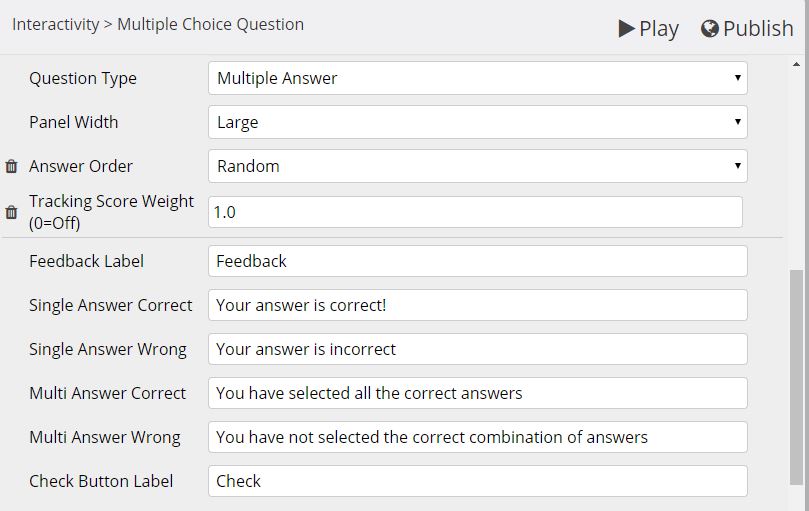
When I use the Multiple Answer question type, I would like to make use of the 'Multi Answer Correct' and 'Multi Answer Wrong' text in the Language Options.
But even though there is text in the fields, it won't show when answering the question. If I set feedback for each answer, though, this shows fine.
I have tried the same thing on a Quiz with multiple answers and it works, but I'd like to use a MCQ in this case to avoid the extra feedback page that lengthens the user journey.
I attach as example of the Language Options I've set. Am I doing something wrong?
Thanks,
Jan
I have an issue with feedback on multiple choice questions.
When I use the Multiple Answer question type, I would like to make use of the 'Multi Answer Correct' and 'Multi Answer Wrong' text in the Language Options.
But even though there is text in the fields, it won't show when answering the question. If I set feedback for each answer, though, this shows fine.
I have tried the same thing on a Quiz with multiple answers and it works, but I'd like to use a MCQ in this case to avoid the extra feedback page that lengthens the user journey.
I attach as example of the Language Options I've set. Am I doing something wrong?
Thanks,
Jan
Graag Inloggen of een account aanmaken deelnemen aan het gesprek.
- Fay
-
- Offline
- Elite lid
-

Minder
Meer
- Berichten: 236
- Ontvangen bedankjes 96
7 jaren 11 maanden geleden #5371
door Fay
Beantwoord door Fay in topic MCQ Language Options not working
Hi Jan
I think this is probably a bug that there's a fix for. Replace the modules/xerte/parent_templates/Nottingham/models_html5/mcq.html file with this one (back up the existing one first in case of any issues): mcq.html fix
Thanks
Fay
I think this is probably a bug that there's a fix for. Replace the modules/xerte/parent_templates/Nottingham/models_html5/mcq.html file with this one (back up the existing one first in case of any issues): mcq.html fix
Thanks
Fay
De volgende gebruiker (s) zei dank u: Jan4
Graag Inloggen of een account aanmaken deelnemen aan het gesprek.
- Jan4
-
Onderwerp Auteur
- Offline
- Nieuw lid
-
Minder
Meer
- Berichten: 9
- Ontvangen bedankjes 0
7 jaren 11 maanden geleden #5378
door Jan4
Beantwoord door Jan4 in topic MCQ Language Options not working
Thank you very much, Fay. This now works well.
Now if I could just get the 'next' button to activate only when the correct answers have been selected, everything would be perfect!
Thanks,
Jan
Now if I could just get the 'next' button to activate only when the correct answers have been selected, everything would be perfect!
Thanks,
Jan
Graag Inloggen of een account aanmaken deelnemen aan het gesprek.
Moderators: ronm, julten, JohnSmith
Tijd voor maken pagina: 0.158 seconden