

- Berichten: 153
- Ontvangen bedankjes 10
Report any technical problems you discover and discuss solutions.
Embedding Xerte into SharePoint
- a511197
-
 Onderwerp Auteur
- Offline
- Premium lid
-

Minder
Meer
8 jaren 2 maanden geleden #5186
door a511197
If you can use Lego, you can use Xerte
Embedding Xerte into SharePoint werd gestart door a511197
Hi there,
We use SharePoint for our intranet as part of the Office 365 suite and I've been trying to embed XOT and Bootstrap templates into the new SharePoint page designs using the embed function. Initially I thought we couldn't embed because our Xerte server wasn't added to the list of trusted sites but even after that was done, we got this issue:
Issue: XOT and bootstrap templates did not display in SharePoint using the embed function.Browser results:
Chrome: no display
Firefox: no display
IE: displayed content
Advise given: Our Helpdesk team advised changing browser settings but that didn't make a difference.They thought the browser was blocking flash content but I said this wasn't flash content. There was no blocked content messages.
Solution: I used this website to generate the iframe code and it worked www.iframe-generator.com/ (see attachment)
Questions:
Q. Why does SharePoint need the additional code to work?
Q. Has anyone else experienced this issue?
TIA
Alison
We use SharePoint for our intranet as part of the Office 365 suite and I've been trying to embed XOT and Bootstrap templates into the new SharePoint page designs using the embed function. Initially I thought we couldn't embed because our Xerte server wasn't added to the list of trusted sites but even after that was done, we got this issue:
Issue: XOT and bootstrap templates did not display in SharePoint using the embed function.Browser results:
Chrome: no display
Firefox: no display
IE: displayed content
Advise given: Our Helpdesk team advised changing browser settings but that didn't make a difference.They thought the browser was blocking flash content but I said this wasn't flash content. There was no blocked content messages.
Solution: I used this website to generate the iframe code and it worked www.iframe-generator.com/ (see attachment)
Questions:
Q. Why does SharePoint need the additional code to work?
Q. Has anyone else experienced this issue?
TIA
Alison
If you can use Lego, you can use Xerte

Graag Inloggen of een account aanmaken deelnemen aan het gesprek.
- Joe Bell
-

- Offline
- Nieuw lid
-

Minder
Meer
- Berichten: 12
- Ontvangen bedankjes 1
6 jaren 3 weken geleden #6827
door Joe Bell
Beantwoord door Joe Bell in topic Embedding Xerte into SharePoint
I am also unable to iFrame Xerte content into SharePoint, and couldn't get custom iFrame code to work either.
Is there any guidance on this?
Is there any guidance on this?
Graag Inloggen of een account aanmaken deelnemen aan het gesprek.
- ronm
-

- Offline
- Administrator
-

6 jaren 3 weken geleden #6828
door ronm
Xerte developer & trainer
e-learning & m-learning consultant
mitchellmedia.co.uk | xerteacademy.com | learningapps.co.uk
Note: Support here is voluntary and meant for users to support each other.
Need direct commercial support with Xerte? mitchellmedia.co.uk/contact/
Beantwoord door ronm in topic Embedding Xerte into SharePoint
Hi Joe/Alison
As long as your SharePoint site administrator has specifically allowed embed code from your Xerte site domain or from any domain then the default embed code provided by Xerte will work except for the following:
You will need to remove position:relative; from style="position:relative; top:0px; left:0px;" so that just becomes style="top:0px; left:0px;"
TBH I don't know why Sharepoint doesn't like that and actually I don't know exactly why we include it in the default Xerte embed code but I have tested in Sharepoint and it's that specific style that SharePoint doesn't like particularly in Chrome.
HTH
Ron
As long as your SharePoint site administrator has specifically allowed embed code from your Xerte site domain or from any domain then the default embed code provided by Xerte will work except for the following:
You will need to remove position:relative; from style="position:relative; top:0px; left:0px;" so that just becomes style="top:0px; left:0px;"
TBH I don't know why Sharepoint doesn't like that and actually I don't know exactly why we include it in the default Xerte embed code but I have tested in Sharepoint and it's that specific style that SharePoint doesn't like particularly in Chrome.
HTH
Ron
Xerte developer & trainer
e-learning & m-learning consultant
mitchellmedia.co.uk | xerteacademy.com | learningapps.co.uk
Note: Support here is voluntary and meant for users to support each other.
Need direct commercial support with Xerte? mitchellmedia.co.uk/contact/
Graag Inloggen of een account aanmaken deelnemen aan het gesprek.
- Joe Bell
-
- Offline
- Nieuw lid
-
Minder
Meer
- Berichten: 12
- Ontvangen bedankjes 1
6 jaren 3 weken geleden #6831
door Joe Bell
Beantwoord door Joe Bell in topic Embedding Xerte into SharePoint
Thanks Ron.
Our own domain was blocked, and was supposed to have been enabled, but it is still not working despite advice above - I've flagged it up to our IT, hopefully it's just a case of Sharepoint permissions. Will let you know!
Our own domain was blocked, and was supposed to have been enabled, but it is still not working despite advice above - I've flagged it up to our IT, hopefully it's just a case of Sharepoint permissions. Will let you know!
Graag Inloggen of een account aanmaken deelnemen aan het gesprek.
- ronm
-
- Offline
- Administrator
-
6 jaren 3 weken geleden #6832
door ronm
Xerte developer & trainer
e-learning & m-learning consultant
mitchellmedia.co.uk | xerteacademy.com | learningapps.co.uk
Note: Support here is voluntary and meant for users to support each other.
Need direct commercial support with Xerte? mitchellmedia.co.uk/contact/
Beantwoord door ronm in topic Embedding Xerte into SharePoint
Hi Joe
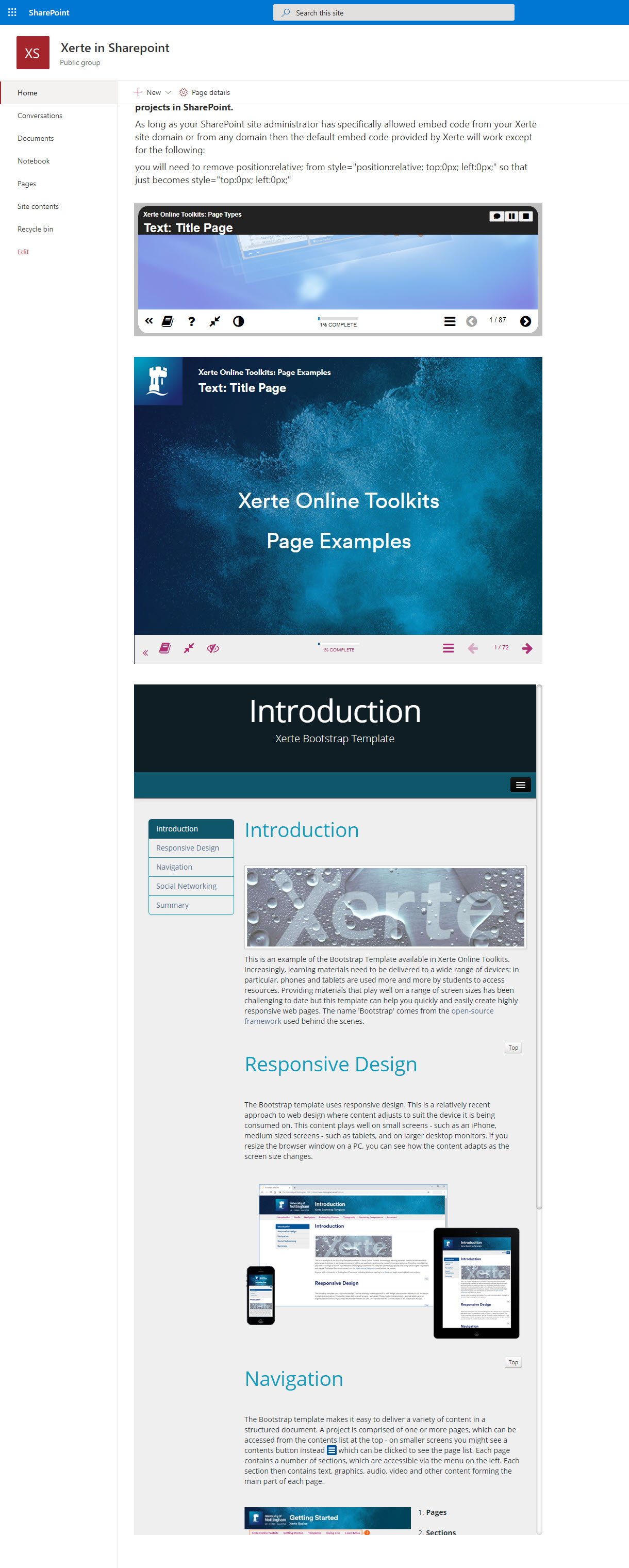
as an example there's a page types demo on your server that we used to share as the demo we pointed people to and the embed code for that to use in Sharepoint would be as follows:
That works fine in my SharePoint as you can see in the attached screenshot.
HTH
Ron
as an example there's a page types demo on your server that we used to share as the demo we pointed people to and the embed code for that to use in Sharepoint would be as follows:
Code:
<iframe src="https://www.nottingham.ac.uk/toolkits/play_8203" name="test" width="802px" height="602px" frameborder="0" style="top:0px; left:0px;"></iframe>
HTH
Ron
Xerte developer & trainer
e-learning & m-learning consultant
mitchellmedia.co.uk | xerteacademy.com | learningapps.co.uk
Note: Support here is voluntary and meant for users to support each other.
Need direct commercial support with Xerte? mitchellmedia.co.uk/contact/
Graag Inloggen of een account aanmaken deelnemen aan het gesprek.
- Joe Bell
-
- Offline
- Nieuw lid
-
Minder
Meer
- Berichten: 12
- Ontvangen bedankjes 1
6 jaren 3 weken geleden #6833
door Joe Bell
Beantwoord door Joe Bell in topic Embedding Xerte into SharePoint
No dice with that code, good to check though - thanks again
Graag Inloggen of een account aanmaken deelnemen aan het gesprek.
Moderators: ronm, julten, JohnSmith
Tijd voor maken pagina: 0.139 seconden