

Upgrade from 2.0 - 2.1 Stylesheet issue
- ronm
-

- Offline
- Administrator
-

Minder
Meer
12 jaren 5 maanden geleden #1679
door ronm
Xerte developer & trainer
e-learning & m-learning consultant
mitchellmedia.co.uk | xerteacademy.com | learningapps.co.uk
Note: Support here is voluntary and meant for users to support each other.
Need direct commercial support with Xerte? mitchellmedia.co.uk/contact/
Beantwoord door ronm in topic Upgrade from 2.0 - 2.1 Stylesheet issue
Those upgrade steps you describe should have worked fine. I can only assume that your first attempt didn't copy the new styles because what you describe (unless I'm misunderstanding) is that you then re-copied the styles folder from a different source and then it worked?
The steps in that upgrade guide should be valid regardless of whether your install is xampp.
Personally I wouldn't upgrade the way Julian describes but that's only because I think you should try to test upgrade on xampp in the same way that you might on a live non-xampp install and copying tha MySQL directory may not be possible outside of xampp. Certainly bacling up the database and xerte install directory is always the first step.
HTH
Ron
The steps in that upgrade guide should be valid regardless of whether your install is xampp.
Personally I wouldn't upgrade the way Julian describes but that's only because I think you should try to test upgrade on xampp in the same way that you might on a live non-xampp install and copying tha MySQL directory may not be possible outside of xampp. Certainly bacling up the database and xerte install directory is always the first step.
HTH
Ron
Xerte developer & trainer
e-learning & m-learning consultant
mitchellmedia.co.uk | xerteacademy.com | learningapps.co.uk
Note: Support here is voluntary and meant for users to support each other.
Need direct commercial support with Xerte? mitchellmedia.co.uk/contact/
Graag Inloggen of een account aanmaken deelnemen aan het gesprek.
- GazL
-
 Onderwerp Auteur
- Offline
- Nieuw lid
-

Minder
Meer
- Berichten: 5
- Ontvangen bedankjes 0
12 jaren 5 maanden geleden #1680
door GazL
Beantwoord door GazL in topic Upgrade from 2.0 - 2.1 Stylesheet issue
Ok, I'll try that and update this post
Graag Inloggen of een account aanmaken deelnemen aan het gesprek.
- GazL
-
Onderwerp Auteur
- Offline
- Nieuw lid
-
Minder
Meer
- Berichten: 5
- Ontvangen bedankjes 0
12 jaren 5 maanden geleden #1713
door GazL
Beantwoord door GazL in topic Upgrade from 2.0 - 2.1 Stylesheet issue
OK Ron, Julian,
I can see where I went wrong.
There are two 2.1 xertetoolkits on your download page. One of which contains only the changes since November 4, 2013 and the other one, which has all the files (including the styles folder) that was missing from my previous upgrade.
I’ve subsequently downloaded the full 2.1 version and followed the upgrade instructions which worked.
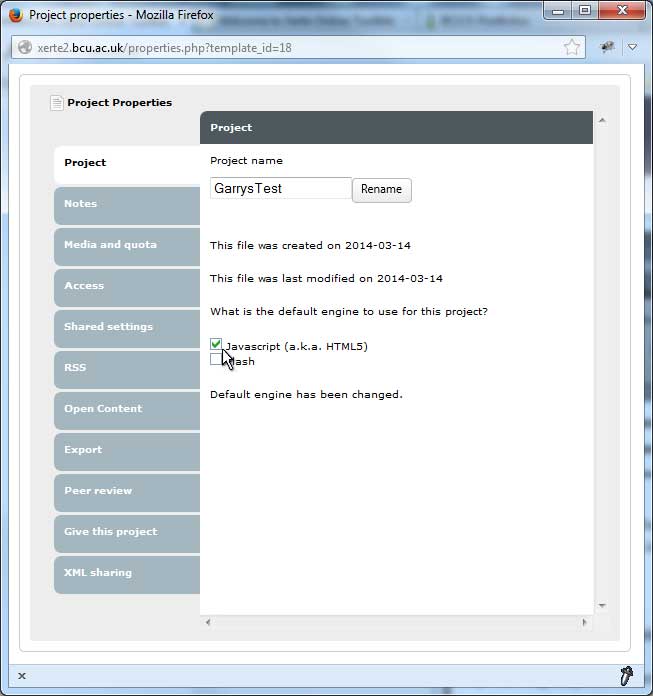
There was one issue with the upgrade: The upgrade inadvertently changed the player engine of previously developed learning objects from the HTML5 player to the Flash player. Therefore, if you had created learning object in xerte2.0 using the HTML5 player, you would have to reset the player after the upgrade to 2.1 (Screen-shot attached).
Regards, Garry
I can see where I went wrong.
There are two 2.1 xertetoolkits on your download page. One of which contains only the changes since November 4, 2013 and the other one, which has all the files (including the styles folder) that was missing from my previous upgrade.
I’ve subsequently downloaded the full 2.1 version and followed the upgrade instructions which worked.
There was one issue with the upgrade: The upgrade inadvertently changed the player engine of previously developed learning objects from the HTML5 player to the Flash player. Therefore, if you had created learning object in xerte2.0 using the HTML5 player, you would have to reset the player after the upgrade to 2.1 (Screen-shot attached).
Regards, Garry
Graag Inloggen of een account aanmaken deelnemen aan het gesprek.
-
- Nieuw lid
-
Minder
Meer
- Ontvangen bedankjes 0
12 jaren 3 maanden geleden #2027
door
Beantwoord door in topic Upgrade from 2.0 - 2.1 Stylesheet issue
What is xertetoolkits? If I developed learning objects I'll reset the player after I upgrade.But how I can upgrade?
Graag Inloggen of een account aanmaken deelnemen aan het gesprek.
- GazL2006
-
- Offline
- Nieuw lid
-
Minder
Meer
- Berichten: 3
- Ontvangen bedankjes 0
12 jaren 3 maanden geleden #2029
door GazL2006
Beantwoord door GazL2006 in topic Upgrade from 2.0 - 2.1 Stylesheet issue
Hi Lottewindow,
This thread has been closed because the issue has been resolved. I recommend you start a new thread in the installation category if you can’t find what you are looking for.
Before you post there, here is are few links to help you get started:
You asked:
What is xertetoolkits? Check out Xerte’s Community website: ‘ Getting started ’
How I can upgrade? Go to the Resources section of the web site (You need to be logged in) and click ‘Software downloads’ link, then ‘Xerte Online Toolkits’ link. Find the link to the latest version of Xerte Online Toolkits and download it. Installation instructions can be found in the documentation folder once you’ve unpacked the file
Regards, Garry
This thread has been closed because the issue has been resolved. I recommend you start a new thread in the installation category if you can’t find what you are looking for.
Before you post there, here is are few links to help you get started:
You asked:
What is xertetoolkits? Check out Xerte’s Community website: ‘ Getting started ’
How I can upgrade? Go to the Resources section of the web site (You need to be logged in) and click ‘Software downloads’ link, then ‘Xerte Online Toolkits’ link. Find the link to the latest version of Xerte Online Toolkits and download it. Installation instructions can be found in the documentation folder once you’ve unpacked the file
Regards, Garry
Graag Inloggen of een account aanmaken deelnemen aan het gesprek.
Moderators: ronm, alimcn
Tijd voor maken pagina: 0.147 seconden