

- Berichten: 24
- Ontvangen bedankjes 0
Adjusting SCORM iframe size to prevent scrollbars in Moodle
- emiliojo59
-
 Onderwerp Auteur
- Offline
- Junior lid
-

Minder
Meer
1 jaar 3 maanden geleden #9513
door emiliojo59
Adjusting SCORM iframe size to prevent scrollbars in Moodle werd gestart door emiliojo59
Hello,
I'm experiencing an issue with Xerte SCORM packages embedded in Moodle. When the SCORM package is launched, it appears with scrollbars, even though the content is responsive. This seems to be due to the iframe size set by Moodle.
xerte.org.uk
+3
xerte.org.uk
+3
xerte.org.uk
+3
I've tried adjusting the Max Width and Max Height settings in the Xerte project configuration, but leaving these fields empty doesn't resolve the issue. Additionally, setting them to percentages isn't allowed.
In the past, I recall seeing discussions on this topic on the Xerte forum, but I'm unsure how to phrase my question in English. Could you please assist me in formulating a clear and concise question for the forum?
xerte.org.uk
Thank you for your help!
I'm experiencing an issue with Xerte SCORM packages embedded in Moodle. When the SCORM package is launched, it appears with scrollbars, even though the content is responsive. This seems to be due to the iframe size set by Moodle.
xerte.org.uk
+3
xerte.org.uk
+3
xerte.org.uk
+3
I've tried adjusting the Max Width and Max Height settings in the Xerte project configuration, but leaving these fields empty doesn't resolve the issue. Additionally, setting them to percentages isn't allowed.
In the past, I recall seeing discussions on this topic on the Xerte forum, but I'm unsure how to phrase my question in English. Could you please assist me in formulating a clear and concise question for the forum?
xerte.org.uk
Thank you for your help!
Graag Inloggen of een account aanmaken deelnemen aan het gesprek.
- ronm
-

- Offline
- Administrator
-

1 jaar 3 maanden geleden - 1 jaar 3 maanden geleden #9514
door ronm
Xerte developer & trainer
e-learning & m-learning consultant
mitchellmedia.co.uk | xerteacademy.com | learningapps.co.uk
Note: Support here is voluntary and meant for users to support each other.
Need direct commercial support with Xerte? mitchellmedia.co.uk/contact/
Beantwoord door ronm in topic Adjusting SCORM iframe size to prevent scrollbars in Moodle
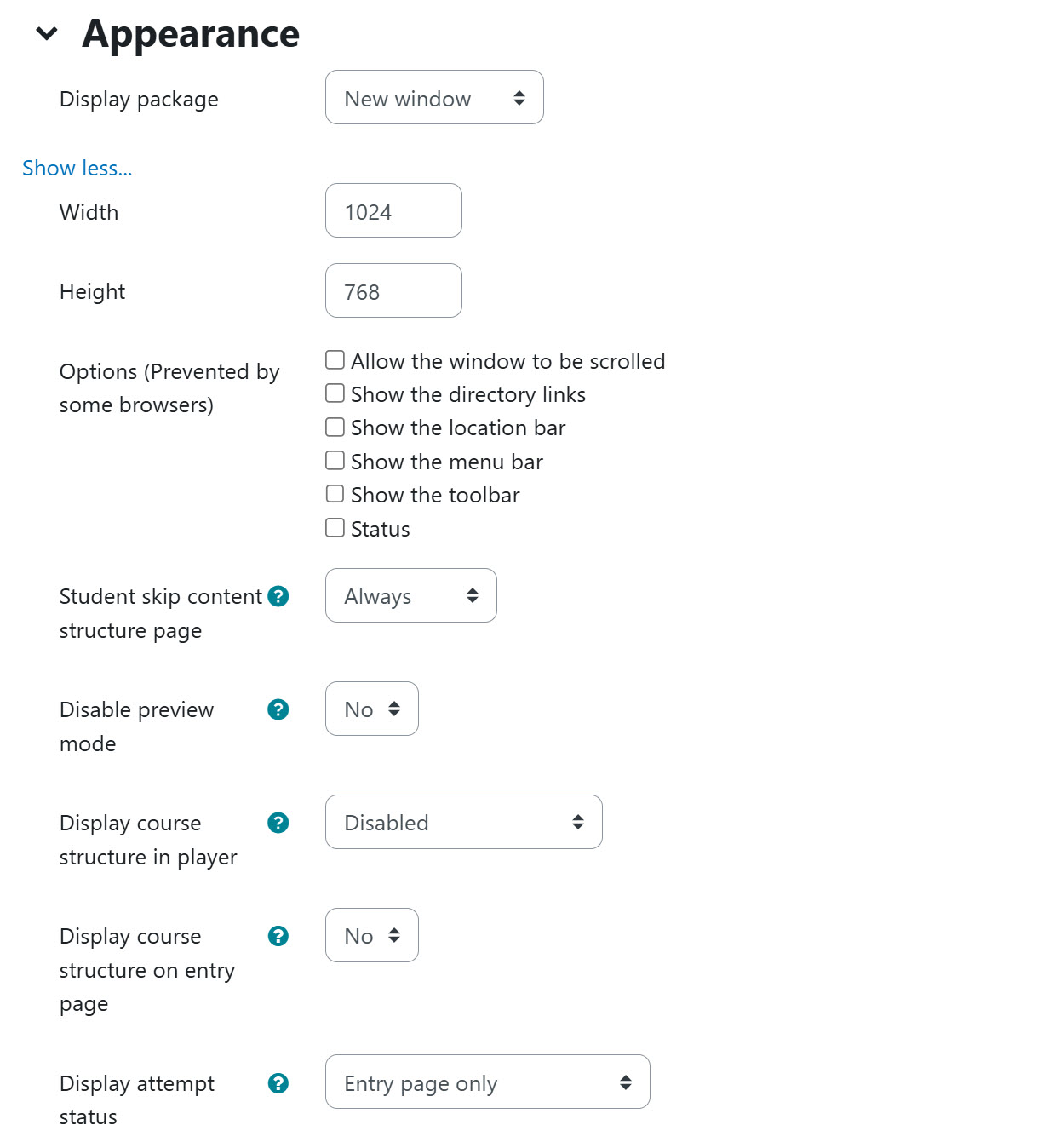
This will vary by the Moodle configuration and theme and what else is on the page etc. This is really a Moodle question rather than a Xerte question. The easiest solution is to set the SCORM object to open in a new window in Moodle rather than embedded in the Moodle page. Again version and options will vary but try something like the settings shown in the following screenshot.
Xerte developer & trainer
e-learning & m-learning consultant
mitchellmedia.co.uk | xerteacademy.com | learningapps.co.uk
Note: Support here is voluntary and meant for users to support each other.
Need direct commercial support with Xerte? mitchellmedia.co.uk/contact/
Laatst bewerkt 1 jaar 3 maanden geleden door ronm.
Graag Inloggen of een account aanmaken deelnemen aan het gesprek.
- emiliojo59
-
Onderwerp Auteur
- Offline
- Junior lid
-
Minder
Meer
- Berichten: 24
- Ontvangen bedankjes 0
1 jaar 3 maanden geleden #9517
door emiliojo59
Beantwoord door emiliojo59 in topic Adjusting SCORM iframe size to prevent scrollbars in Moodle
Thank you very much for your response. No, it's not a Moodle configuration; I had it in a new window, with no bars, and 100% width and height.
A while back, I read something about this in one of the posts, and I think I should have set the width and height of the Xerte project frame to a lower percentage, but I don't know the parameters.
Sorry if I'm confused.
A while back, I read something about this in one of the posts, and I think I should have set the width and height of the Xerte project frame to a lower percentage, but I don't know the parameters.
Sorry if I'm confused.
Graag Inloggen of een account aanmaken deelnemen aan het gesprek.
- ronm
-
- Offline
- Administrator
-
1 jaar 3 maanden geleden #9523
door ronm
Xerte developer & trainer
e-learning & m-learning consultant
mitchellmedia.co.uk | xerteacademy.com | learningapps.co.uk
Note: Support here is voluntary and meant for users to support each other.
Need direct commercial support with Xerte? mitchellmedia.co.uk/contact/
Beantwoord door ronm in topic Adjusting SCORM iframe size to prevent scrollbars in Moodle
Hi
you'll need to post screenshots showing exactly where you are setting those width and height values and where you are seeing scroll bars.
These sound like Moodle settings because Xerte itself doesn't have an option to set max width and height. There is a max width optional property in the Xerte XOT template but that is just for the internal page width and there is no height option for that. There is also a Display Mode optional property in Xerte which should be set to Fill window. But as I say it doesn't sound like you are describing Xerte setting but rather Moodle settings and often a height option will not accept a value of 100%.
you'll need to post screenshots showing exactly where you are setting those width and height values and where you are seeing scroll bars.
These sound like Moodle settings because Xerte itself doesn't have an option to set max width and height. There is a max width optional property in the Xerte XOT template but that is just for the internal page width and there is no height option for that. There is also a Display Mode optional property in Xerte which should be set to Fill window. But as I say it doesn't sound like you are describing Xerte setting but rather Moodle settings and often a height option will not accept a value of 100%.
Xerte developer & trainer
e-learning & m-learning consultant
mitchellmedia.co.uk | xerteacademy.com | learningapps.co.uk
Note: Support here is voluntary and meant for users to support each other.
Need direct commercial support with Xerte? mitchellmedia.co.uk/contact/
Graag Inloggen of een account aanmaken deelnemen aan het gesprek.
Moderators: ronm, alimcn
Tijd voor maken pagina: 0.199 seconden