

permanently change styles
- ronm
-

- Offline
- Administrator
-

Minder
Meer
6 jaren 8 maanden geleden #6278
door ronm
Xerte developer & trainer
e-learning & m-learning consultant
mitchellmedia.co.uk | xerteacademy.com | learningapps.co.uk
Note: Support here is voluntary and meant for users to support each other.
Need direct commercial support with Xerte? mitchellmedia.co.uk/contact/
Beantwoord door ronm in topic permanently change styles
Hi
I have to repeat my suggestion would be to NOT change core code like this especially for something simple like this which I'll explain further below. If you customise core code then you risk unforeseen consequences e.g. conflicts and knock on effects with other things. Also we won't be able to offer free support because you'll be using different code to us.
You asked "How / where can I permanently adjust the panels and the special container?" There is a big difference between these:
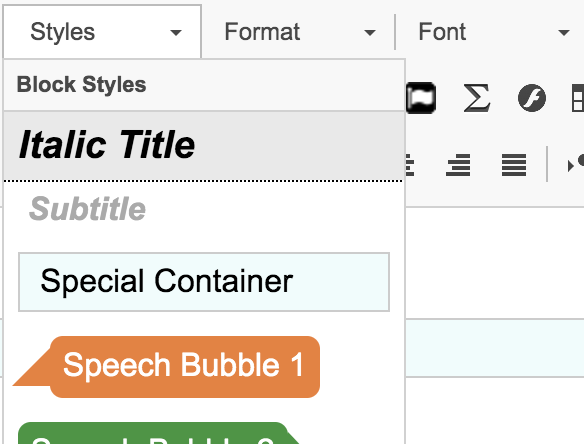
Special container
This is a default style of the CKEditor not something we've added as part of Xerte developments. It's also bad in my opinion because it adds a div without a class name or ID and with hard coded styles which is bad for accessibility and bad for when you change themes or an end user changes themes. In my opinion I wouldn't use or change special container. We leave it there because it's a default style of CKEditor and to maintain backwards compatibility. If all you want is a div where you can control how it looks just add a div with a class name and then control how it looks within your theme. So instead of
Just use:
Panels
These are different and part of what I/we added to extend the functionality and styling available in the editor and via the themes. The same applies to the speech bubbles and highlights and also the additional blockquote styles. There is no need to customise core code to change any of these. You can add your own theme, style it as you wish and when you select that theme in your project these styles will show you the styling according to your theme in the editor as well as the project when you play it.
To create your own theme just use one of the existing themes as a starting point. But I would use one of the themes that contains an scss folder rather than one of the older themes. However there's no shortcut here. You will have to invest the time into setting yourself up to be able to use SASS/SCSS and then in addition learn how to use and then how to customise whatever you want in Xerte. Just search for SASS/SCSS there are loads of generic guides and videos online. sass-lang.com/ and www.w3schools.com/sass/sass_intro.asp might be useful but you may also need to invest in a tool that works seamlessley with SASS/SCSS too. If that's all a step too far for you at the moment then just use one of the older themes and just CSS rather than SCSS. I should add that I have spent a lot of time adding many of the themes and styles that you currently get for free when you download Xerte and it does take time and effort to develop custom themes. I have developed custom themes for a number or organisations but obviously they have paid me to do so and sometimes those developments have also become part of later releases available to everyone. Bottom line is you will have to invest the time and effort yourself or pay someone to do it for you.
HTH
Ron
I have to repeat my suggestion would be to NOT change core code like this especially for something simple like this which I'll explain further below. If you customise core code then you risk unforeseen consequences e.g. conflicts and knock on effects with other things. Also we won't be able to offer free support because you'll be using different code to us.
You asked "How / where can I permanently adjust the panels and the special container?" There is a big difference between these:
Special container
This is a default style of the CKEditor not something we've added as part of Xerte developments. It's also bad in my opinion because it adds a div without a class name or ID and with hard coded styles which is bad for accessibility and bad for when you change themes or an end user changes themes. In my opinion I wouldn't use or change special container. We leave it there because it's a default style of CKEditor and to maintain backwards compatibility. If all you want is a div where you can control how it looks just add a div with a class name and then control how it looks within your theme. So instead of
Code:
<div style="background:#eeeeee;border:1px solid #cccccc;color:#000000;padding:5px 10px;">special contaner text
</div>
Code:
<div class="yourClassName">special contaner text
</div>
Panels
These are different and part of what I/we added to extend the functionality and styling available in the editor and via the themes. The same applies to the speech bubbles and highlights and also the additional blockquote styles. There is no need to customise core code to change any of these. You can add your own theme, style it as you wish and when you select that theme in your project these styles will show you the styling according to your theme in the editor as well as the project when you play it.
To create your own theme just use one of the existing themes as a starting point. But I would use one of the themes that contains an scss folder rather than one of the older themes. However there's no shortcut here. You will have to invest the time into setting yourself up to be able to use SASS/SCSS and then in addition learn how to use and then how to customise whatever you want in Xerte. Just search for SASS/SCSS there are loads of generic guides and videos online. sass-lang.com/ and www.w3schools.com/sass/sass_intro.asp might be useful but you may also need to invest in a tool that works seamlessley with SASS/SCSS too. If that's all a step too far for you at the moment then just use one of the older themes and just CSS rather than SCSS. I should add that I have spent a lot of time adding many of the themes and styles that you currently get for free when you download Xerte and it does take time and effort to develop custom themes. I have developed custom themes for a number or organisations but obviously they have paid me to do so and sometimes those developments have also become part of later releases available to everyone. Bottom line is you will have to invest the time and effort yourself or pay someone to do it for you.
HTH
Ron
Xerte developer & trainer
e-learning & m-learning consultant
mitchellmedia.co.uk | xerteacademy.com | learningapps.co.uk
Note: Support here is voluntary and meant for users to support each other.
Need direct commercial support with Xerte? mitchellmedia.co.uk/contact/
Graag Inloggen of een account aanmaken deelnemen aan het gesprek.
- rloenen
-
 Onderwerp Auteur
- Offline
- Premium lid
-

Minder
Meer
- Berichten: 99
- Ontvangen bedankjes 0
6 jaren 8 maanden geleden #6285
door rloenen
Beantwoord door rloenen in topic permanently change styles
Hi Ron,
I will certainly take notice to your advice. I had two reasons to change standards. Being able to directly see what an effect is in the editor screen and add effects faster.
I already used a "<div class =", but you don't see any effect in your editor screen, while you see that with "<div style =".
With some LOs I want to use a frame on every page and with "<div class =" I have to put the code in each source instead of being able to get it quickly from a list.
For example, I had made my own highlights that I use for questions (blue) and answers (green), but which, among other things, must always be the same width in order to get peace and unity on the screens. But I don't see it either, and you'll soon forget one because you don't see it in the editor screen. Now that I have adjusted them 'internally', I can use them faster and I immediately see the effect.
Creating and testing pages therefore takes more time. But I understand from you that that does not outweigh any problems that may arise.
It will be a challenge for me!
gr
Ronald
I will certainly take notice to your advice. I had two reasons to change standards. Being able to directly see what an effect is in the editor screen and add effects faster.
I already used a "<div class =", but you don't see any effect in your editor screen, while you see that with "<div style =".
With some LOs I want to use a frame on every page and with "<div class =" I have to put the code in each source instead of being able to get it quickly from a list.
For example, I had made my own highlights that I use for questions (blue) and answers (green), but which, among other things, must always be the same width in order to get peace and unity on the screens. But I don't see it either, and you'll soon forget one because you don't see it in the editor screen. Now that I have adjusted them 'internally', I can use them faster and I immediately see the effect.
Creating and testing pages therefore takes more time. But I understand from you that that does not outweigh any problems that may arise.
It will be a challenge for me!
gr
Ronald
Graag Inloggen of een account aanmaken deelnemen aan het gesprek.
- julian_admin
-

- Offline
- Administrator
-
Minder
Meer
- Berichten: 9
- Ontvangen bedankjes 2
6 jaren 8 maanden geleden #6286
door julian_admin
Beantwoord door julian_admin in topic permanently change styles
Changing core code is a really bad idea and will almost certainly lead to issues at some point. We would never change core code in any of the systems we run for any reason. It's OK to say you'll keep a note of the changes, but if we were to completely refactor the way the code works, for example, it might not be easy or even possible to re-insert your changes. You may not be fully aware of the implications of any change you make to core code and it may create downstream issues you are not even aware you are creating, and you lose any possibility of support if you change the core code. It is a bad idea, and I don't recommend it even under a 'do it at your own risk' caveat, irrespective of skill levels. What starts as 'ooh, I'll just make one small change, that will be OK...' tends to be the start of a bad habit.
Graag Inloggen of een account aanmaken deelnemen aan het gesprek.
- rloenen
-
Onderwerp Auteur
- Offline
- Premium lid
-
Minder
Meer
- Berichten: 99
- Ontvangen bedankjes 0
6 jaren 8 maanden geleden #6287
door rloenen
Beantwoord door rloenen in topic permanently change styles
I am convinced!
Graag Inloggen of een account aanmaken deelnemen aan het gesprek.
- drlara
-

- Offline
- Nieuw lid
-

Minder
Meer
- Berichten: 15
- Ontvangen bedankjes 9
6 jaren 8 maanden geleden #6288
door drlara
Beantwoord door drlara in topic permanently change styles
Hi @rloenen,
You should definitely consider the advice of Xerte administrators regarding avoiding changing core code and creating your own theme.
As pointed out, all of your changes to the core code will be gone when installing a new version of Xerte.
The solution I proposed should have worked, though. You just need to logout and login once more (see attached file).
You should definitely consider the advice of Xerte administrators regarding avoiding changing core code and creating your own theme.
As pointed out, all of your changes to the core code will be gone when installing a new version of Xerte.
The solution I proposed should have worked, though. You just need to logout and login once more (see attached file).
Graag Inloggen of een account aanmaken deelnemen aan het gesprek.
Moderators: ronm, alimcn
Tijd voor maken pagina: 0.170 seconden