

- Berichten: 179
- Ontvangen bedankjes 0
Fewer export settings for Decision Tree template
- annem
-
 Onderwerp Auteur
- Offline
- Elite lid
-

Minder
Meer
9 jaren 7 maanden geleden #4273
door annem
Fewer export settings for Decision Tree template werd gestart door annem
Hi there,
I hope you can help me. I have developed my Xerte LO using the Decision Tree template and I am very pleased with it.
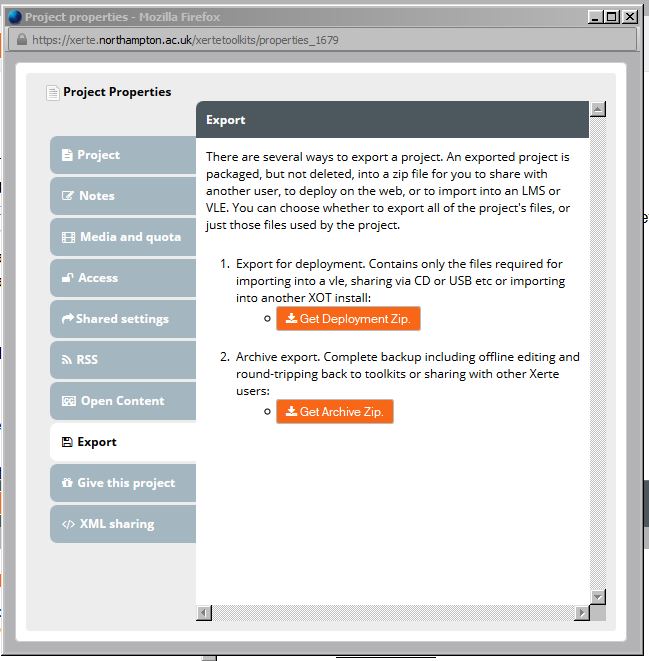
When I try to export I don't see all of the export settings. I only see export to Deployment and Archive (see attached screenprint). How do I get all of the export settings, or is this normal?
By the way, I did previously have this LO as @Public' access, so that Fay could look at it, and now I have changed it to Private access. Will that affect the LO output? Thanks in advance for any help. Anne
I hope you can help me. I have developed my Xerte LO using the Decision Tree template and I am very pleased with it.
When I try to export I don't see all of the export settings. I only see export to Deployment and Archive (see attached screenprint). How do I get all of the export settings, or is this normal?
By the way, I did previously have this LO as @Public' access, so that Fay could look at it, and now I have changed it to Private access. Will that affect the LO output? Thanks in advance for any help. Anne
Graag Inloggen of een account aanmaken deelnemen aan het gesprek.
- ronm
-

- Offline
- Administrator
-

9 jaren 7 maanden geleden #4276
door ronm
Xerte developer & trainer
e-learning & m-learning consultant
mitchellmedia.co.uk | xerteacademy.com | learningapps.co.uk
Note: Support here is voluntary and meant for users to support each other.
Need direct commercial support with Xerte? mitchellmedia.co.uk/contact/
Beantwoord door ronm in topic Fewer export settings for Decision Tree template
Hi Anne
all the export options in the XOT template are a bit misleading these days but kept in for backwards compatibility. e.g. the archive export option was only really relevant when editing the project in the old desktop developer tool. The SCORM export options only currently exist in the XOT template and aren't really appropriate for the site/bootstrap or decision templates. If you are planning to import your project into Blackboard just use the deployment export, upload to blackboard and link to the index file or indeed just link or embed from your Xerte installation.
HTH
Ron
all the export options in the XOT template are a bit misleading these days but kept in for backwards compatibility. e.g. the archive export option was only really relevant when editing the project in the old desktop developer tool. The SCORM export options only currently exist in the XOT template and aren't really appropriate for the site/bootstrap or decision templates. If you are planning to import your project into Blackboard just use the deployment export, upload to blackboard and link to the index file or indeed just link or embed from your Xerte installation.
HTH
Ron
Xerte developer & trainer
e-learning & m-learning consultant
mitchellmedia.co.uk | xerteacademy.com | learningapps.co.uk
Note: Support here is voluntary and meant for users to support each other.
Need direct commercial support with Xerte? mitchellmedia.co.uk/contact/
Graag Inloggen of een account aanmaken deelnemen aan het gesprek.
- annem
-
Onderwerp Auteur
- Offline
- Elite lid
-
Minder
Meer
- Berichten: 179
- Ontvangen bedankjes 0
9 jaren 7 maanden geleden #4277
door annem
Beantwoord door annem in topic Fewer export settings for Decision Tree template
Hi Ron,
Thank you and I have embedded the Xerte into Blackboard. Just to let you know that when the 'Print' icon is clicked at the end of quiz session (the icon to the left of the email icon) only 1 page of content (the quiz questions and correct answers) is available to print and there should be about 3 or 4 pages of quiz content (it's quite a large quiz).
I just thought I would let you know. Would you be able to try using my link I previously sent to Fay?
Thank you
Anne
Thank you and I have embedded the Xerte into Blackboard. Just to let you know that when the 'Print' icon is clicked at the end of quiz session (the icon to the left of the email icon) only 1 page of content (the quiz questions and correct answers) is available to print and there should be about 3 or 4 pages of quiz content (it's quite a large quiz).
I just thought I would let you know. Would you be able to try using my link I previously sent to Fay?
Thank you
Anne
Graag Inloggen of een account aanmaken deelnemen aan het gesprek.
- ronm
-
- Offline
- Administrator
-
9 jaren 7 maanden geleden #4278
door ronm
Xerte developer & trainer
e-learning & m-learning consultant
mitchellmedia.co.uk | xerteacademy.com | learningapps.co.uk
Note: Support here is voluntary and meant for users to support each other.
Need direct commercial support with Xerte? mitchellmedia.co.uk/contact/
Beantwoord door ronm in topic Fewer export settings for Decision Tree template
Hi Anne
Yes I can replicate that but it's not a problem with just the print button because right click > print or file > print results in the same single page only regardless of print settings. I think that's because of how the page is displayed and would need some work to test and resolve this. I suspect the best option will be the download as word/pdf as Fay has described and then that could be printed or attached to an email.
If you are using this with learners before any improvement is available you could add an instruction to select everything on the page (Ctrl + A) and then copy and paste into an email or word document which of course could then be saved or printed etc.
HTH
Ron
Yes I can replicate that but it's not a problem with just the print button because right click > print or file > print results in the same single page only regardless of print settings. I think that's because of how the page is displayed and would need some work to test and resolve this. I suspect the best option will be the download as word/pdf as Fay has described and then that could be printed or attached to an email.
If you are using this with learners before any improvement is available you could add an instruction to select everything on the page (Ctrl + A) and then copy and paste into an email or word document which of course could then be saved or printed etc.
HTH
Ron
Xerte developer & trainer
e-learning & m-learning consultant
mitchellmedia.co.uk | xerteacademy.com | learningapps.co.uk
Note: Support here is voluntary and meant for users to support each other.
Need direct commercial support with Xerte? mitchellmedia.co.uk/contact/
De volgende gebruiker (s) zei dank u: annem
Graag Inloggen of een account aanmaken deelnemen aan het gesprek.
Moderators: ronm, alimcn
Tijd voor maken pagina: 0.158 seconden