

- Messages : 8
- Remerciements reçus 1
Questions on getting Xerte Toolkits installed on your server and questions about authentication and user logins.
Frontpage not working
- imjjss
-
 Auteur du sujet
- Hors Ligne
- Nouveau membre
-

Moins
Plus d'informations
il y a 6 ans 8 mois #6296
par imjjss
Frontpage not working a été créé par imjjss
I successfully installed xertetoolkits 3.8 on Ubuntu Server 16.04 with LAMP. Things went smoothly until I arrived the finishing step.
1. The front page
It shows logo, welcome message, language box and the background image. But no hint or link to go to workspace or login box.
2. the management.php
Clicking on the Central Templates tab doesn't bring anything.
Is there anything I need to do after installation and before go to the front page?
1. The front page
It shows logo, welcome message, language box and the background image. But no hint or link to go to workspace or login box.
2. the management.php
Clicking on the Central Templates tab doesn't bring anything.
Is there anything I need to do after installation and before go to the front page?
Connexion ou Créer un compte pour participer à la conversation.
- tom
-

- Hors Ligne
- Administrateur
-

Moins
Plus d'informations
- Messages : 1365
- Remerciements reçus 344
il y a 6 ans 8 mois #6297
par tom
Réponse de tom sur le sujet Frontpage not working
Can you please verify the following:
- Do you get any error messages in the javascript console? (Press F12 in the browser, this will popup a new window with the javascript development tools in most browsers, but certainly in Chrome, do you see eny erroro there?)
- Verify in management.php, that the Site->Site url is correct (see screenshot)
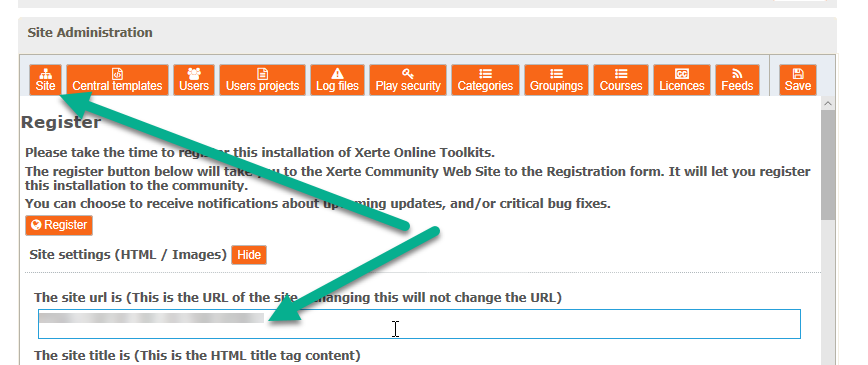
- Do you get any error messages in the javascript console? (Press F12 in the browser, this will popup a new window with the javascript development tools in most browsers, but certainly in Chrome, do you see eny erroro there?)
- Verify in management.php, that the Site->Site url is correct (see screenshot)
Connexion ou Créer un compte pour participer à la conversation.
- tom
-
- Hors Ligne
- Administrateur
-
Moins
Plus d'informations
- Messages : 1365
- Remerciements reçus 344
il y a 6 ans 8 mois #6298
par tom
Réponse de tom sur le sujet Frontpage not working
Also, you could check the apache error log for errors. It might be caused by a missing php extension.
Connexion ou Créer un compte pour participer à la conversation.
- imjjss
-
Auteur du sujet
- Hors Ligne
- Nouveau membre
-
Moins
Plus d'informations
- Messages : 8
- Remerciements reçus 1
il y a 6 ans 8 mois #6300
par imjjss
Réponse de imjjss sur le sujet Frontpage not working
Chrome F12 doesn't show error message on my page.
My site_url is correct and I can open it. It's just that the content of the page is mostly messing.
apache error log shows:
My site_url is correct and I can open it. It's just that the content of the page is mostly messing.
apache error log shows:
Code:
[Thu Feb 06 15:32:50.268119 2020] [:error] [pid 7661] [client 192.168.1.104:51954] PHP Fatal error: Uncaught Error: Call to a member function errorInfo() on boolean in /var/www/html/toolkits/setup/page_password.php:37\nStack trace:\n#0 {main}\n thrown in /var/www/html/toolkits/setup/page_password.php on line 37, referer: /toolkits/setup/page2.php
[Thu Feb 06 15:56:25.929206 2020] [:error] [pid 7670] [client 192.168.1.104:52522] Failed to load language file for Xerte - en-GB/editor/js/vendor/jquery-1.9.1.min.js, referer: /toolkits/management.php?register
Connexion ou Créer un compte pour participer à la conversation.
- imjjss
-
Auteur du sujet
- Hors Ligne
- Nouveau membre
-
Moins
Plus d'informations
- Messages : 8
- Remerciements reçus 1
il y a 6 ans 8 mois #6301
par imjjss
Réponse de imjjss sur le sujet Frontpage not working
By the way, I removed my site url in the error_log because the forum requires to do so.
Connexion ou Créer un compte pour participer à la conversation.
- tom
-
- Hors Ligne
- Administrateur
-
Moins
Plus d'informations
- Messages : 1365
- Remerciements reçus 344
il y a 6 ans 8 mois #6302
par tom
Réponse de tom sur le sujet Frontpage not working
The error message of the first line, suggests that during installation an error occured when setting the database credetials. Did you successfully get through the whole installation?
Could you please change the value of $developmentto true in config.php (around line 43) and then visit the workspace.
After that, check the file error_log/debug.log for any database connection errors.
Could you please change the value of $developmentto true in config.php (around line 43) and then visit the workspace.
After that, check the file error_log/debug.log for any database connection errors.
Connexion ou Créer un compte pour participer à la conversation.
Temps de génération de la page : 0.733 secondes