

- Messages : 1
- Remerciements reçus 0
Questions on getting Xerte Toolkits installed on your server and questions about authentication and user logins.
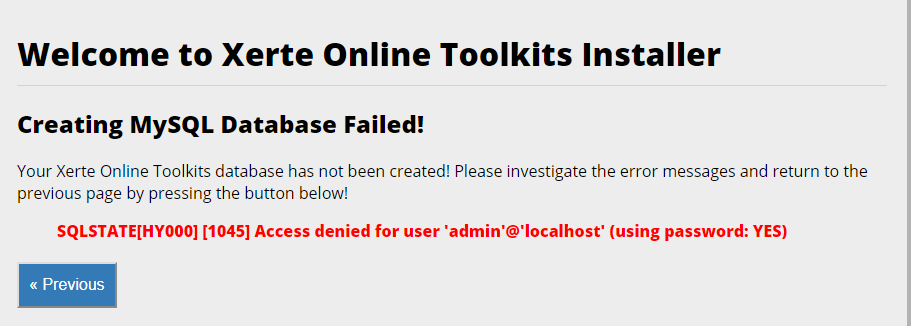
Creating MySQL Database Failed!
- duan
-
 Auteur du sujet
- Hors Ligne
- Nouveau membre
-

Moins
Plus d'informations
il y a 7 ans 3 mois #5778
par duan
Creating MySQL Database Failed! a été créé par duan
Dear all,
I'm new to Xerte and I came across the following error when I tried to installed the software. It says:
Your Xerte Online Toolkits database has not been created! Please investigate the error messages and return to the previous page by pressing the button below!
SQLSTATE[HY000] [1045] Access denied for user 'admin'@'localhost' (using password: YES)
I'd be grateful for your help.
thanks,
duan
I'm new to Xerte and I came across the following error when I tried to installed the software. It says:
Your Xerte Online Toolkits database has not been created! Please investigate the error messages and return to the previous page by pressing the button below!
SQLSTATE[HY000] [1045] Access denied for user 'admin'@'localhost' (using password: YES)
I'd be grateful for your help.
thanks,
duan
Connexion ou Créer un compte pour participer à la conversation.
- ciroteo
-

- Hors Ligne
- Nouveau membre
-
Moins
Plus d'informations
- Messages : 13
- Remerciements reçus 0
il y a 5 ans 10 mois #7120
par ciroteo
Réponse de ciroteo sur le sujet Creating MySQL Database Failed!
I am encurrinng in the same message during installation on a cpanel website.
Did any one solve the issue?
Did any one solve the issue?
Connexion ou Créer un compte pour participer à la conversation.
- ronm
-

- Hors Ligne
- Administrateur
-

il y a 5 ans 10 mois #7121
par ronm
Xerte developer & trainer
e-learning & m-learning consultant
mitchellmedia.co.uk | xerteacademy.com | learningapps.co.uk
Note: Support here is voluntary and meant for users to support each other.
Need direct commercial support with Xerte? mitchellmedia.co.uk/contact/
Réponse de ronm sur le sujet Creating MySQL Database Failed!
Hi
If you’re using a server with cPanel try creating an empty database for xerte, a user for that database assigned with full permissions and then use those details when you run the xerte setup.
If you’ve already had a failed attempt at this you might need to remove the file named database.php if that was created during that attempt.
HTH
Ron
If you’re using a server with cPanel try creating an empty database for xerte, a user for that database assigned with full permissions and then use those details when you run the xerte setup.
If you’ve already had a failed attempt at this you might need to remove the file named database.php if that was created during that attempt.
HTH
Ron
Xerte developer & trainer
e-learning & m-learning consultant
mitchellmedia.co.uk | xerteacademy.com | learningapps.co.uk
Note: Support here is voluntary and meant for users to support each other.
Need direct commercial support with Xerte? mitchellmedia.co.uk/contact/
Les utilisateur(s) suivant ont remercié: ciroteo
Connexion ou Créer un compte pour participer à la conversation.
- ciroteo
-
- Hors Ligne
- Nouveau membre
-
Moins
Plus d'informations
- Messages : 13
- Remerciements reçus 0
il y a 5 ans 10 mois #7122
par ciroteo
Réponse de ciroteo sur le sujet Creating MySQL Database Failed!
Hallo Ron, thanks for your prompt reply.
I am so sorry but I did all the things you suggest.
I manually create with phpmyadmin a database and a user with full privileges for this database.
I did not find the database.php file so I guess that the wizard did not finish.
The error remains
I did another installation on my laptop wiht xamp and it woks perfectly despite the autenthication method that is not working.
Here I can use guest as well.
Maybe on cpanel is just a matter of permission but it is so strange.
I'd prefere to have my xerte online so I can work both from home and from office where I have a stronger internet connection I can use to upload big scorm on LMS.
Thanks your your help, if you have other suggestion I appreciate.
I try to contact cpanel as well.
matteo
I am so sorry but I did all the things you suggest.
I manually create with phpmyadmin a database and a user with full privileges for this database.
I did not find the database.php file so I guess that the wizard did not finish.
The error remains
I did another installation on my laptop wiht xamp and it woks perfectly despite the autenthication method that is not working.
Here I can use guest as well.
Maybe on cpanel is just a matter of permission but it is so strange.
I'd prefere to have my xerte online so I can work both from home and from office where I have a stronger internet connection I can use to upload big scorm on LMS.
Thanks your your help, if you have other suggestion I appreciate.
I try to contact cpanel as well.
matteo
Connexion ou Créer un compte pour participer à la conversation.
- ciroteo
-
- Hors Ligne
- Nouveau membre
-
Moins
Plus d'informations
- Messages : 13
- Remerciements reçus 0
il y a 5 ans 10 mois #7125
par ciroteo
Réponse de ciroteo sur le sujet Creating MySQL Database Failed!
Hallo Ron, what do you think if i manually upload the files I have in my local folder via ftp and then backup and restore the local database changing manually info in the database.php file?
I have to skip standard xerte installation via cpanel website because it crashes.
thanks for your support
Matteo
I have to skip standard xerte installation via cpanel website because it crashes.
thanks for your support
Matteo
Connexion ou Créer un compte pour participer à la conversation.
- ronm
-
- Hors Ligne
- Administrateur
-
il y a 5 ans 10 mois #7126
par ronm
Xerte developer & trainer
e-learning & m-learning consultant
mitchellmedia.co.uk | xerteacademy.com | learningapps.co.uk
Note: Support here is voluntary and meant for users to support each other.
Need direct commercial support with Xerte? mitchellmedia.co.uk/contact/
Réponse de ronm sur le sujet Creating MySQL Database Failed!
Hi Matteo
that isn't going to work unless you're confident editing values in the database itself too. Here's a summary of what should happen:
You have you xerte folder inside public_html or whatever folder you are using as your web root e.g. /public_html/xerte.
When you visit youserveraddress/xerte if it hasn't been setup it prompts you through a step by step process of installing Xerte including if the setup detects that the relevant folders aren't writeable etc.
When prompted you either use a mysql account that is able to create a database e.g. the root account or you entre the details of a database and mysql account that you have already configured via cpanel.
Xerte will then attempt to write a file named database.php inside the xerte folder. If that is failing you will not get any further and need to resolve whatever is preventing that from happening. If that file is being created but is empty or the credentials you've added are not correct then again you will need to resolve whatever is the cause of that.
There isn't anything wrong with the Xerte setup routine and I have installed Xerte and lots of cpanel servers as well as others. The reason it is working for you via xampp is because by default you use the root account which has full permissions on the whole database server and typically the directories inside htdocs will be automatically writeable etc.
HTH
Ron
that isn't going to work unless you're confident editing values in the database itself too. Here's a summary of what should happen:
You have you xerte folder inside public_html or whatever folder you are using as your web root e.g. /public_html/xerte.
When you visit youserveraddress/xerte if it hasn't been setup it prompts you through a step by step process of installing Xerte including if the setup detects that the relevant folders aren't writeable etc.
When prompted you either use a mysql account that is able to create a database e.g. the root account or you entre the details of a database and mysql account that you have already configured via cpanel.
Xerte will then attempt to write a file named database.php inside the xerte folder. If that is failing you will not get any further and need to resolve whatever is preventing that from happening. If that file is being created but is empty or the credentials you've added are not correct then again you will need to resolve whatever is the cause of that.
There isn't anything wrong with the Xerte setup routine and I have installed Xerte and lots of cpanel servers as well as others. The reason it is working for you via xampp is because by default you use the root account which has full permissions on the whole database server and typically the directories inside htdocs will be automatically writeable etc.
HTH
Ron
Xerte developer & trainer
e-learning & m-learning consultant
mitchellmedia.co.uk | xerteacademy.com | learningapps.co.uk
Note: Support here is voluntary and meant for users to support each other.
Need direct commercial support with Xerte? mitchellmedia.co.uk/contact/
Connexion ou Créer un compte pour participer à la conversation.
Temps de génération de la page : 0.178 secondes