

- Messages : 17
- Remerciements reçus 0
Report any technical problems you discover and discuss solutions.
bubble text on the hotspot image connector page
- Martens
-
 Auteur du sujet
- Hors Ligne
- Nouveau membre
-

Moins
Plus d'informations
il y a 1 an 8 mois #9442
par Martens
bubble text on the hotspot image connector page a été créé par Martens
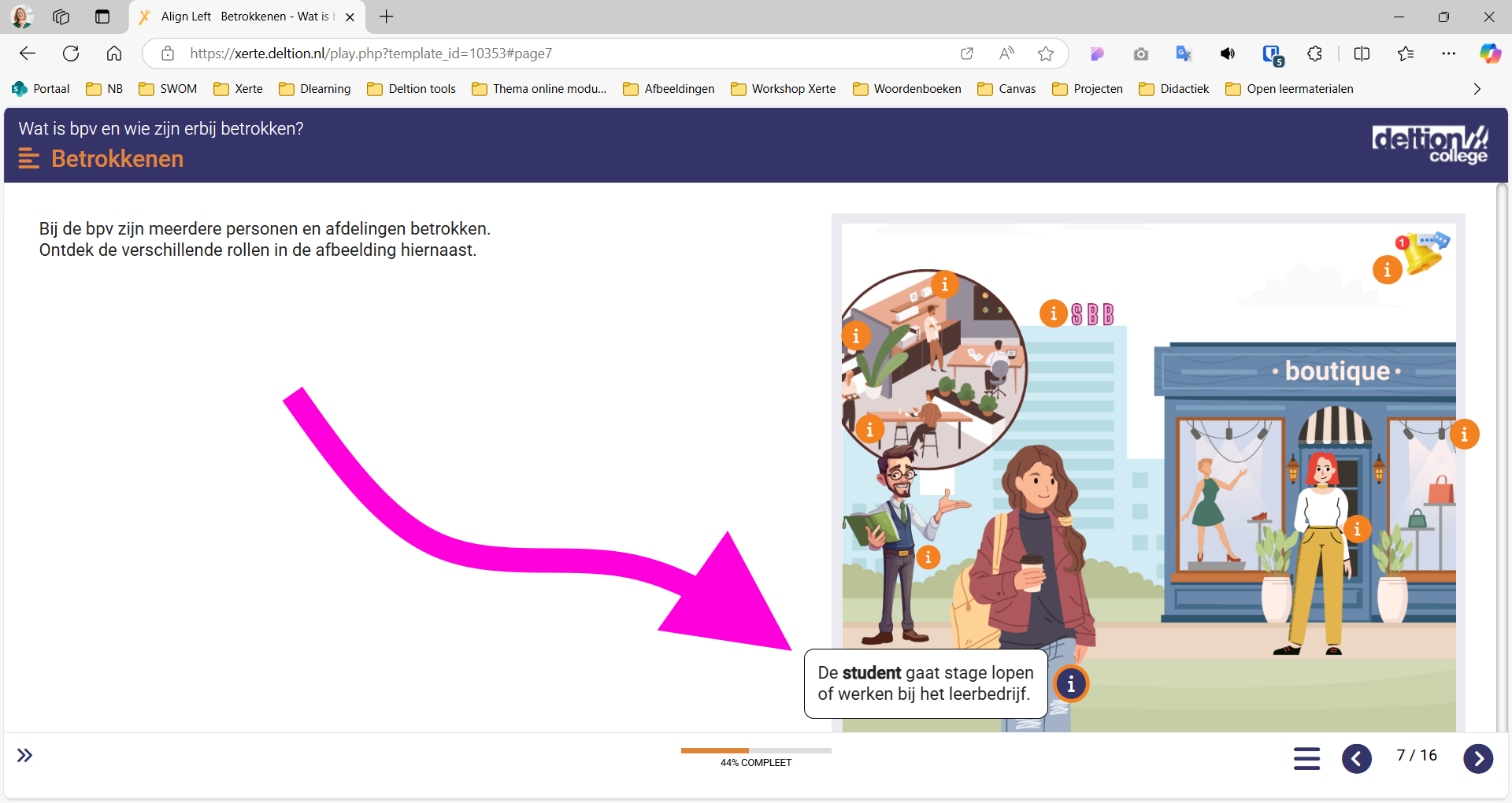
I would like to change the background color of the bubble text on the hotspot image connector page, among other things. However, I can't find the right CSS code. Does anyone know the CSS code for the bubble text?
Connexion ou Créer un compte pour participer à la conversation.
- ronm
-

- Hors Ligne
- Administrateur
-

il y a 1 an 8 mois #9443
par ronm
Xerte developer & trainer
e-learning & m-learning consultant
mitchellmedia.co.uk | xerteacademy.com | learningapps.co.uk
Note: Support here is voluntary and meant for users to support each other.
Need direct commercial support with Xerte? mitchellmedia.co.uk/contact/
Réponse de ronm sur le sujet bubble text on the hotspot image connector page
Try something like the following:
.x_connectorHotspotImage_page div.hotspot_bubble {
color: red;
}
.x_connectorHotspotImage_page div.hotspot_bubble {
color: red;
}
Xerte developer & trainer
e-learning & m-learning consultant
mitchellmedia.co.uk | xerteacademy.com | learningapps.co.uk
Note: Support here is voluntary and meant for users to support each other.
Need direct commercial support with Xerte? mitchellmedia.co.uk/contact/
Les utilisateur(s) suivant ont remercié: Martens
Connexion ou Créer un compte pour participer à la conversation.
- Martens
-
Auteur du sujet
- Hors Ligne
- Nouveau membre
-
Moins
Plus d'informations
- Messages : 17
- Remerciements reçus 0
il y a 1 an 1 mois - il y a 1 an 1 mois #9576
par Martens
Réponse de Martens sur le sujet bubble text on the hotspot image connector page
Hi @Ron. The code doesn't work anymore. I think because of Xerte 3.14. Can you give me the new code... or can you explain how to find the right code. Because I can't find it with F12.
Dernière édition: il y a 1 an 1 mois par Martens.
Connexion ou Créer un compte pour participer à la conversation.
- ronm
-
- Hors Ligne
- Administrateur
-
il y a 1 an 1 mois #9577
par ronm
Xerte developer & trainer
e-learning & m-learning consultant
mitchellmedia.co.uk | xerteacademy.com | learningapps.co.uk
Note: Support here is voluntary and meant for users to support each other.
Need direct commercial support with Xerte? mitchellmedia.co.uk/contact/
Réponse de ronm sur le sujet bubble text on the hotspot image connector page
Hi Corine
You're right there does seem to be a difference between 3.13 and 3.14 preventing my previous suggestion from working in 3.14 and I'm not sure what exactly.
However where are you adding this? Are you adding at project level or in the styles property of your connector page? If the latter you can just use:
div.hotspot_bubble {
color: red;
}
I usually include the page selector so that I can add the css at project level and only impact that page type or even when added on the page too. However something seems to have changed that is preventing that from working now so try without the page selector?
HTH
Ron
You're right there does seem to be a difference between 3.13 and 3.14 preventing my previous suggestion from working in 3.14 and I'm not sure what exactly.
However where are you adding this? Are you adding at project level or in the styles property of your connector page? If the latter you can just use:
div.hotspot_bubble {
color: red;
}
I usually include the page selector so that I can add the css at project level and only impact that page type or even when added on the page too. However something seems to have changed that is preventing that from working now so try without the page selector?
HTH
Ron
Xerte developer & trainer
e-learning & m-learning consultant
mitchellmedia.co.uk | xerteacademy.com | learningapps.co.uk
Note: Support here is voluntary and meant for users to support each other.
Need direct commercial support with Xerte? mitchellmedia.co.uk/contact/
Connexion ou Créer un compte pour participer à la conversation.
- Martens
-
Auteur du sujet
- Hors Ligne
- Nouveau membre
-
Moins
Plus d'informations
- Messages : 17
- Remerciements reçus 0
il y a 1 an 1 mois #9578
par Martens
Réponse de Martens sur le sujet bubble text on the hotspot image connector page
Thanks. It works now. I use the styles properties at page-level. Most of the time.
Connexion ou Créer un compte pour participer à la conversation.
- ronm
-
- Hors Ligne
- Administrateur
-
il y a 1 an 1 mois #9579
par ronm
Xerte developer & trainer
e-learning & m-learning consultant
mitchellmedia.co.uk | xerteacademy.com | learningapps.co.uk
Note: Support here is voluntary and meant for users to support each other.
Need direct commercial support with Xerte? mitchellmedia.co.uk/contact/
Réponse de ronm sur le sujet bubble text on the hotspot image connector page
Hi
Just a quick update and general comment.
Firstly there was a change in 3.14 to fix an issue with the bubbles so that they are always above the page content which meant they were no long part of the same div structure as previously and therefore using .x_connectorHotspotImage_page div.hotspot_bubble no longer works but div.hotspot_bubble on it's own does.
However the reason I originally suggested using .x_connectorHotspotImage_page div.hotspot_bubble which worked in 3.13 is because it's better to use custom css in one place at project level but still limit what it impacts to specific page types. Lets say you have 3 different hotspot image connector pages in your project you really don't want to have to have the same custom css repeated in each of those pages so that if something changes you have to edit all 3 pages. Of course that gets even more of a problem if you have the same thing in multiple projects. For me the only reason to put the custom css at page level is if you only want to impact that page or if you want different changes on other pages.
In this specifc example if you use just
div.hotspot_bubble {
color: red;
}
at project level it will change all instances of text color in those divs on all your hotspot image connector pages (and any other pages where the same class is used) but then you can change it in one place.
HTH
Ron
Just a quick update and general comment.
Firstly there was a change in 3.14 to fix an issue with the bubbles so that they are always above the page content which meant they were no long part of the same div structure as previously and therefore using .x_connectorHotspotImage_page div.hotspot_bubble no longer works but div.hotspot_bubble on it's own does.
However the reason I originally suggested using .x_connectorHotspotImage_page div.hotspot_bubble which worked in 3.13 is because it's better to use custom css in one place at project level but still limit what it impacts to specific page types. Lets say you have 3 different hotspot image connector pages in your project you really don't want to have to have the same custom css repeated in each of those pages so that if something changes you have to edit all 3 pages. Of course that gets even more of a problem if you have the same thing in multiple projects. For me the only reason to put the custom css at page level is if you only want to impact that page or if you want different changes on other pages.
In this specifc example if you use just
div.hotspot_bubble {
color: red;
}
at project level it will change all instances of text color in those divs on all your hotspot image connector pages (and any other pages where the same class is used) but then you can change it in one place.
HTH
Ron
Xerte developer & trainer
e-learning & m-learning consultant
mitchellmedia.co.uk | xerteacademy.com | learningapps.co.uk
Note: Support here is voluntary and meant for users to support each other.
Need direct commercial support with Xerte? mitchellmedia.co.uk/contact/
Les utilisateur(s) suivant ont remercié: Martens
Connexion ou Créer un compte pour participer à la conversation.
Modérateurs: ronm, julten, JohnSmith
Temps de génération de la page : 1.020 secondes